
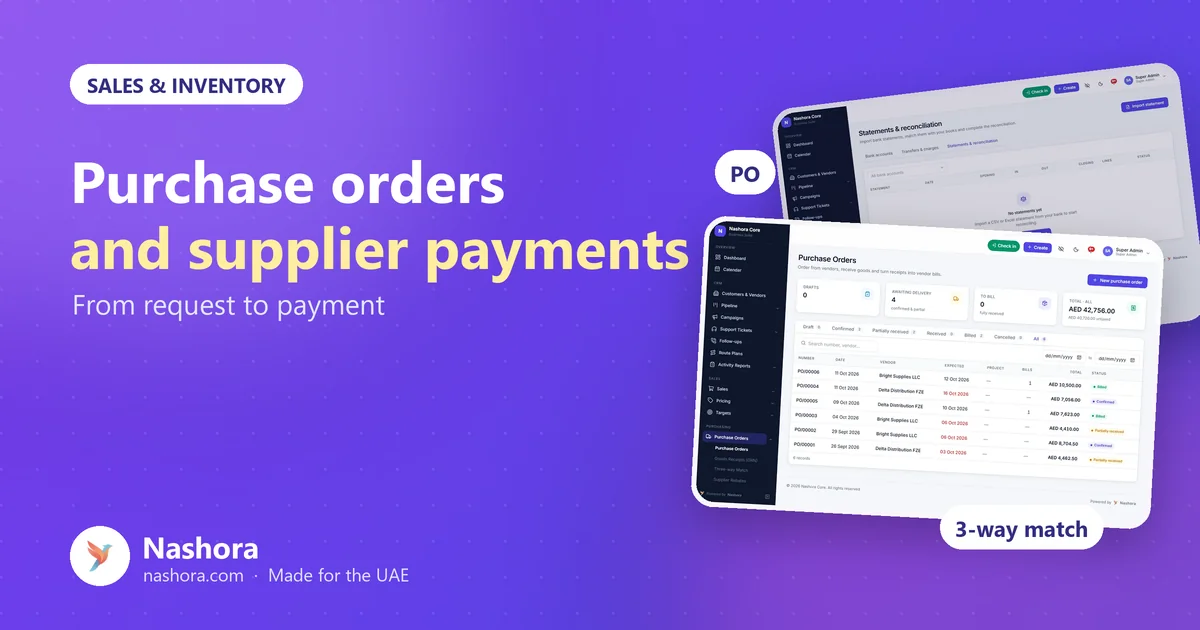
A supplier calls on the 3rd to ask why invoice 2281 is still unpaid. Your accountant says it was never approved. The storekeeper says the goods arrived two weeks ago, short by 20 cartons. The buyer says the price was agreed on WhatsApp and is lower than the invoice. Meanwhile somebody has already paid a different invoice for the same delivery, because it arrived twice. Everyone is half right, and the money has already left the bank.
Purchase order management exists to stop that conversation. It is the discipline of recording what you asked for, what you agreed, what arrived and what you were billed, and paying only when those four things agree. This guide walks through the whole buy-to-pay flow, the controls that stop you overpaying, the timing of supplier payments, the VAT paperwork you need to recover input tax, and what each step looks like in Nashora. It is general information, not tax or legal advice.
Purchase order management: the buy-to-pay flow at a glance
Buying looks simple from the outside, but there are nine separate moments where something can go wrong. Here is the full sequence from the first request to the closed payable.
- Purchase request. A department or the warehouse says what it needs, in what quantity and by when.
- Purchase order (PO) with approval. Buying raises the PO to a named supplier with quantities, prices and delivery date. It is approved by someone with the right limit.
- Goods received note (GRN). The warehouse records what actually arrived, in what quantity and condition, against the PO.
- Supplier bill. The supplier's tax invoice is entered and linked to the PO and the receipt.
- Three-way match. The order, the receipt and the bill are compared on quantity and price.
- Payment approval. A matched bill is scheduled for payment on its due date.
- Payment. By bank transfer, cheque or post-dated cheque, recorded against the bill.
- Statement reconciliation. The supplier's statement is compared with your payables.
- Cost update. Freight, customs and other charges are added to what the item really cost you.
None of these steps is difficult. The problems appear when two of them are done by the same person with nothing written down, or when a step is skipped because the supplier is a friend and the order is urgent.
Purchase requests and purchase orders with approval
A purchase request is a polite, written way of saying "we need this". It matters because it separates the person who needs something from the person who spends the company's money. The request carries the need, the quantity and the date. Buying then turns it into a PO addressed to a supplier with an agreed price.
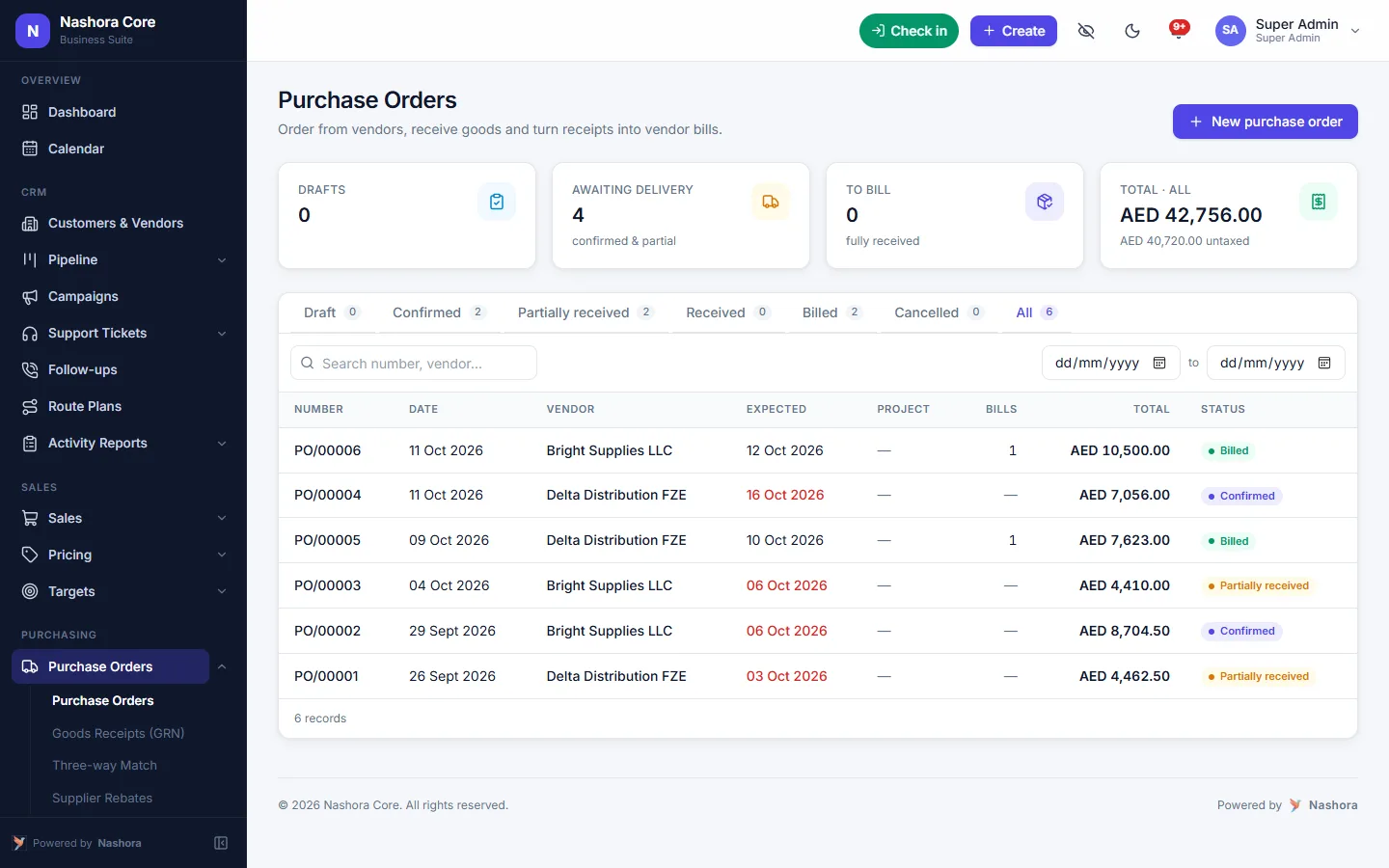
The PO is your side of the contract. It should show the supplier, the items, quantities, unit prices, VAT, delivery date and payment terms. Everything you later compare against starts here, which is why "the price was agreed on WhatsApp" is not enough. If it was agreed, it goes on the PO.
Approval limits that people actually follow
The simple rule is that nobody approves their own spending and bigger amounts need a more senior signature. In Nashora, a purchase request becomes a purchase order after approval, purchase orders follow approval rules, and roles can carry approval limits by amount. Decide the limits in plain numbers first. For example, a department head approves up to a figure you choose, finance approves up to a higher one, and the owner signs the rest. Then make sure there is a deputy for when somebody is away, or approvals will be given late or skipped.
A PO also has a life. It starts as a draft, becomes confirmed, may be partially received and eventually received and billed, or cancelled. Seeing that status is useful in itself: you can tell at once what is still awaited from suppliers, what has arrived but not been billed and what is complete.
Goods received notes: proof of what arrived
The GRN is the most undervalued document in purchasing. It says, in the warehouse's words, what physically came in, on what date, against which PO. Without it, the bill is the only evidence, and the bill only tells you what the supplier says they sent.
Good receiving habits are modest. Count against the PO, not against the delivery note alone. Record shortages and damage on the day. Receive partial deliveries as partial deliveries, so the PO shows the balance still due. In Nashora, the goods received note adds stock in the warehouse that received it, so your stock records and the purchasing records move together. Our article on managing inventory in a trading company covers the warehouse side in more detail.
If you do not hold stock, because the purchase is a service or a consumable, you still want a record that somebody confirmed the work or the goods. A short receipt confirmation by the requester is enough.
Supplier bills and the three-way match
A three-way match compares three documents before you pay: the purchase order (what you ordered and at what price), the goods received note (what arrived) and the supplier bill (what you are asked to pay). If they agree on quantity and price, the bill is cleared for payment. If they do not, someone has to look at it first.
The check sounds fussy until you see the mistakes it catches. The table below uses one illustrative order: 100 units at AED 50, so AED 5,000 before VAT, and AED 250 of VAT at 5%.
| Situation | Order (PO) | Received (GRN) | Bill | What to do |
|---|---|---|---|---|
| Everything agrees | 100 × 50 = 5,000 | 100 units | 100 × 50 = 5,000 | Clear for payment: 5,000 plus VAT 250 = 5,250 |
| Short delivery | 100 × 50 = 5,000 | 80 units, worth 4,000 | 100 × 50 = 5,000 | Ask for a credit note or corrected bill. You owe 4,000 plus VAT 200 = 4,200 for now |
| Price higher than ordered | 100 × 50 = 5,000 | 100 units | 100 × 52 = 5,200 | Difference of 200, which is 4%. Check what was agreed and who approved a change |
| Bill with no receipt | 100 × 50 = 5,000 | Nothing received | 5,000 | Hold payment until the goods arrive |
| Same bill entered twice | 100 × 50 = 5,000 | 100 units | Two bills of 5,000 for one delivery | Block the second one. Paying it would cost 5,250 for nothing |
The check is strict about the principle and flexible about the detail. Many companies allow a small tolerance, for example a rounding difference, and send anything bigger back to the buyer. Pick a tolerance you can defend and write it down.
In Nashora, the vendor bill is checked against both the purchase order and the goods received note in a three-way match, and purchase orders can be turned into vendor bills from the receipts. So you start from what arrived instead of retyping the supplier's paper.
Controls that stop you overpaying
Overpaying seldom looks like fraud. It usually looks like a busy week. These controls cost very little and catch most of it.
- No PO, no payment. Anything above a small value needs a PO first. Make exceptions visible, not silent.
- Separate the roles. The person who raises the PO should not receive the goods, and neither should approve the payment.
- Receive before you pay. A bill without a receipt waits.
- Match on quantity and price. Let the system compare, and let a human decide the exceptions.
- Check for duplicates. Same supplier, same number or amount, same date range.
- Protect supplier bank details. Changing an account number is a classic route to fraud. Confirm any change by calling a known contact, not the number on the e-mail asking for the change.
- Approve payment runs. One person prepares, another releases.
- Reconcile the bank. Every payment that left should match a bill you approved.
Software helps with several of these. Nashora's roles set view, create, edit, approve and export rights per module and limit users to their own, their team's or their branch's records, posted accounting documents are locked, and every change goes into the audit log. That does not replace judgement, but it makes the trail visible to whoever checks.
Paying suppliers: bank transfer, cheque and post-dated cheque
In the UAE, supplier payments commonly go out by bank transfer, cheque or post-dated cheque (PDC), and many businesses use all three with different suppliers. What matters is the record: each payment is recorded against the bill it settles, so the payable goes down and the bank or cheque account moves on the same day.
Bank transfer
Fast and easy to trace. Pay from an approved payment list, check beneficiary details against the supplier record, and keep the bank confirmation with the bill.
Cheques and PDCs
A cheque is a promise on a date. When you issue a PDC, you commit cash on a specific day in the future, so it belongs in your cash planning from the moment you write it, not the day it clears. Nashora's accounting module handles cheques and PDC, so issued cheques sit in the books with their dates. Never issue a cheque you cannot fund on the date it is presented. A returned cheque is a serious matter in the UAE, and not one to improvise around.
Partial payments and credit notes
A short delivery, a returned item or a price correction usually ends in a supplier credit note. Apply it against the bill or the next payment, and tell the supplier so their statement matches yours.
Cash-flow timing of supplier payments
Supplier terms are a source of finance that does not show up on the loan schedule. Say you buy AED 120,000 of goods a month. On 30-day terms you owe your suppliers roughly AED 120,000 at any time. On 60-day terms you owe roughly AED 240,000, so about AED 120,000 more stays in your bank. That is not free, because suppliers price it in, but it is real.
Early-payment discounts work the other way. Take "2% if paid within 10 days, otherwise net 30". Paying 20 days early to save 2% means you pay AED 98 instead of AED 100, a return of 2 divided by 98, about 2.04%, for 20 days. Over a year that works out to roughly 37% (2.04% times 365 divided by 20). If your cash is idle or you borrow at far less than that, take the discount. If paying early forces you to borrow at a high rate or miss payroll, do not.
Plan the week, not the month
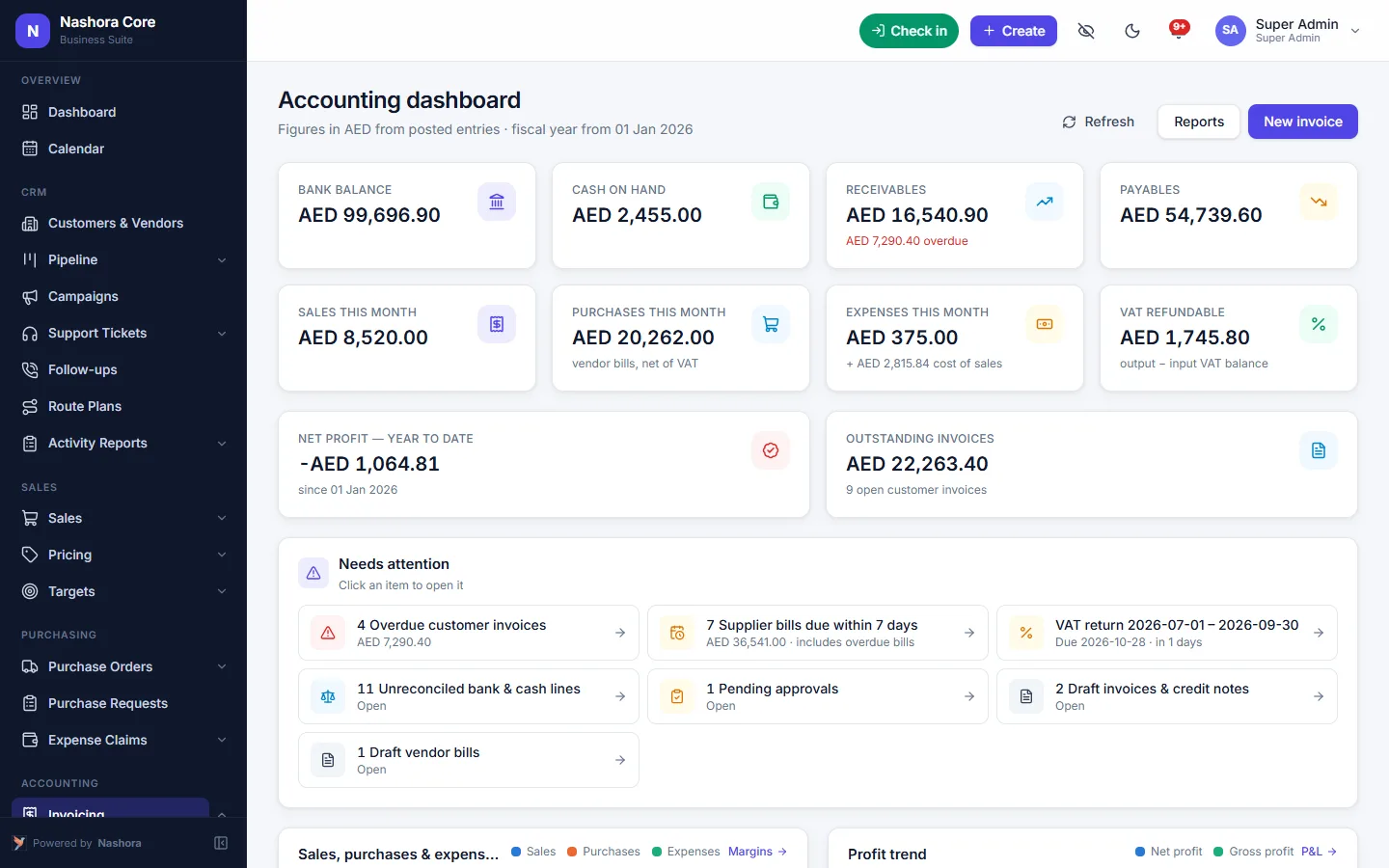
Payment timing is a calendar problem. You need to see which bills fall due this week, which are overdue and what your bank balance can bear. The accounting dashboard in Nashora flags supplier bills due within seven days, with the total and whether some are already overdue, and the aging reports show the rest of the payable book. Agree a fixed payment day each week, pay on due dates rather than whenever somebody has time and tell suppliers about your cycle. Paying everyone early to keep them happy is the most common way to run out of cash.
VAT on purchases: valid tax invoices and the supplier TRN
Purchases are also where you recover VAT. If your business is VAT-registered, you can generally recover the VAT you pay on business purchases as input tax, by offsetting it against the VAT you charge customers in your VAT 201 return. But the claim needs paperwork.
- A valid tax invoice. A document marked as a tax invoice showing the supplier's name, address and TRN, your details, the date, a description of the goods or services, the amount and the VAT charged.
- The supplier's TRN. If a supplier's invoice has no TRN, or the number is wrong, your claim may be refused. Check it when you set up the supplier, not at VAT time.
- A business purpose. Input VAT on purchases that are not for your taxable business activity may not be recoverable.
- Records. Keep invoices and supporting documents for the period the rules require, which is five years as a general rule.
Purchases from outside the UAE can fall under the reverse charge, where you account for the VAT yourself. Rules vary by type of purchase and by situation, so check the current rules with the FTA or your tax adviser. The practical lesson is the same: keep the supplier's TRN on the supplier record and the tax invoice attached to the bill. Our guide on how to calculate VAT in the UAE covers the calculation, and the accounting and VAT software page shows how purchases flow into the VAT 201 return.
Landed cost: what an imported item really costs
The price on the supplier's invoice is not what the goods cost you. Freight, customs and clearing charges are part of the cost of getting stock onto your shelf, and ignoring them overstates your margin.
An illustrative example. You import 200 units for AED 10,000 (AED 50 each). Freight is AED 600, customs is AED 500 and clearing and handling is AED 300 (amounts before VAT, which is dealt with separately). The landed cost is 10,000 + 600 + 500 + 300 = AED 11,400, or AED 57 a unit.
| Measure | Invoice price only | Landed cost |
|---|---|---|
| Cost per unit | AED 50.00 | AED 57.00 |
| Selling price per unit | AED 65.00 | AED 65.00 |
| Profit per unit | AED 15.00 | AED 8.00 |
| Margin on selling price | 23.1% | 12.3% |
The margin almost halves. In Nashora, freight and customs are added to product cost as landed costs, so the margin you see on your next sale uses the real figure. Choose average cost or FIFO with your accountant. We go into margin arithmetic in how to calculate product profit margin.
Reconciling supplier statements
Once a month, ask your main suppliers for a statement and compare it with what your books say you owe them. Differences are normal and almost always have a boring cause: an invoice you have not received, a payment the supplier has not yet applied, a credit note that is missing on one side or a bill you rejected that they still count.
- Compare the closing balances, then list what is on their statement and not on yours, and the reverse.
- Match each difference to a document: a bill, a payment, a credit note.
- Agree corrections, and ask for missing credit notes in writing.
- Record anything you owe that you had missed, and pay the undisputed amount.
Your payables aging report is the starting point, and the bank reconciliation confirms that payments really cleared. Because the match and approval happened earlier, most statements agree, and the ones that do not are usually the ones worth a phone call. For the wider picture of money owed to and by you, see how to manage accounts receivable and payable.
Purchase-to-pay checklist
Use this as a review sheet for your process, or as the list you walk through with a new accounts clerk.
| Stage | Control question | Evidence kept |
|---|---|---|
| Request | Is the need written, with quantity and date? | Purchase request |
| Supplier set-up | Are the TRN, bank details and terms recorded and checked? | Supplier record, trade licence and TRN copy |
| Purchase order | Do price, quantity, VAT and terms match what was agreed? | Approved PO |
| Approval | Was it approved by someone within their limit, and not by the requester? | Approval record |
| Receiving | Was the delivery counted and checked against the PO on the day? | GRN, with shortages and damage noted |
| Bill entry | Is it a valid tax invoice with the supplier's TRN, and not a duplicate? | Supplier tax invoice linked to the bill |
| Three-way match | Do order, receipt and bill agree within tolerance? | Match result and notes on exceptions |
| Payment approval | Is the bill due, matched and approved by a second person? | Payment list |
| Payment | Was it recorded against the bill, with the right method and date? | Bank advice or cheque counterfoil |
| Landed cost | Were freight, customs and clearing added to the product cost? | Cost allocation |
| Statement check | Does the supplier statement agree with your payable? | Signed-off reconciliation |
| VAT | Is input VAT claimed only on valid invoices? | VAT 201 workings, invoices filed for five years |
Purchasing in Nashora, step by step
The purchasing screens follow the flow above, inside the same system as stock, accounts and VAT. The CRM, sales and inventory module includes purchase requests that become purchase orders after approval, purchase orders with approval rules, goods received notes, a three-way match of order, receipt and bill, and landed costs. Bills, payments, cheques and PDC, bank reconciliation, aging and VAT sit in the accounting side.
| Task | Nashora | Spreadsheets and e-mail | Separate apps |
|---|---|---|---|
| Purchase request to order | Request becomes a PO after approval | Retyped from a message | Depends on the app |
| Approval by amount | Approval rules and limits by role | A signature on paper | In some purchasing tools |
| Receiving | GRN adds stock in the right warehouse | Stock sheet updated later | Only if linked to inventory |
| Three-way match | Order, receipt and bill compared | Eyeballed, if at all | Often a paid extra |
| Supplier bill | Created from the receipt, posts to the books | Entered again by accounts | Needs a link to accounting |
| Cheques and PDC | Recorded with dates in the accounts | A list on a desk | Varies |
| Landed cost | Freight and customs added to product cost | Worked out on the side | Often missing |
| Payables aging and due bills | Aging reports and a dashboard list of bills due | Manual formulas | In the accounting app |
| VAT on purchases | VAT per line, flows into the VAT 201 return | Re-entered at quarter end | Needs a link to accounting |
| Audit trail | Audit log, posted documents locked | Overwritten files | Set up in each app |
To be honest about limits, the flow depends on people entering things in order. A system will happily let you create a bill without a PO if your rules allow it, so decide which exceptions are permitted and who reviews them.
Benefits and who needs it
Fewer overpayments and disputes
You pay for what arrived, at the price you agreed, once. When a supplier calls, you can open the PO, the receipt and the bill in a minute.
Cash you can plan
Due dates, aging and issued cheques are visible together, so the weekly payment run is a decision, not a scramble.
Honest margins
Landed costs flow into product cost, so the profit you report is the profit you made.
Cleaner VAT
Supplier TRNs and tax invoices live with the bill, so input VAT is easy to support at VAT 201 time and when the FTA asks. See what an FTA Audit File is.
Who gets the most from it
Trading and distribution companies buy often, import and have the most to lose from a wrong cost. Retail and wholesale with warehouses need receipts to match stock. Contractors and project businesses buy for jobs and need approvals before commitments are made. Food and consumables businesses benefit from lot and expiry tracking at the point of receipt. For the sales side of the same stock, read what a stock-aware CRM is.
A typical scenario
Picture a trading company in Sharjah ordering 500 cartons from a supplier abroad. The PO is approved at the right limit, 480 cartons arrive, and the GRN says so. The supplier bills 500. The three-way match flags the difference, the buyer asks for a credit note for 20 cartons, and payment goes out on the due date for what was actually received. This is an illustration, not a customer story.
Purchasing for businesses across the UAE
Buyers in Dubai, Sharjah, Abu Dhabi, Ajman, Ras Al Khaimah, Fujairah, Umm Al Quwain and Al Ain deal with a mix of local suppliers and imports through ports and free zones. That brings VAT on local purchases, customs on imports, supplier invoices in AED or foreign currency and, for many, post-dated cheques. Nashora supports multi-currency and applies UAE VAT per line, and a company in a free zone or on the mainland has its own TRN and books. With UAE corporate tax at 9% above the AED 375,000 threshold, accurate cost of goods, including landed costs, matters more than before.
Nashora runs in the browser, so there is nothing to install, and we help with setup, Excel import of vendors and products, and training. Purchasing and full inventory are included from the Business plan at AED 6,468 a year for 10 users, with a one-time installation fee of AED 5,000 in the first year. Prices exclude 5% VAT. See the pricing page or the features list.
What to do next
- Trace one recent purchase from request to payment. Note every point where a document was missing or a step was done by the same person.
- Set approval limits in writing and name a deputy for each approver.
- Run a supplier statement reconciliation for your three biggest suppliers this month.
- Check TRNs. Confirm every active supplier has a TRN on file and that recent bills are valid tax invoices.
- See it on your own orders. Book a free purchasing demo and bring one real PO, or talk to us first. The FAQ covers setup and pricing.