
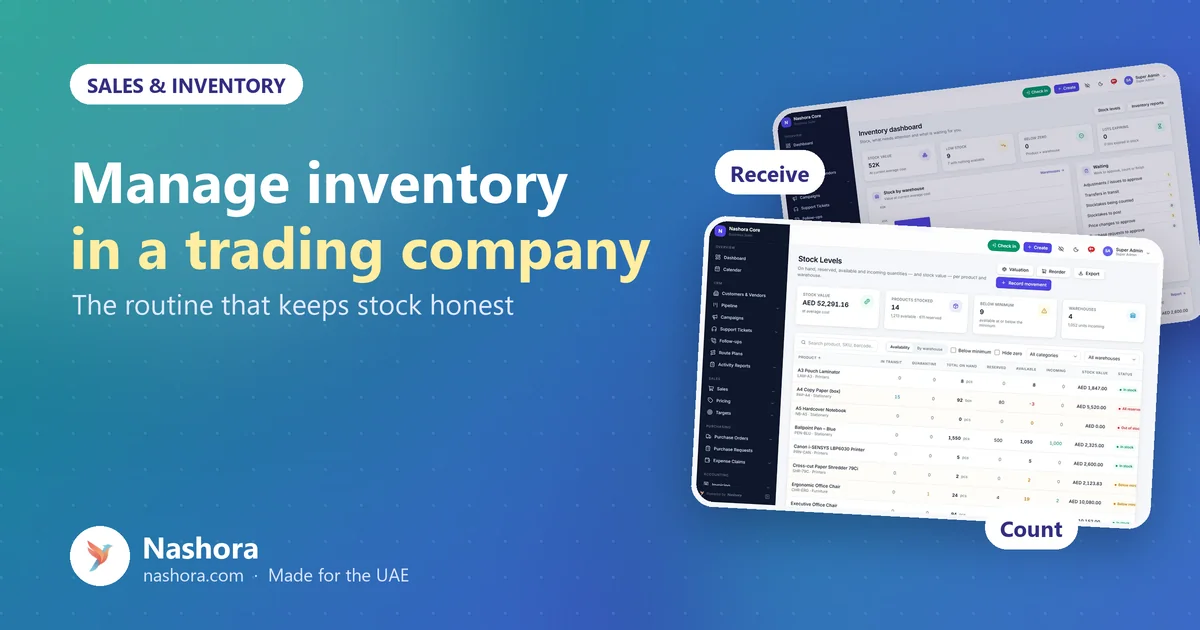
It is a Thursday afternoon and a customer in Ajman wants 300 cartons of a product you sell every week. The storekeeper says there are about 250. The sales manager thinks there are 400 because a container arrived on Monday. The accountant has a third number, because the goods received note was never entered. Nobody is lying. Each person is looking at a different piece of paper.
That small argument is what poor inventory control looks like in a trading company. This guide explains how to manage inventory in a trading company as a routine you can actually run: receiving, coding, locations, reorder levels, counting, cost and a few numbers to watch. It is written for UAE traders who buy, store and resell goods, and it says plainly where software helps and where a good habit is enough.
Why inventory goes wrong in a trading company
A trader's stock is usually the biggest asset on the balance sheet and the least controlled one. Cash is counted every day. Stock is counted once a year, if at all, and mostly remembered in between.
Traders also have a harder job than manufacturers in one respect: nothing is made, so every item is bought, and every purchase is a bet on what will sell. Buy too little and customers go to the next shop in the Sharjah industrial area. Buy too much and the cash sits on a shelf in Ras Al Khor until the product goes out of fashion or out of date.
The usual causes of trouble are simple and boring:
- Goods are received without checking them against the purchase order, so quantities and prices go unchecked.
- The same product has three names, so one item is counted three times, or not at all.
- Stock moves between warehouses on a phone call with nothing written down.
- Nobody owns the reorder decision, so it happens when somebody sees an empty shelf.
- Imported goods are valued at the supplier's price, ignoring freight, duty and clearing charges.
None of this needs software to fix. But it does need a routine, and routines are easier to keep when the system forces the paperwork.
The routine: a simple rhythm that keeps stock honest
Good stock control is not a big project. It is a handful of habits repeated every day, every week and every month, with one rule above all: stock only moves with a document. No document, no movement.
- Receive against the purchase order. Check quantity, condition and expiry on arrival, and record what you actually received, not what the delivery note says.
- Put away to a named location. Every item goes to a warehouse and bin that appears in your records.
- Issue only against a delivery note. Sales, samples, internal use and transfers each have their own document, so the shelf and the records change together.
- Review the reorder list weekly. One person looks at what is below minimum and decides what to buy.
- Count a slice of stock every week. A few products or one bin at a time, rotating through the whole range over the quarter.
- Review slow movers and the three KPIs monthly. Decide what to discount, return to the supplier or stop buying.
The rest of this guide takes these habits one at a time.
Receive against purchase orders, not against memory
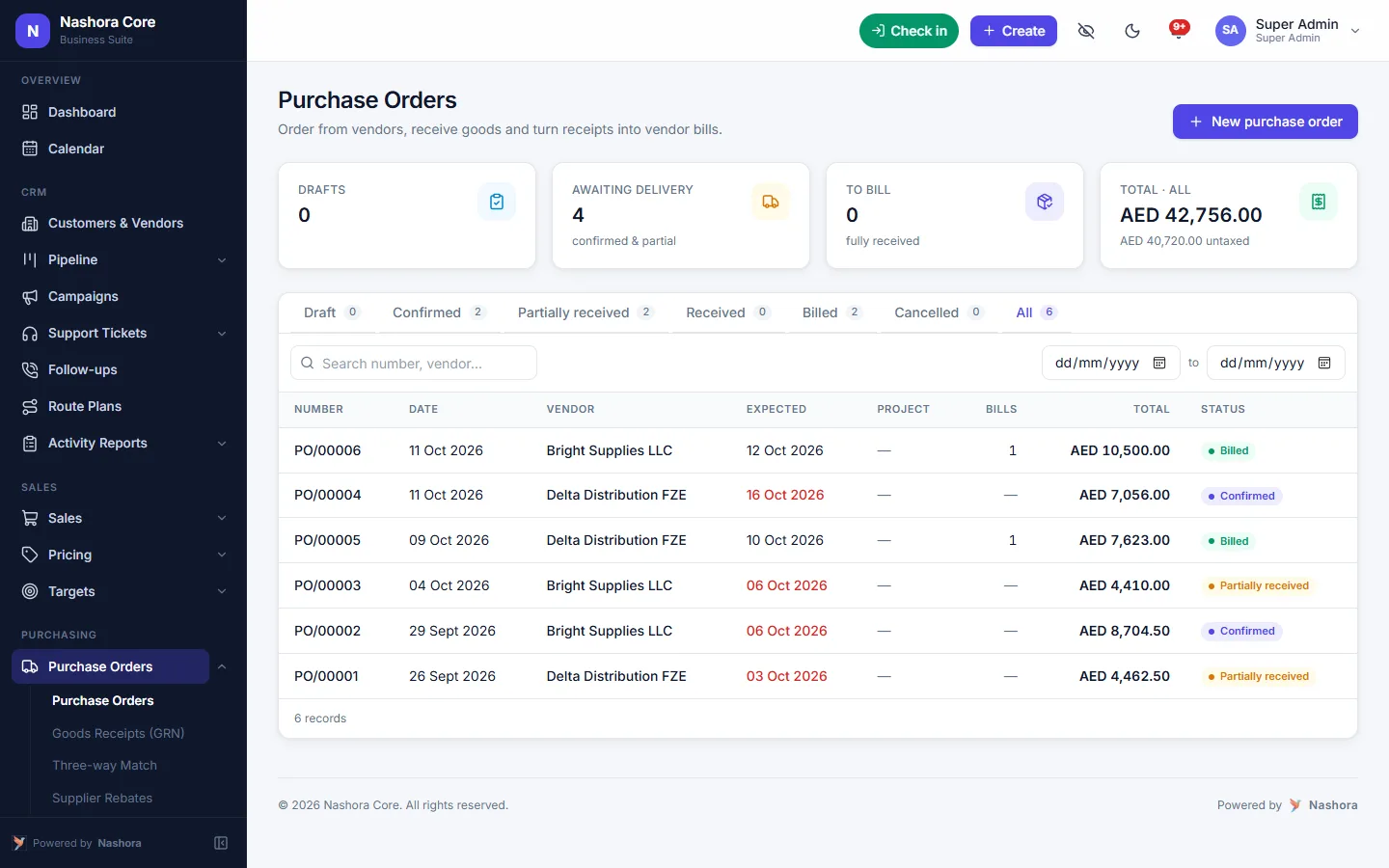
Receiving is where stock records are born, so it is where most errors enter. The cleanest habit is a three-document match: the purchase order says what you asked for, the goods received note says what arrived, and the supplier's bill says what you are being charged. If all three agree, you pay. If they do not, you ask before paying, not after.
What to check on the dock
Count the cartons, open a few, check the product against the order and look at expiry dates and damage. If the delivery is short, write the shortage on the goods received note and tell the buyer the same day. A shortage found three weeks later is almost impossible to claim.
Partial deliveries and returns to suppliers
Suppliers often deliver an order in parts. Keep the purchase order open for the balance, receive each delivery separately and chase the rest from the same document. If you return goods to the supplier, record it as a return, not as a silent reduction in stock. For the buying side in more detail, see our guide to managing purchase orders and supplier payments.
Name and code your items so nobody has to guess
Tidy item data is the cheapest improvement in inventory management, and the one people skip. If "A4 paper 80gsm box" is also "A4 Copy Paper (box)" and "paper A4 carton", your records will always disagree with the shelf.
One item, one code, one unit
Give each product a short, unique code and a single standard name. Choose one base unit (pieces, boxes, kilograms) and define how others convert, so that "one carton = 24 pieces" is written down once rather than known by one person. Keep colour, size and pack variants as variants of the same product instead of unrelated items.
Categories you will actually report on
Categories are for reporting, so keep them few and meaningful: the groups you would want to compare for sales and margin. Ten useful categories beat a hundred that nobody maintains. Clean up the list before you import it into any system, because a system only repeats the habits you give it.
Warehouses and bins: know where it is, not just how much
A quantity without a location is half an answer. If you have 90 cartons in the company but 60 are in the Sharjah store and 30 are in Jebel Ali, a customer who collects from Sharjah can only be given 60.
Set up each physical place as its own warehouse, including the awkward ones: a van, a showroom, goods in transit between sites, and a quarantine area for damaged or disputed stock. Inside a warehouse, divide the space into bins or shelf locations with simple labels such as A-01-02. Staff then find items faster, and counting becomes easy because you can count one bin at a time.
Moving stock between locations needs a transfer document with a sending and a receiving side. The gap between the two is stock in transit, and it is exactly the kind of stock that disappears when moves are done by phone call.
Min, max and reorder point: when to buy, and how much
Most traders reorder by feel, which works until the person with the feel goes on leave. A reorder point turns the feel into a number. The formula is short:
Reorder point = average daily sales × supplier lead time (days) + safety stock
Say you sell 20 cartons a day, your supplier takes 14 days to deliver and you want 100 cartons as a cushion for a late shipment. The reorder point is 20 × 14 + 100 = 380 cartons. When stock, plus anything already on order, falls to 380, you place the next order.
Minimum and maximum levels
The minimum is the level at which you want a warning, usually the reorder point. The maximum is the most you are willing to hold, set by your cash, your space and the shelf life of the product. In the example above, a 30-day order is 20 × 30 = 600 cartons. If it arrives when you have sold down to the 100-carton safety stock, shelves peak at about 700 cartons, so a maximum of around 700 would be sensible.
Review them, because demand changes
Levels set last January are wrong by June. Review the top 20 products every quarter and adjust for season: Ramadan, summer, back-to-school and year-end all move demand in the UAE. Longer lead times from a new supplier or a delayed shipment also change the number, so the formula has to be re-run, not remembered.
Fast movers, slow movers and dead stock
Not all products deserve the same attention. A small number of items usually produce most of your sales, and a long tail sits quietly collecting dust. Sort them by how long stock would last at the current sales rate: stock on hand divided by average daily sales gives days of cover.
- Fast movers turn quickly. Protect them with healthy safety stock and a tight reorder routine, because a stock-out costs you the most here.
- Slow movers have months of cover. Stop reordering, offer them in bundles or to customers who buy them rarely, and ask suppliers whether they take returns.
- Dead stock has not sold for a long time at all. Decide a cut-off, for example nothing sold in 90 days, then list it and make a decision: discount, return, donate or write off.
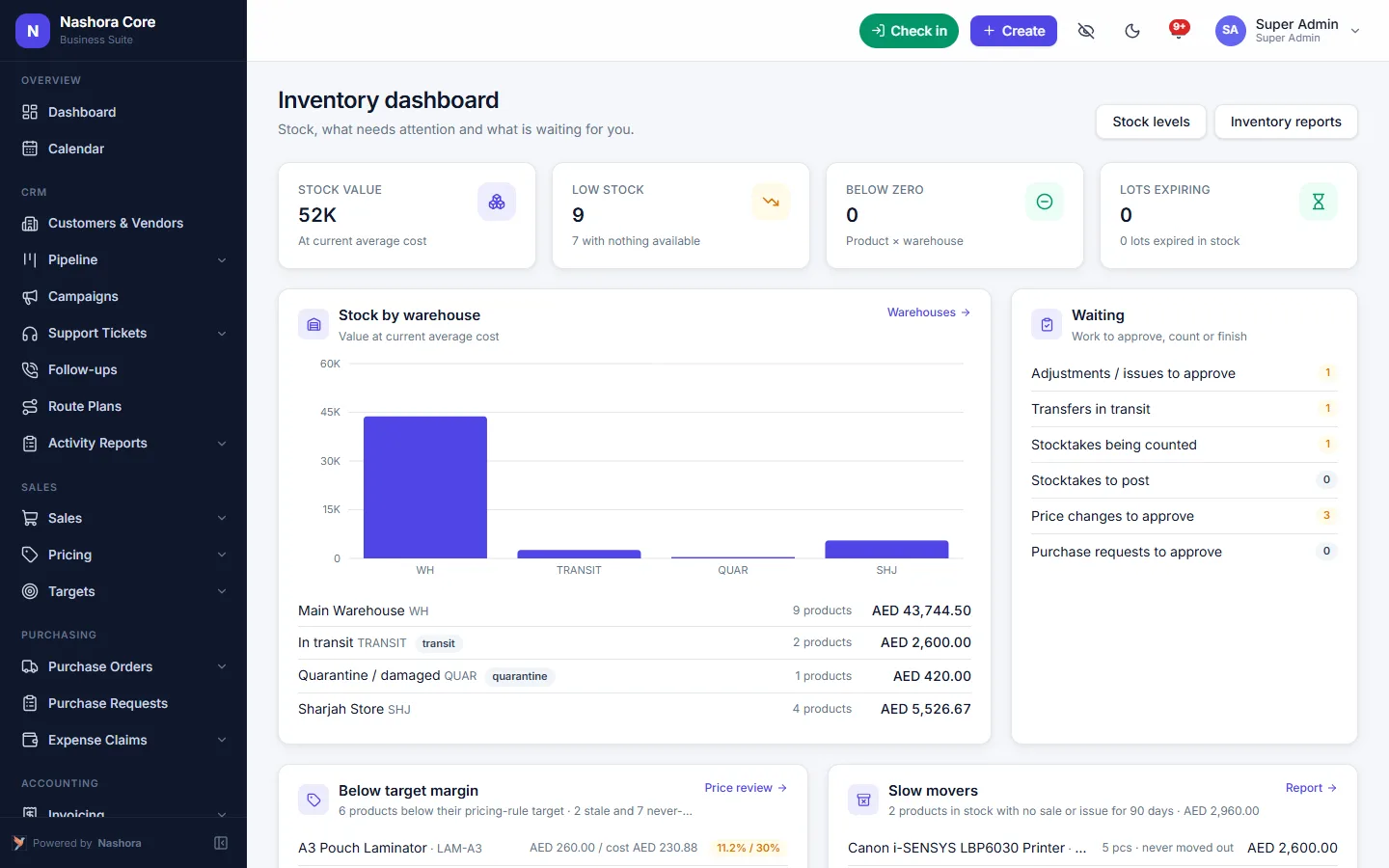
Writing off is unpleasant, but keeping the item on the books at full cost only hides the loss and keeps tying up shelf space. In Nashora, the inventory dashboard has a slow movers card for exactly this review, listing products in stock with no sale or issue for 90 days.
Stocktakes and cycle counts: how to check the shelf
A stocktake counts everything, usually at year end or before an audit. A cycle count counts a slice at a time, such as one bin, one category or the top-selling items, so that the whole warehouse gets checked over a few weeks without stopping trade.
How to run a count that finds the problem
Print or open the count sheet without showing the system quantity, so counters write what they see. Count in pairs where you can. Recount any difference above a small tolerance before changing anything, because many differences are misplaced stock sitting in the next bin. Only then post the adjustment, with a reason and an approval, so that corrections leave a trail.
How often?
Count fast movers and high-value items most often, perhaps monthly, and the long tail quarterly. A product that is wrong again and again points to a process problem, such as goods issued without a delivery note, rather than a counting problem.
Shrinkage: where stock quietly disappears
Shrinkage is the gap between what your records say you have and what is on the shelf. It is rarely dramatic theft. More often it is a dozen small things: receiving errors, goods issued without paperwork, breakage and damage nobody recorded, samples that were never booked out, wrong items delivered, and yes, the occasional dishonest person.
The fix is control, not suspicion. Limit who can adjust stock, require approval for write-offs, keep damaged items in a quarantine warehouse and review adjustments monthly. It also helps when every change is logged against a user. Nashora keeps an audit log with the IP address, and approval limits by amount can be set per role.
To measure it, compare book stock value with counted stock value: shrinkage rate = (book value − counted value) ÷ book value. If the books say AED 320,000 and the count says AED 316,800, the loss is AED 3,200, which is 1.0%. Track that number after every count and you will see whether controls are working.
Landed cost for imports through Jebel Ali and the Sharjah ports
If you import, the supplier's invoice is not what the goods cost you. Freight, insurance, customs duty, port and terminal charges, clearing agent fees and trucking to your warehouse all belong in the cost. Left out, they make every product look more profitable than it is, and they are the reason a trader can sell everything and still wonder where the money went.
Here is an illustrative shipment of 1,000 cartons arriving by sea. We assume customs duty at 5% on the cost-plus-freight value for the example; the actual rate depends on the product and the way the goods are cleared, so confirm with your clearing agent.
| Cost element | Amount (AED) | Note |
|---|---|---|
| Goods (1,000 cartons at AED 50) | 50,000 | Supplier invoice, converted to AED |
| Sea freight | 3,000 | Origin port to Jebel Ali or a Sharjah port |
| Customs duty at 5% | 2,650 | 5% of (50,000 + 3,000) = 53,000 |
| Port and clearing charges | 1,200 | Terminal handling, agent fees, documents |
| Local trucking to warehouse | 800 | Delivery order and transport |
| Total landed cost | 57,650 | AED 57.65 per carton |
That is AED 7,650 on top of the invoice, or 15.3% more than the AED 50 per carton you might have written on the price list. If you sell at AED 60 and think your cost is AED 50, you believe you earn a 16.7% margin. At the true cost of AED 57.65, you earn AED 2.35 a carton, which is 3.9%. Same shipment, very different business. Our article on how to calculate product profit margin goes deeper on that arithmetic.
Two practical notes. Spread each cost across the items in the shipment by value or by quantity, and do it the same way every time. And if you are VAT registered, VAT paid on the import is normally recoverable as input tax, so it is not part of the product cost. Check the current treatment with the FTA or your tax adviser, particularly for goods held in a free zone or designated zone.
Valuation: average cost or FIFO
Prices change between shipments, so the same product sits on your shelf at different costs. Valuation is the rule for deciding which cost goes into the cost of goods sold when you sell, and what is left in stock on the balance sheet.
- Average cost blends everything on hand into one cost per unit, recalculated after each receipt.
- FIFO (first in, first out) assumes the oldest purchase is sold first, so the oldest cost leaves the stock first.
Take 100 units bought at AED 10 and another 100 bought later at AED 12, then 150 units sold. The two methods give different numbers from the same facts:
| Method | Cost of goods sold | Closing stock value | How it is worked out |
|---|---|---|---|
| Average cost | AED 1,650 | AED 550 | Average = (1,000 + 1,200) ÷ 200 = AED 11; 150 × 11 = 1,650; 50 × 11 = 550 |
| FIFO | AED 1,600 | AED 600 | 100 × 10 + 50 × 12 = 1,600; remaining 50 × 12 = 600 |
Both add up to AED 2,200, the total purchased. FIFO shows slightly higher profit when prices are rising, because older, cheaper units are expensed first. Average cost smooths out price swings, which many traders find easier to explain. Neither is wrong, but you should pick one, apply it consistently and ask your accountant which suits your business and reporting needs.
Three KPIs: turnover, days of stock and stock-out rate
You do not need twenty dashboards. Three numbers tell you whether your stock is working for you or against you. Calculate them monthly and compare with your own history, not with a figure from a book; a food importer and a tools dealer will never look alike.
| KPI | Formula | Illustrative example | What it tells you |
|---|---|---|---|
| Stock turnover | Cost of goods sold ÷ average stock value | AED 1,200,000 ÷ AED 300,000 = 4.0 times a year | How often you sell and replace your stock |
| Days of stock | 365 ÷ stock turnover | 365 ÷ 4.0 = about 91 days | How long the average item sits before it sells |
| Stock-out rate | Order lines not filled in full ÷ total order lines | 36 ÷ 900 = 4% | How often customers hear "not available" |
| Shrinkage rate | (Book value − counted value) ÷ book value | AED 3,200 ÷ AED 320,000 = 1.0% | How much stock is lost between records and shelf |
In the turnover example, average stock is the opening AED 280,000 plus the closing AED 320,000, divided by two, which is AED 300,000. Turnover of 4.0 means the stock is sold and replaced four times a year. That sounds fine until you see that the stock-out rate is 4% at the same time: you hold 91 days of stock overall and still disappoint customers on some lines. That is the classic sign of the wrong mix, too much of the slow items and too little of the fast ones.
An inventory checklist you can use today
Use this as a self-audit. If you answer no to more than a few of these, you know where to start.
| Area | Question to ask | Good practice |
|---|---|---|
| Receiving | Is every delivery checked against a purchase order? | Goods received note for every delivery; shortages written on it the same day |
| Item data | Does each product have one code, one name and one base unit? | Unique code, standard unit and conversions, variants grouped |
| Locations | Can you say which warehouse and bin holds an item? | Every location named, including vans, transit and quarantine |
| Movements | Does stock ever move without a document? | Delivery note, transfer or adjustment for every movement |
| Reorder | Does each fast mover have a minimum and a reorder point? | Levels set from daily sales and lead time, reviewed quarterly |
| Slow stock | Do you know what has not sold in 90 days? | Monthly review with a decision for each item |
| Counting | When did you last count your top 20 products? | Cycle counts weekly, full stocktake at least once a year |
| Adjustments | Who can change a quantity, and who approves it? | Limited rights, reason required, approval for write-offs |
| Imports | Are freight, duty and clearing in the product cost? | Landed cost added to each shipment before you price |
| Valuation | Is average cost or FIFO applied the same way every time? | One method, stock value reconciled to the accounts |
| Numbers | Do you review turnover, days of stock and stock-outs? | Three KPIs every month, compared with last month and last year |
Where Nashora helps with trading inventory
You can run all of the above in a well-disciplined spreadsheet for a while. Honestly, a spreadsheet is fine until you have more than one warehouse, more than one person updating it, or products that expire. After that the discipline has to be forced by the system, which is where the CRM, sales and inventory module in Nashora comes in. Based on what the product does today:
- Buying and receiving. A purchase request becomes a purchase order after approval, the goods received note adds the stock, and the vendor bill is matched to the order and the receipt in a three-way match.
- Locations. As many warehouses as you need, divided into bins, with transfers between them.
- Tracking. Lots with expiry dates and serial numbers, plus expiry reports.
- Cost. Landed costs for freight and customs, average cost or FIFO, stock revaluations and a valuation that is reconciled to the books.
- Control. Reorder planning, backorders, low-stock alerts, stocktakes and cycle counts, with approvals for adjustments and an audit log.
- Visibility. An inventory dashboard and stock and expiry reports that export to Excel and PDF.
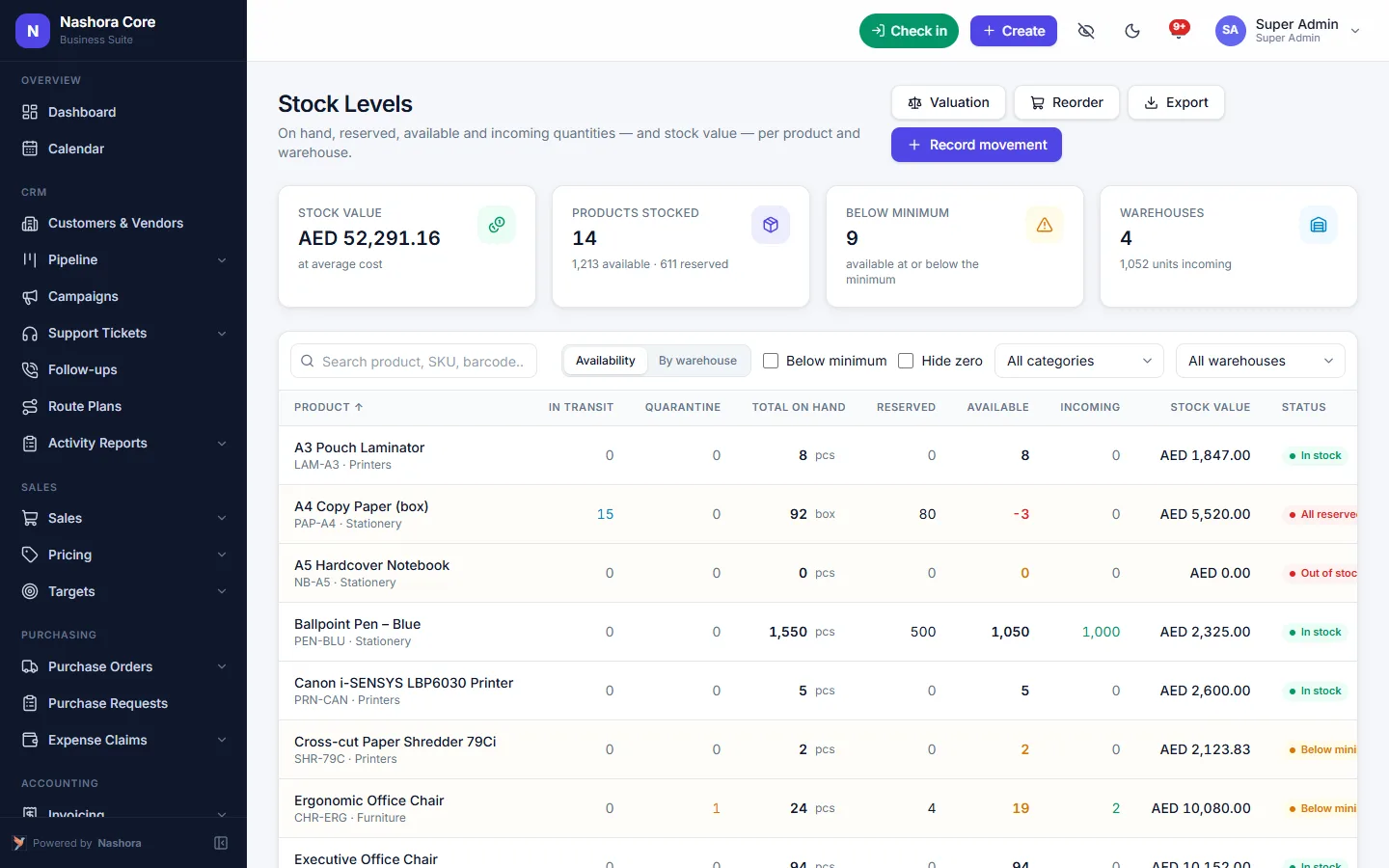
The stock screen shows, for each product and warehouse, the quantity on hand, reserved, available and incoming, with the stock value at average cost. Delivery notes reduce stock in the warehouse they ship from, so the sales side and the warehouse side use the same numbers. For the wider workflow, read our guides to an inventory and sales system for the UAE and to stock-aware CRM. If you are still deciding whether to leave spreadsheets, compare Excel vs ERP software and the guide on why businesses need inventory management software.
Serving traders across the UAE
Nashora is built in Al Nahda, Sharjah, for businesses in Dubai, Sharjah, Abu Dhabi, Ajman, Ras Al Khaimah, Fujairah, Umm Al Quwain and Al Ain. A trader might import through Jebel Ali, store in Sharjah and sell across several emirates, and all of those locations can work from the same live stock records because Nashora runs in a browser.
Stock and accounts share a database, so UAE requirements follow the same documents: VAT at 5% on invoices carrying your TRN, VAT 201 returns, the FTA Audit File and records kept for the period the law requires. With corporate tax at 9% above the AED 375,000 threshold, an accurate cost of goods sold also matters more at year end than it used to. The accounting and VAT module covers the books side, and the pricing page shows which plan includes what. Basic stock sits in the Starter plan and full inventory with purchasing starts in the Business plan.
What to do next
- Fix your item list. One code, one name and one unit for each product, with duplicates merged, before you add anything else.
- Name your locations. Warehouses, bins, vans and a quarantine area, each with a label.
- Set reorder points for your top 20 products. Use the formula above and write the levels down.
- Count one bin this week. Compare it with the records and find out why the difference exists.
- Add landed cost to your next import. Re-price anything where the true margin surprised you.
If you would rather see this running on your own products, book a free demo and bring one real purchase order and one real delivery. We will walk both through Nashora with you. The FAQ answers questions about setup and plans, or you can talk to us directly.