
A salesperson sends a quotation for 200 cartons of a fast-moving product. The customer in Dubai says yes by WhatsApp within the hour. Then the warehouse supervisor looks at the shelf and finds 140. Another 60 are reserved for a customer who ordered last week, and the next container is still at Jebel Ali. Now somebody has to phone the customer and explain, and the quotation you were proud of becomes an apology.
A stock-aware CRM exists to stop that phone call from being necessary. In plain words, it is a CRM that knows what is on the shelf. Below we explain the idea without jargon, show where it changes quoting, orders, delivery notes, purchasing and follow-ups, and say honestly what Nashora does today and what you should look for in any tool.
What a stock-aware CRM actually is
A normal CRM keeps customers, leads, follow-ups and quotations. It has a product list, but the product list is just names and prices. It has no idea whether you own any of it.
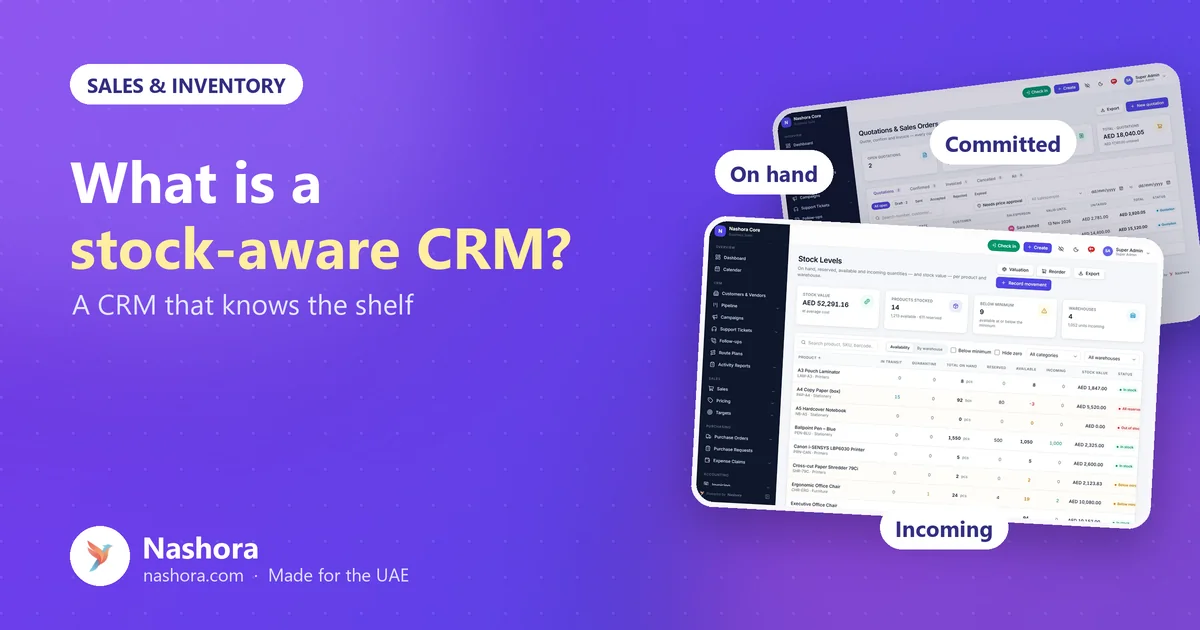
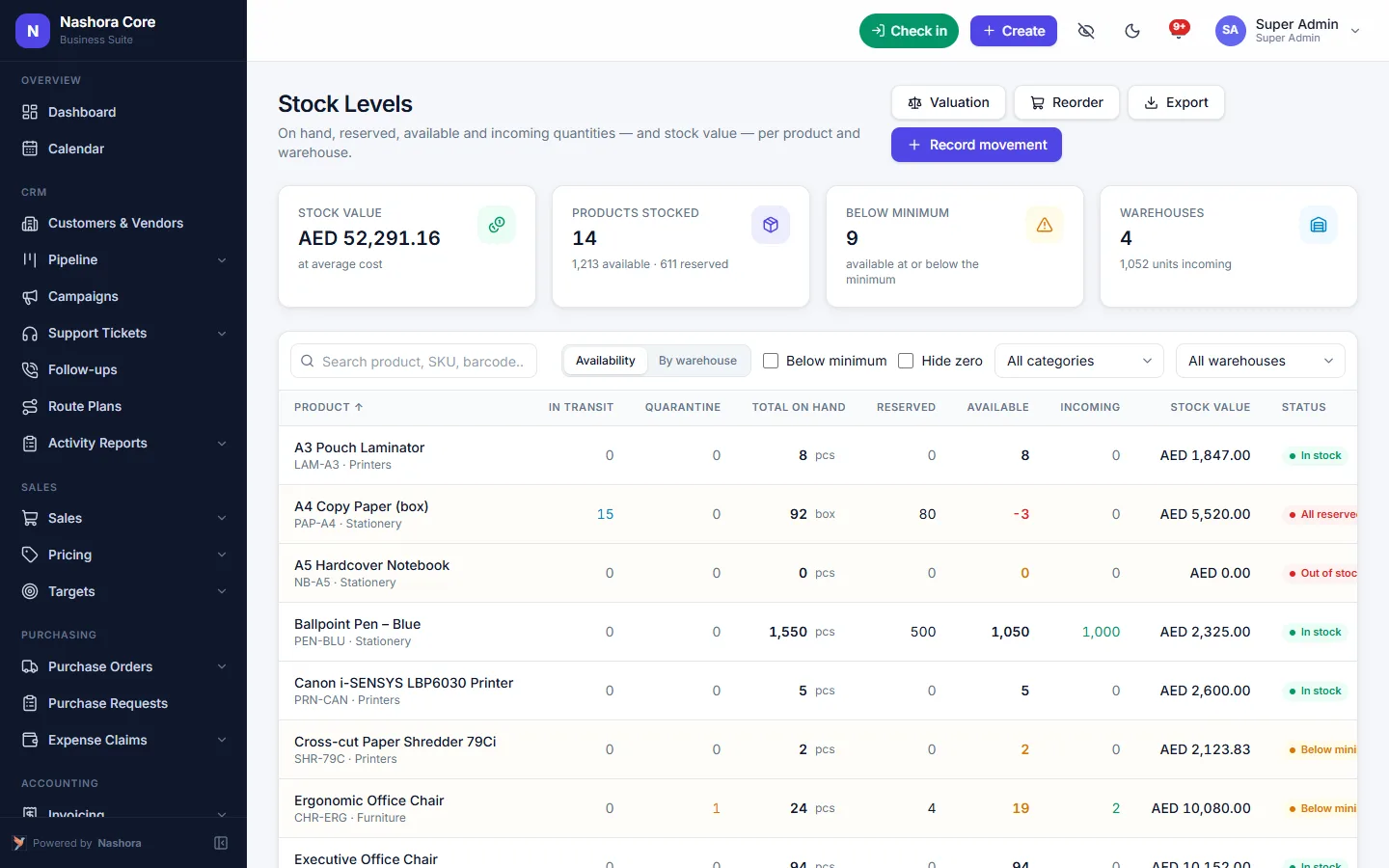
A stock-aware CRM, sometimes called an inventory-aware CRM or a CRM with inventory, shares its database with your stock records. When a salesperson picks a product on a quotation, the system knows how much is available, in which warehouse, and what is already promised or on its way in. The sales side and the warehouse side stop being two different worlds.
Not the same as a CRM with a product catalogue
Plenty of CRMs let you add products to a quotation. That is a catalogue, not stock awareness. The test is simple: when the delivery note is made, does the quantity on the shelf go down by itself? If someone has to update a separate sheet, the CRM is not stock-aware, whatever the brochure says.
Three numbers worth understanding
Most of the confusion comes from treating "stock" as one number. In practice it is at least three:
- On hand. What is physically in the warehouse right now.
- Committed (reserved). What has been promised to customers on confirmed orders but not yet delivered.
- Incoming. What you have ordered from suppliers and not yet received.
Put them together and you get what many systems call available to promise: on hand, minus what is already committed, plus what is reliably arriving. That is the number a salesperson actually needs when a customer asks, "Can you deliver 200 by Thursday?"
The typical failure: how a quotation for 200 units you don't have happens
It is rarely stupidity. It is a chain of small gaps.
The quotation is created in a CRM or a Word template with no link to stock. The salesperson guesses, or checks a stock sheet that was last updated on Sunday. The customer accepts. The order goes to the warehouse by message. The warehouse sees it for the first time when the pick is due, and by then two other orders have taken the stock.
Then come the second-order effects. A partial delivery is promised without anyone recording it. The invoice goes out for the full quantity because that is what the order said. The customer pays for 140, disputes 60, and your receivables carry a mismatch for weeks. The root cause was not the invoice. It was a quotation made without looking at the shelf.
How stock-awareness changes the daily work
Quoting
The salesperson sees quantities while building the quotation, in the right warehouse. They can quote what is available, offer a partial shipment now with the balance later, or quote a realistic date if the rest is on order. Price lists and below-cost checks sit alongside, so a discount that kills the margin gets flagged at the same moment.
Orders
When a quotation is accepted it becomes a sales order, and the quantities on that order are known commitments. Without some form of reservation, two salespeople can promise the same 140 cartons on the same afternoon. With it, the second salesperson sees less available than they hoped, which is annoying and much cheaper than a broken promise.
Delivery notes
The delivery note is where the shelf actually changes. In a stock-aware system it reduces stock in the warehouse it ships from, by lot or serial number where you track them, and it supports partial deliveries. You then invoice what was delivered, not what was ordered.
Purchasing
Once stock is visible, buying becomes less of a gut feeling. Low-stock alerts, reorder planning and backorders tell you what to buy, and a goods received note puts stock back on the shelf, which immediately changes what salespeople can promise.
Follow-ups
This one is often forgotten. A backordered item is a promise with a date. If the CRM knows the item is short, the follow-up becomes "tell the customer the balance arrives next week" rather than a surprise on the delivery day. Follow-ups, activities and the shared calendar live in the same system, so the reminder is attached to the customer.
A stock-aware sale in Nashora, step by step
Here is the path of a typical order in Nashora, built from what the product does today.
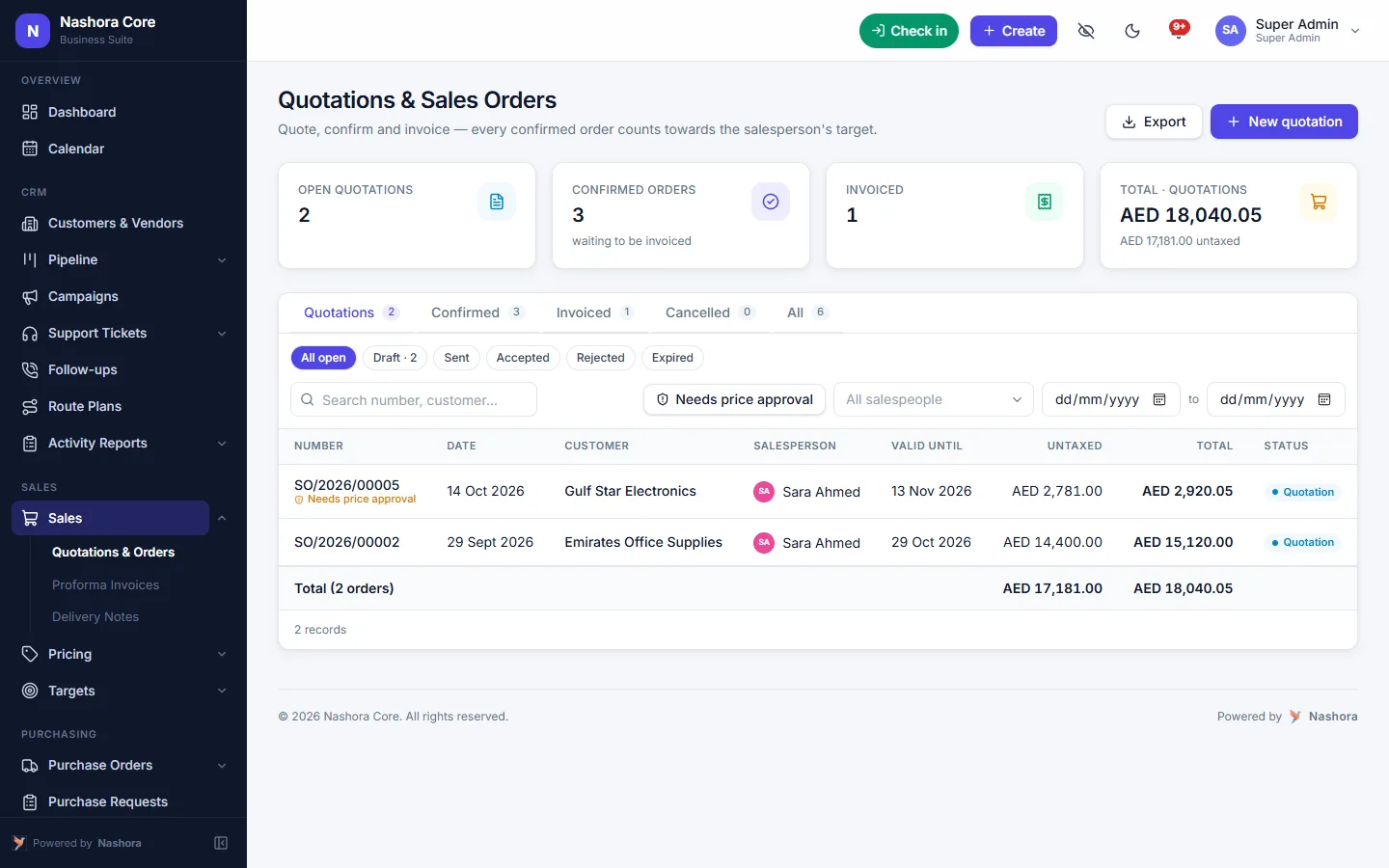
- Check stock for the customer. The salesperson looks at the product's stock per warehouse before promising a quantity or a delivery date.
- Send the quotation. It is built from the customer's price list, versioned, approved if needed, and flagged by the below-cost check if the discount is too deep.
- Confirm the sales order. The accepted quotation becomes a sales order, with a proforma invoice if the customer pays in advance.
- Pick and pack. A pick list goes to the warehouse, followed by packing.
- Deliver in full or in parts. Each delivery note reduces stock in the warehouse it ships from, by lot or serial number where tracked.
- Replenish the shortfall. Low-stock alerts, backorders and reorder planning show what to buy, and the goods received note adds the stock when it arrives.
- Invoice what was delivered. The invoice carries UAE VAT on every line and posts to the books, and stock valuation is reconciled to the accounts.
No one retyped the order into a stock sheet, and nobody updated one later.
Stock-aware CRM vs spreadsheets vs separate CRM and inventory apps
A spreadsheet is fine if you have a few products and one person who checks the shelf. It breaks down when stock sits in several places or several people sell the same items. Separate apps help, but the link between them is where problems hide.
| Task | Nashora | Spreadsheets | Separate CRM + inventory apps |
|---|---|---|---|
| Stock reduced on delivery | Delivery note moves stock in that warehouse | Someone updates the sheet later | Only if the integration works |
| Quotation to sales order | The accepted quotation becomes the order | Retyped into a new sheet | Retyped or synced between apps |
| Partial deliveries | Several delivery notes against one order | Tracked in comments | Often limited |
| Multiple warehouses and transfers | Warehouses, bins and transfers built in | One tab per warehouse | In the inventory app |
| Lots, expiry and serial numbers | Tracked per warehouse and bin | Extra columns, easy to miss | In some inventory apps |
| Reorder and backorders | Reorder planning, backorders and low-stock alerts | Remembered, or not | In the inventory app, not seen by sales |
| Below-cost warning on quotes | Margin targets and below-cost checks | Noticed after the sale | Depends on the CRM |
| Landed cost | Freight and customs added to product cost | Worked out on the side | Often missing |
| Stock value in the books | Valuation reconciled to the accounts | A separate sheet | Often out of step |
| VAT invoice | Invoice with VAT posts to the books | Re-entered by the accountant | Needs a link to accounting |
| Who sees what | Own, team, branch or all records, per role | Whole file shared | Set up in each app |
What Nashora does today, and what to ask about
Because you are comparing tools, here is a straight account. The CRM, sales and inventory module shares one database for customers, products, quotations, orders, delivery notes and stock. Each delivery note and goods received note moves stock in the right warehouse. Partial deliveries, lots with expiry dates, serial numbers, landed costs, average cost or FIFO, stocktakes, cycle counts, reorder planning, backorders and low-stock alerts are all on our public features list.
What our feature list does not use are the exact terms "reserved stock" or "available to promise". We would rather say so than let a keyword imply more than it should. If a reservation rule that blocks a second order against already-committed stock is vital for you, ask us to show it in a demo, with your own example, and judge it on what you see.
That advice applies to every vendor. Words like "real-time stock" can mean anything from "reduces on delivery" to a full reservation engine, and the difference matters when you sell the same items to many customers.
Benefits of a CRM that knows the shelf
Fewer promises you cannot keep
Salespeople quote from facts instead of memory. Customers hear a realistic date the first time.
Faster, calmer order handling
The order reaches the warehouse as a document, with pick lists and packing, not as a message that gets lost between shifts.
Invoices that match deliveries
You invoice what was delivered. Short deliveries do not turn into disputes about what was billed.
Smarter buying
Reorder planning and low-stock alerts mean you learn a product is running out before a customer asks for it, not after.
Stock that matches the books
Stock valuation is reconciled to the accounts, so the warehouse figure and the balance sheet figure are the same number, posted into the books described on our accounting and VAT software page. Month-end gets shorter.
Who needs a stock-aware CRM in the UAE
Traders
Fast-moving items, many customers, prices that change with the market. Price lists per customer, branch and currency, plus below-cost checks, protect margin while stock-awareness protects delivery promises.
Wholesalers
Large orders delivered in several drops. Partial deliveries with a delivery note each time, and invoices for what actually left the warehouse, keep the paperwork honest.
Distributors with several warehouses
Stock in Sharjah, Dubai and maybe Abu Dhabi. Warehouses, bins and transfers let you see the quantity in each location and move stock between them as needed.
Food, personal care and anything with a shelf life
Lots with expiry dates and expiry reports show what is close to its date in each warehouse, so you can sell it first or set it aside.
Spare parts and equipment
Serial numbers follow each unit from the goods received note to the delivery note, so when a customer calls about a particular machine you can trace the exact unit.
Retail with warehouses
Cycle counts let you check part of your stock at a time, with full stocktakes when you need them, so the shelf and the system agree.
Real day-to-day scenarios
Picture a distributor in Sharjah selling cleaning supplies to supermarkets. These are illustrative, not a customer story.
The big order on a short shelf
A supermarket group wants 500 cases. The salesperson sees 320 in the main warehouse, quotes a first delivery of 320 and the balance on a date after the next goods received note. The customer agrees to two drops, and two delivery notes follow.
The slow Friday
The sales manager opens the CRM dashboard and sees follow-ups that are overdue. One is a customer waiting for a backordered item. A phone call before the weekend avoids an angry one on Monday.
The expiry surprise
The expiry report shows a batch close to its date in one warehouse. Salespeople offer it first to customers who can use it quickly, rather than writing it off later.
What to look for in any stock-aware CRM
Use this checklist whichever product you evaluate. Ask to see each point with your own product and warehouse set-up.
| Area | What to check | In Nashora |
|---|---|---|
| Stock on the quotation | Can the salesperson see quantity by warehouse while quoting? | Stock is held per warehouse and bin in the same system as the quotation |
| Delivery moves stock | Does the delivery note reduce stock automatically? | Yes, in the warehouse the delivery ships from |
| Partial deliveries | Can one order ship in several drops? | Yes, one delivery note per drop; invoice what was delivered |
| Reserved stock | Does confirmed-order stock get held back from other quotes? | Not named on our feature list. Ask us to show it |
| Available to promise | Is there a single available figure that includes incoming stock? | Not named on our feature list. Ask us to show it |
| Backorders | Are shortfalls recorded and visible? | Backorders, reorder planning and low-stock alerts |
| Receiving | Does a goods received note add stock and match the bill? | Yes, with a three-way match: order, receipt, bill |
| Multi-warehouse | Warehouses, bins and transfers? | Built in |
| Batches and serials | Lots with expiry and serial tracking? | Lots, expiry dates and serial numbers; expiry reports |
| Costing | Landed cost, average cost or FIFO? | All three available; stock valuation reconciled to the books |
| Counting | Cycle counts and stocktakes? | Both included |
| Roles | Can a salesperson see stock without editing it? | Custom roles with view, create, edit, approve and export rights per module |
Why it is easier to get started than it sounds
Nashora runs in the browser on desktop, tablet and phone, so there is nothing to install. We configure your company, VAT, users and roles, help import customers, vendors, products and opening balances from Excel, and train each team. Help mode explains each screen, and a built-in tutorial walks through examples. Most companies go live within days to a few weeks.
A word on the numbers that matter at the start: the opening stock. Count it, clean the product list, and import it. A stock-aware system is only as good as the first quantity you give it, and a cycle count in the first weeks is a cheap way to catch the products where the shelf and the system disagree.
CRM, quotations, purchasing and full inventory are in the Business plan at AED 6,468 a year for ten users, with a one-time installation fee and prices excluding 5% VAT. The Starter plan includes accounting, VAT, invoices and basic stock. See the pricing page for details.
Serving traders and distributors across the UAE
We are based in Al Nahda, Sharjah, and Nashora is built for businesses in Dubai, Sharjah, Abu Dhabi, Ajman, Ras Al Khaimah, Fujairah, Umm Al Quwain and Al Ain. Warehouses in an industrial area in one emirate and a showroom in another can work on the same live data.
Because stock and money live together, UAE requirements are handled in the same flow: VAT on every line, the VAT 201 return by the selling branch's emirate, the FTA Audit File, and stock valuation that reconciles to your books. That helps at year end too, when corporate tax at 9% makes accurate cost of goods more than a nicety. For the finance side of the story, read our article on accounting and CRM software, or the guide to an inventory and sales system for the UAE.
What to do next
- Find your last stock-out promise. Pick one order where you promised stock you did not have, and trace which document or message was missing.
- List the three numbers. Decide how you want on hand, committed and incoming stock to be shown to salespeople.
- Check any tool against the table above. Pay special attention to reservations, partial deliveries and backorders.
- Clean your product and stock lists. Codes, units, warehouses and opening quantities are the foundation of everything else.
- See it on your own products. Book a free CRM and inventory demo, bring one real order and walk it from quotation to delivery. The FAQ covers setup and pricing, or talk to us directly.