

A customer sends a message on WhatsApp at 9:40 on a Sunday evening: "Can you quote 300 of the same as last time, delivery to Ajman?" Your salesperson replies with a price from memory, the customer says "ok, send it", and then the real work begins. Which price list applies? Is there stock? Did anyone approve that discount? Who is chasing the payment? A good sales system in the UAE is what turns that quick chat into a quotation, an order, a delivery and a paid invoice without anything getting lost on the way.
This article is for owners and sales managers at UAE small and medium businesses who are working out what a sales management system should actually include. We will follow one sale from first enquiry to cash, talk honestly about WhatsApp, and look at price lists, margin checks, follow-ups and reporting. Product details come from what Nashora's CRM, sales and inventory module does today.
What a sales system for a UAE SME should include
Most people picture a sales system as a contact list with a pipeline. That is the front half. For a business that sells goods and invoices with VAT, the system has to carry the sale all the way to cash, and it has to know about stock and accounts on the way. Here is the checklist we would use.
- Lead capture and ownership. Every enquiry has an owner and a next step, however it arrived.
- A pipeline with stages and probabilities, so you see expected and weighted value rather than a hopeful list.
- Quotation software with versions and approval. You can see what was sent, to whom, and what changed.
- Price lists and pricing rules, so the right price appears without the salesperson remembering it.
- Margin checks, so a discount that loses money is flagged before the customer sees it.
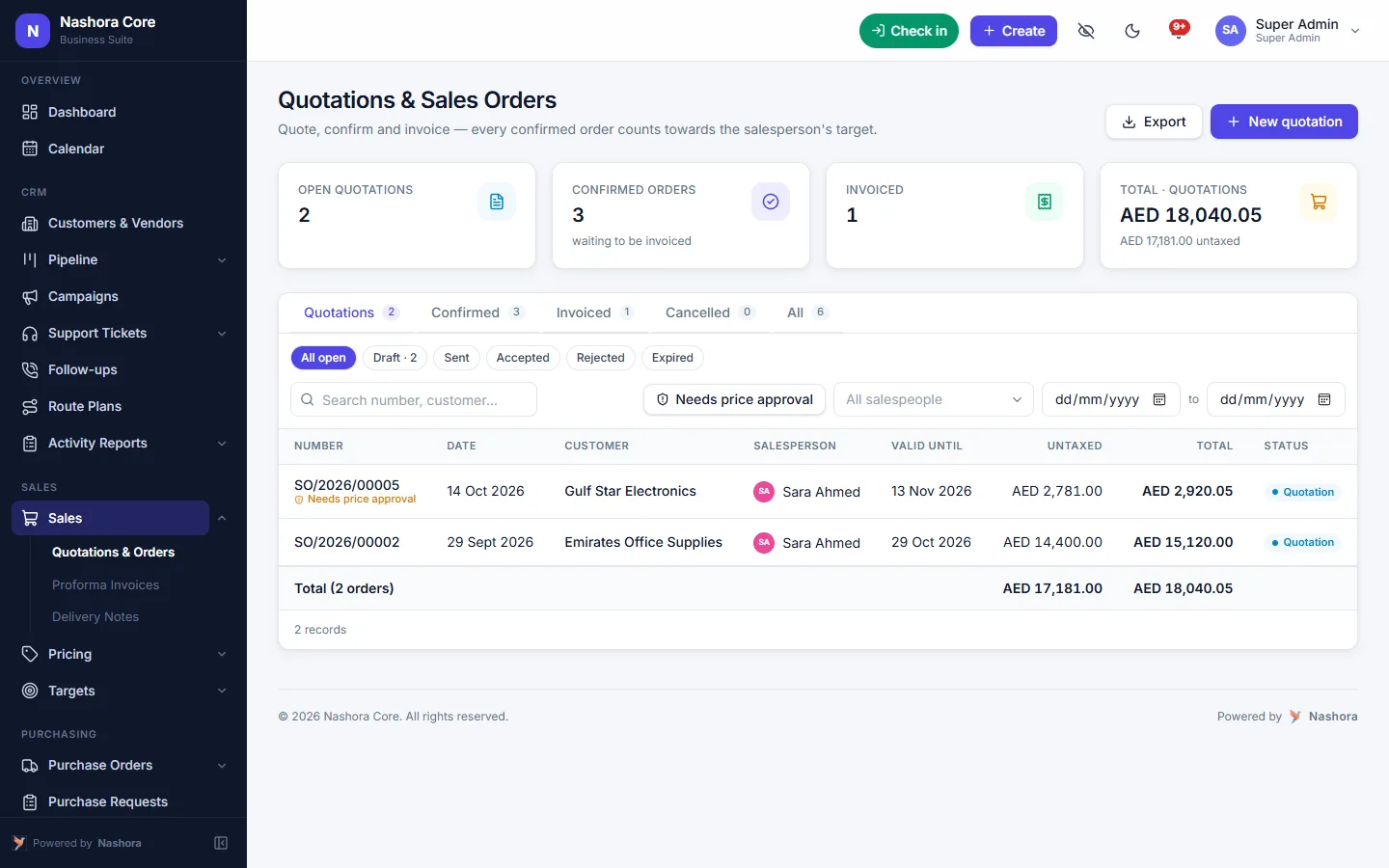
- Sales order software that takes an accepted quotation forward, including proforma invoices and delivery.
- Stock awareness, so you do not promise what the warehouse cannot deliver.
- VAT invoices and receipts that post to the books.
- Targets and reports that everyone can see without a spreadsheet.
The sales process, stage by stage
The table below shows the path of a typical sale in Nashora, and what the system keeps at each step. If a stage in your business has no record at all today, that is where deals leak.
| Stage | What happens | What the system records |
|---|---|---|
| 1. Enquiry | A lead arrives from your website form, the API or a salesperson entering it by hand | Lead with source, owner (via assignment rules) and date |
| 2. Qualify and follow up | Calls, visits and reminders; field staff work from route plans | Activities, follow-up dates, calendar entries and visit reports |
| 3. Pipeline | The lead moves across stages as the deal firms up | Stage, probability, expected and weighted value |
| 4. Quotation | Prices come from the customer's price list; below-cost checks run | Quotation versions, who prepared it, e-mail sent |
| 5. Approval | Discounts or large amounts go to a manager when rules say so | Approval request, approver and decision |
| 6. Sales order | The accepted quotation becomes an order; a proforma invoice is issued if the customer pays in advance | Order, proforma, links back to the quotation |
| 7. Pick, pack, deliver | Pick list and packing, then a delivery note in full or in parts | Delivery notes; stock reduced in the warehouse that shipped |
| 8. Invoice | The invoice covers what was delivered, with UAE VAT on every line | Tax invoice, receivable, output VAT and journal entry |
| 9. Collect | The customer pays by transfer, cheque or post-dated cheque | Receipt against the invoice; receivable aging updates |
| 10. Review | The manager checks the pipeline, targets and margins | Dashboards, targets per person and team, profitability reports |
WhatsApp-driven selling: keep the chat, fix the record
Let us be realistic. In the UAE a large share of selling happens on WhatsApp. Customers prefer it, salespeople are fast on it, and no software will change that by decree. Trying to ban it usually makes a sales team hide things rather than record them.
The useful approach is to treat WhatsApp as a door, not a filing cabinet. The conversation can start there, but the lead, the quotation and the follow-up should live in the system, where somebody other than the salesperson can see them. In practice that means a few habits.
- Every enquiry becomes a lead the same day. It takes a minute, and it gives the deal an owner.
- Prices come from the quotation, not from memory. A figure typed in a chat has no version history and no margin check.
- Agreements are logged as activities. "Customer agreed verbally, waiting for LPO" is a note anyone can read.
- The next step has a date. A follow-up with a date appears on the shared calendar. A promise to "get back tomorrow" does not.
To be clear about what we claim: Nashora runs in the browser, so a salesperson can update a lead from a phone, and it offers webhooks for your mail and phone systems. We are not describing a WhatsApp integration here. The point is that the sale stops depending on one person's chat history.
Price lists and pricing rules per customer
Almost every UAE trader has more than one price for the same item: a retail price, a wholesale price, a special price for the big customer who has been buying for years, and perhaps another in dollars for an export customer. Keeping those in a spreadsheet and hoping salespeople pick the right column is how margins quietly disappear.
Nashora supports price lists per customer, branch and currency, plus pricing rules, discounts and market prices. Margin targets and below-cost checks sit on top. When a price changes, it can go through approval, and you can see the price-change impact before you publish it, which is helpful when a supplier raises costs and you want to know which customers are affected.
Why this matters more than it looks
A quotation built from the right price list is consistent. Two salespeople quoting the same customer produce the same number. A customer who compares quotes will notice if you do not, and the one who notices usually asks for the lower figure.
Approvals and margin checks
Every sales manager has the same wish: to say yes to the big deal quickly, without losing money on it. Approvals and margin checks make that possible without the manager reading every quotation.
The margin check flags a quotation line priced below cost. Quotations can be sent for approval, and approval limits by amount mean small deals go through while larger ones wait for the right person. Because freight and customs are added to product cost as landed costs, the "cost" in that check is the real one, not the supplier's invoice price. Choose average cost or FIFO, and agree it with your accountant first.
A word of caution: approvals only help if they are quick. If a manager sits on requests for two days, the salesperson will go back to WhatsApp and quote from memory. Decide who approves, and who covers when they are out.
Pipeline vs orders: two different questions
The pipeline answers "what might I sell?". The order book answers "what have I promised?". Mixing them is a common mistake and it makes forecasts useless.
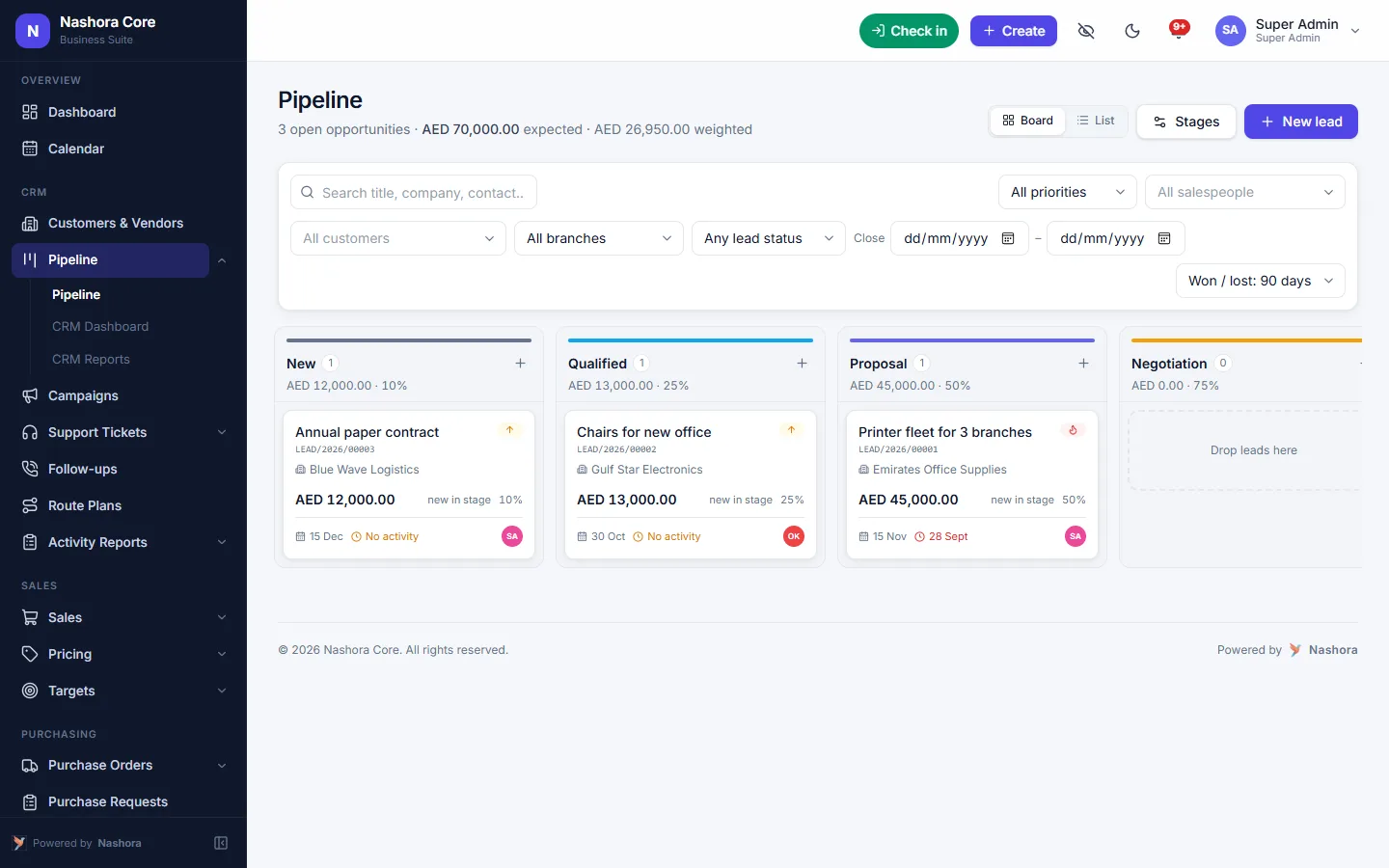
In Nashora the pipeline board holds leads, with each stage carrying a probability, so you see expected and weighted value. Once the customer accepts, the quotation becomes a sales order, and from that point the question is delivery and invoicing, not selling. Keep the two views separate: a manager reviewing the pipeline asks which deals are stuck, and a manager reviewing orders asks which are late or unpaid.
The CRM dashboard shows open pipeline by stage, weighted value, win rate, leads nobody owns and overdue follow-ups, by period, salesperson, team, source or branch. Click any number and the leads behind it open.
Who owns follow-ups
Quotations rarely die from a "no". They die from silence. Nobody follows up, the customer buys from whoever did, and the loss never appears in a report.
The fix is ownership and visibility. Assignment rules decide which salesperson or team gets each new lead. Follow-ups and activities go on the shared calendar. The dashboard then shows overdue follow-ups and leads with no owner, so the sales manager does not need to ask "anything pending?" on Monday morning. That is a better conversation than hunting for numbers.
For field teams, route plans say where each person is going today, and activity reports capture what happened at every visit. Roles can limit a salesperson to their own leads and a branch manager to their branch, while the owner sees everything.
Sales targets and reporting
Targets set per person and per team, and tracked live, change the monthly sales meeting. Instead of an hour spent collecting figures, you spend it deciding what to do about the gap. Beyond targets, three reports are worth looking at regularly:
- Profitability by product, customer and branch, because revenue without margin is a vanity figure.
- Receivable aging, because a sale is not finished until the cash arrives.
- Win rate and lead source, to see where enquiries come from and which ones close.
All reports export to Excel and PDF, so your finance team can keep working in the format it likes.
How a sales system connects to stock and accounting
This is where a stand-alone CRM runs out of road. Selling is only useful if you can deliver, and only profitable if the invoice is right and gets paid.
Stock
The delivery note reduces stock in the warehouse it ships from, by lot or serial number where you track them, and partial deliveries are fine. Reorder planning, backorders and low-stock alerts tell the buying side what to order. For more on this, see our guide to an inventory and sales system in the UAE, and the explanation of a stock-aware CRM.
Accounting
The invoice carries VAT on every line and posts its own journal to sales, receivables and output VAT. The receipt clears the receivable, and the VAT 201 return is prepared from invoices already in the system. Your accountant does not enter the sale a second time. We cover that side in accounting and CRM software for the UAE and on the accounting and VAT page.
Sales system compared: Nashora vs spreadsheets vs separate apps
| Task | Nashora | Spreadsheets | Separate apps |
|---|---|---|---|
| Capture a new lead | Web form or API, with assignment rules | Typed in by hand | In the CRM app |
| Pipeline and weighted value | Stages with probabilities | Manual formulas | In the CRM, not linked to stock |
| Price per customer | Price lists per customer, branch and currency | A column per price, easy to misread | Depends on the app |
| Below-cost warning | Margin checks on quotations | Noticed after the sale | Often missing |
| Quotation versions and approval | Versions, approval and e-mail | Files saved as final_v3 | In some quoting tools |
| Quotation to order | Accepted quotation becomes the order | Retyped into a new sheet | Retyped or synced |
| Delivery and stock | Delivery note reduces stock | Stock sheet updated later | Only if the integration works |
| VAT invoice | Posts to the books automatically | Re-entered by the accountant | Needs a link to accounting |
| Follow-up reminders | Shared calendar, overdue list on the dashboard | Personal notes and memory | In the CRM app |
| Field visits | Route plans and activity reports | Paper or chat messages | In some CRM apps |
| Sales targets | Per person and team, tracked live | Updated by hand each month | In the CRM only |
| Who sees what | Own, team, branch or all, by role | Whole file shared | Set up in each app |
How to set up a sales system, step by step
- Write down your real sales stages. Use the words your team uses, then map them to pipeline stages with a probability each.
- Import customers and products from Excel. Clean the lists first, then import them together with opening balances.
- Build your price lists. Start with the two or three that matter most, such as retail, wholesale and a key customer.
- Set margin targets and approval rules. Decide the discount a salesperson can give alone, and who approves the rest.
- Connect lead sources. Point your website form at the CRM and set assignment rules so every lead has an owner.
- Set roles and targets. Limit people to what they need to see, then enter targets per person and team.
- Run one live deal through every stage. From lead to receipt, and check stock, receivables and VAT moved correctly.
- Train the team and review weekly. Use the dashboard in the weekly sales meeting from the first week.
Benefits
One view of every customer
Customer 360 shows sales, open orders, pipeline and the products each customer has bought, so whoever picks up the phone has the full history.
Fewer missed follow-ups
Overdue follow-ups and unowned leads are visible by salesperson, team, source or branch, with one click to reassign.
Margins that hold
Price lists and below-cost checks keep quotations consistent, and landed costs keep the cost side honest.
A faster route to cash
Proforma invoices for advance payment, delivery notes, invoices and receipts all follow from the same order, so nothing is retyped or forgotten.
Use cases by business type
Trading and distribution
Different prices per customer, orders delivered in drops and customers on credit: price lists, partial deliveries and receivable aging in one system.
Wholesale and retail with warehouses
Quotations that respect what each warehouse actually holds, with transfers between locations.
Field sales teams
Route plans, visit reports and live targets, with updates from a phone between appointments.
Businesses with dated or serialised goods
Lots with expiry dates and serial numbers, so a quotation reflects stock that can really be sold.
Everyday applications
These scenarios are illustrative rather than real customer stories.
The repeat order on WhatsApp. A customer messages "same as last month". The salesperson opens Customer 360, sees the products bought, and raises a quotation from the customer's price list in a couple of minutes.
The discount request. Picture a sales executive in Sharjah asking for 12% off a large order. The margin check shows it is below cost on two lines. The request goes to the manager, who approves one line and adjusts the other.
The cold quotation. On Monday the dashboard shows three quotations with overdue follow-ups. Each has an owner and a date, so the manager reassigns one, and the salesperson calls the other two before lunch.
Why it is easier to get started
Nashora is browser-based, so there is nothing to install. We configure your company, VAT, users and roles, help you import customers, vendors, products and opening balances from Excel, and give each team short training. Help mode explains every screen, and the tutorial walks new users through examples. Most companies go live within days to a few weeks, and the FAQ covers setup, data and pricing questions.
On plans: accounting, VAT and invoices start in Starter, while CRM, quotations, purchasing and full inventory come with the Business plan. See the pricing page for the figures, which exclude 5% VAT.
Serving businesses across the UAE
Sales teams in Dubai, Sharjah, Abu Dhabi, Ajman, Ras Al Khaimah, Fujairah, Umm Al Quwain and Al Ain work with the same paperwork: VAT invoices with the customer's TRN, proforma invoices for advance payments and, for many traders, post-dated cheques. Nashora applies UAE VAT on every line, prepares the VAT 201 return by the selling branch's emirate and keeps post-dated cheques in the accounts. Whether a company is mainland or in a free zone, each one has its own TRN and its own books, so groups run them as separate companies inside one Nashora, with one login. UAE corporate tax at 9% is another reason to see real margins by product and customer. If your growth also means hiring, the same company file covers HR and WPS payroll. The complete module list is on the features page.
What to do next
- Write down your sales stages and where each enquiry currently gets recorded.
- List your price lists, and which customers get which.
- Decide the discount level a salesperson may give without asking, and who approves beyond it.
- Name the owner of every open quotation, with a date for the next follow-up.
- Book a free CRM demo and bring a real quotation, or talk to us first.