
CRM software for UAE businesses, with sales & inventory in one place
From the first call to the delivered order and the paid invoice — with stock updated at every step.
What is CRM and inventory software?
CRM and inventory software is one system that tracks your customers and sales — leads, follow-ups, quotations and orders — together with the stock you sell in every warehouse. In Nashora, each delivery note reduces stock and each invoice carries UAE VAT and posts to the books, so sales, stock and accounts always agree.
A pipeline your team actually uses
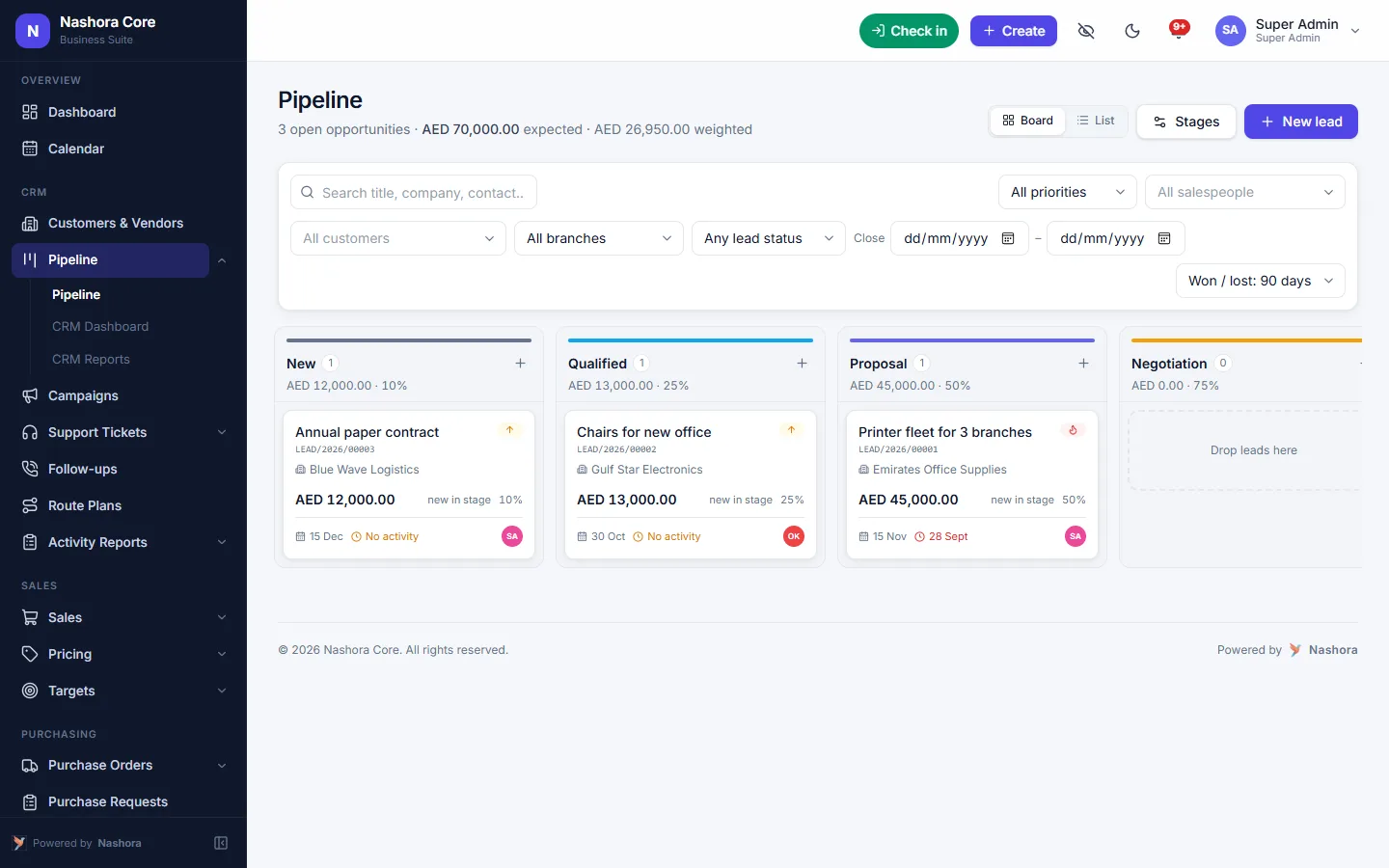
Drag leads across stages, schedule follow-ups and see the expected and weighted value of every deal.
- Leads, stages and probabilities
- Follow-ups, activities and shared calendar
- Route plans and activity reports for field sales
- Targets per salesperson, tracked live
- Campaigns and support tickets with SLA timers
Quotation to cash
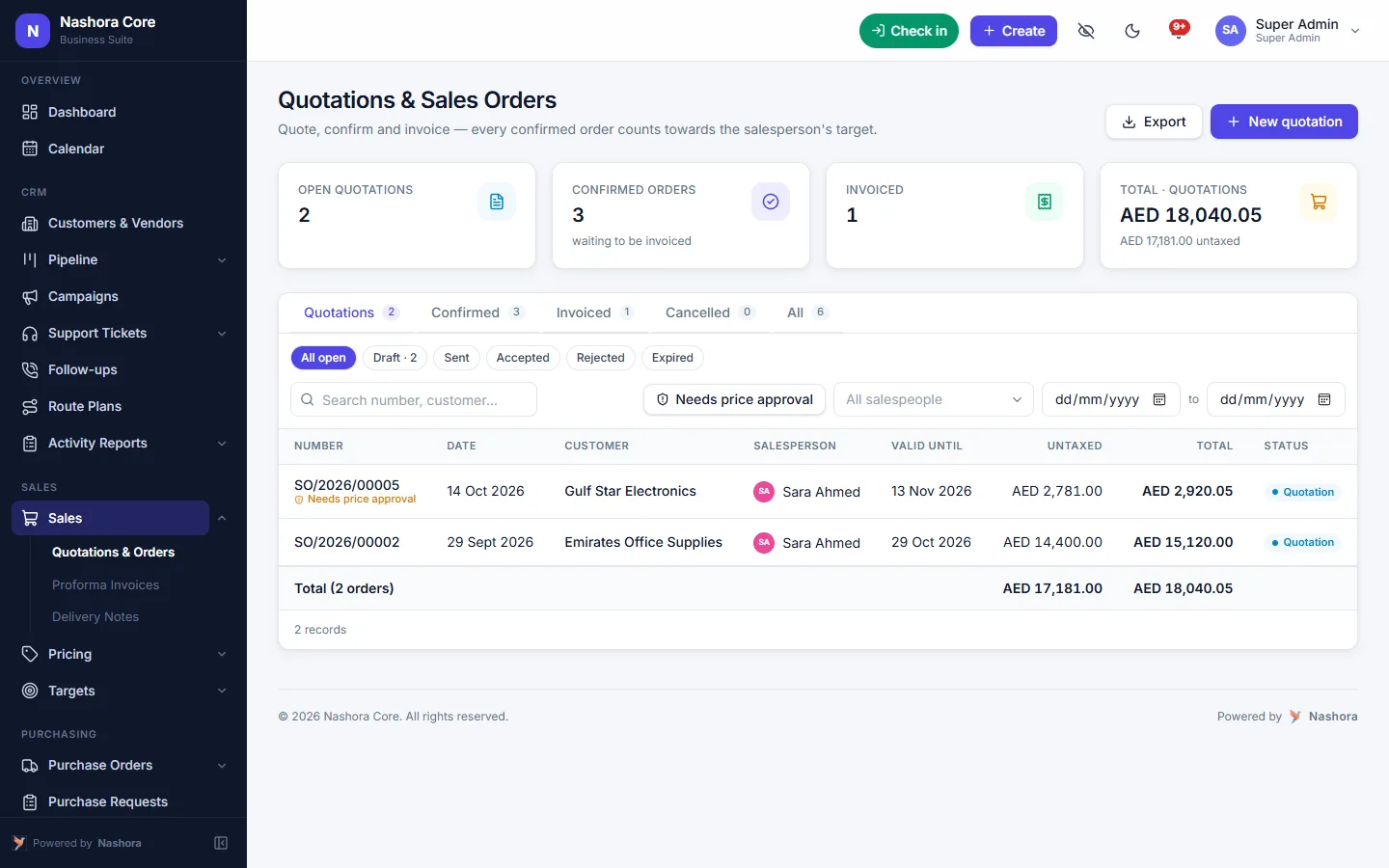
Turn a quotation into an order, send a proforma, deliver in full or in parts, and invoice what was delivered.
- Quotations with versions, approval and e-mail
- Price lists, pricing rules and below-cost checks
- Proforma invoices for advance payment
- Pick lists, packing and delivery notes that reduce stock
- Invoices with VAT and receipts
Stock you can trust
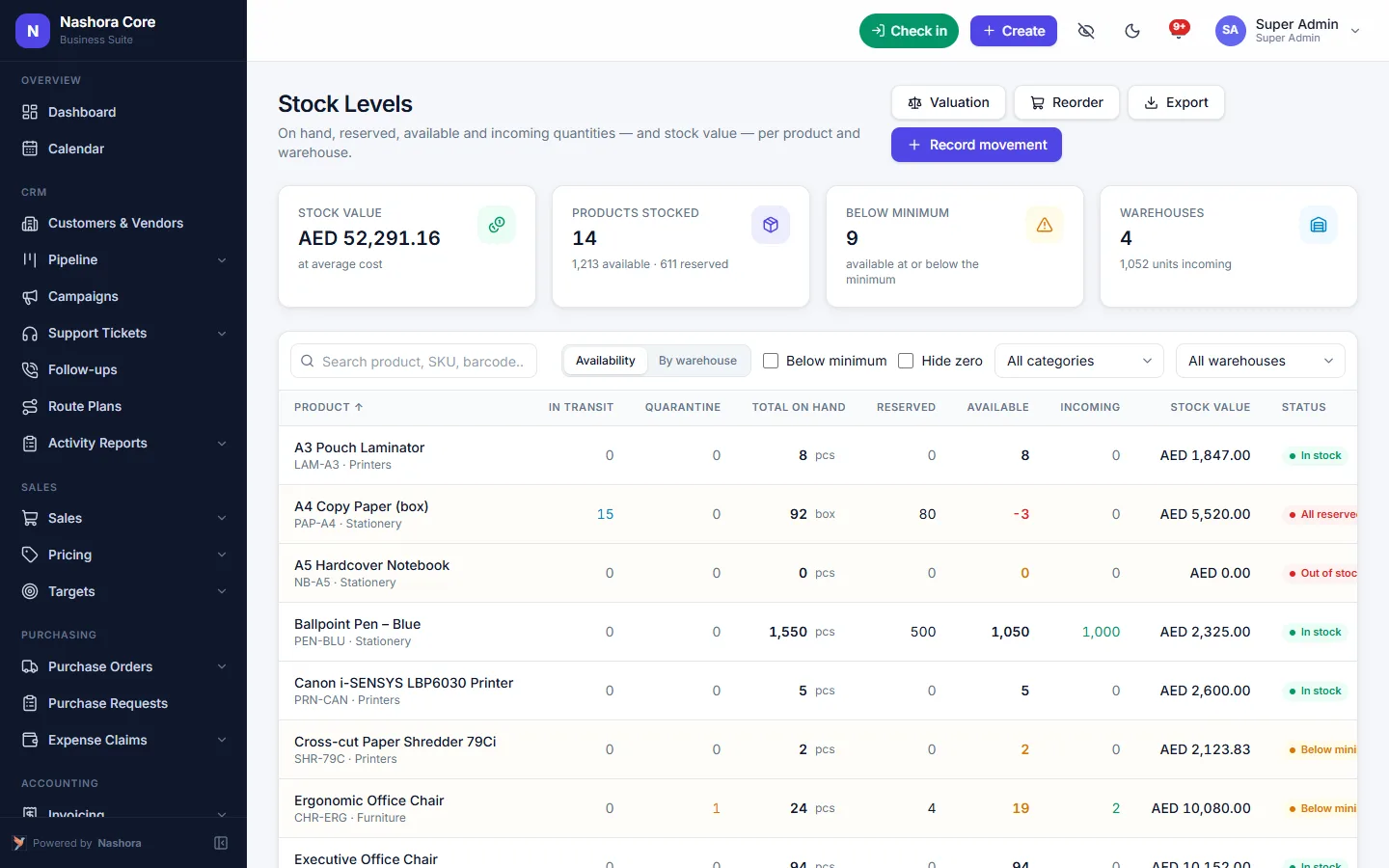
Every delivery and goods receipt moves stock automatically, across as many warehouses as you need.
- Products, categories and units
- Multiple warehouses, bins and transfers
- Lots, expiry dates and serial numbers
- Landed costs, average cost or FIFO
- Reorder planning, stocktakes and cycle counts
- Stock valuation in the books
What to look for in CRM software in the UAE
Most sales teams here start the same way: a spreadsheet of leads, a WhatsApp group for quotations and a separate stock sheet that someone promises to update later. It holds together until a salesperson promises 200 cartons that are already reserved for another customer, or a quotation goes cold because nobody owned the follow-up.
Good CRM software for a UAE business has to do more than store phone numbers. It should carry a lead all the way to a delivered order and a VAT invoice, and it should know what is sitting in each warehouse while it does that. That is how Nashora is built. The pipeline, the sales documents and the stock records live in one system and share the same customers and products, so nobody retypes an order between apps. You can see every module on the Nashora features page.
Ask three questions of any system you look at. Can it turn a quotation into an order and a delivery without copying data? Does each delivery move stock in the right warehouse? And do invoices land in the accounts with VAT already worked out? If the answer to any of these is "with an export", you will still be reconciling by hand at month end.
From lead to delivery in Nashora
Here is how a typical sale moves through the system, one document at a time.
- Capture the lead. Leads arrive from your website form or through the API, or your team adds them by hand. Assignment rules decide which salesperson gets each one.
- Work the pipeline. Drag the lead across stages on the pipeline board. Each stage carries a probability, so you see the expected and weighted value of every deal.
- Follow up. Calls, visits and reminders go on the shared calendar. Field staff work from route plans and file activity reports after each visit.
- Send the quotation. Build it from your price lists, keep each version, send it for approval when needed and e-mail it to the customer. Below-cost checks flag a price that would lose money.
- Confirm the sales order. The accepted quotation becomes a sales order. If the customer pays in advance, issue a proforma invoice against it.
- Pick, pack and deliver. Pick lists and packing come next, then the delivery note. Deliver in full or in parts — each delivery note reduces stock in the warehouse it ships from.
- Invoice what was delivered. The customer invoice carries UAE VAT on every line, and the receipt is recorded against it when the customer pays.
- Stock and accounts update. Stock, receivables and VAT are updated by those same documents, so your accountant does not enter the sale a second time.
Benefits
One view of every customer
Customer 360° shows sales, open orders, pipeline and the products each customer has bought. Whoever picks up the phone sees the full history instead of shouting across the office for it.
Fewer missed follow-ups
The CRM dashboard shows overdue follow-ups and leads nobody owns, by salesperson, team, source or branch. Click any number and the leads behind it open, ready to reassign.
Targets everyone can see
Set sales targets per person and per team and track them live. The monthly sales meeting becomes a talk about what to do next rather than an hour of collecting figures.
Margins you can believe
Freight and customs are added to product cost as landed costs, and you choose average cost or FIFO. Profitability reports by product, customer and branch then work from what the goods really cost you.
Purchasing that feeds the warehouse
Purchase requests become orders after approval, goods received notes put stock on the shelf, and the vendor bill is matched to what was ordered and received. Reorder planning, backorders and low-stock alerts tell you what to buy next.
Stock that matches the books
Stock valuation is reconciled to the books, so the warehouse figure and the balance sheet figure are the same number. Invoices, VAT and stock value post straight to the ledger in Nashora accounting and VAT, ready for your VAT 201 return.
Who it's for
Trading and distribution companies
Traders and distributors in Dubai, Sharjah and across the Emirates deal with different prices for different customers, orders delivered in several drops and customers on credit. Nashora covers price lists per customer, branch and currency, partial deliveries against one order and receivable aging in one place.
Retail with warehouses
If you keep stock in more than one location, multiple warehouses, bins and transfers keep each location's quantity accurate. Cycle counts let you check part of your stock at a time, with full stocktakes when you need them.
Field sales teams
Route plans tell each salesperson where to go today, and activity reports show what happened at each visit. Because Nashora runs in the browser, they can update a lead from a phone between appointments.
Products with batches and expiry dates
Food, personal care and other products with a shelf life can be tracked by lot with expiry dates. Expiry reports show what is close to its date in each warehouse, so you can move it first or set it aside.
Spare parts and equipment with serial numbers
Serial numbers follow each unit from the goods received note to the delivery note. When a customer calls about a specific machine, you can trace which unit they received.
Why it's easier to get started
Nashora runs in the web browser on desktop, tablet and phone, so there is nothing to install. We set up your company, VAT, users and roles, import customers, vendors, products and opening balances from Excel, and give each team short training. Help mode explains every screen, and a step-by-step tutorial walks new users through examples.
Roles control who sees what. A salesperson can be limited to their own leads and a branch manager to their branch, while the owner sees everything. Most companies go live within days to a few weeks, and the Nashora FAQ answers common questions about setup, data and pricing.
Sales is rarely the only system a business needs. The same company file also runs HR and WPS payroll in Nashora, so the office, the warehouse and the payroll run all work from one system. To see your own sales process in it, request a CRM and inventory demo.
Nashora vs spreadsheets vs separate CRM and inventory apps
Most growing businesses run sales in one of two ways: everything in Excel, or a CRM app on one side and a stock app on the other. Here is how the daily work compares.
| Task | Nashora | Spreadsheets | Separate CRM + inventory apps |
|---|---|---|---|
| Leads from your website | Arrive from the web form or API, with assignment rules | Copied in by hand | In the CRM app only |
| Pipeline and weighted value | Pipeline board with stages and probabilities | Manual formulas | In the CRM, not linked to stock |
| Quotation to sales order | The accepted quotation becomes the order | Retyped into a new sheet | Retyped or synced between apps |
| Proforma invoice | Issued from the sales order | Made in a separate template | Depends on the app |
| Stock reduced on delivery | Delivery note moves stock in that warehouse | Someone updates the sheet later | Only if the integration works |
| Partial deliveries | Several delivery notes against one order | Tracked in comments | Often limited |
| Multiple warehouses and transfers | Warehouses, bins and transfers built in | One tab per warehouse | In the inventory app |
| Lots, expiry dates and serial numbers | Tracked per warehouse and bin | Extra columns, easy to miss | In some inventory apps |
| Landed cost | Freight and customs added to product cost | Worked out on the side | Often missing |
| VAT invoice and the books | Invoice with VAT posts to the accounts | Re-entered by the accountant | Needs a link to accounting software |
| Sales targets | Per person and team, tracked live | Updated by hand each month | In the CRM only |
| Who sees what | Own, team, branch or all records, per role | Whole file shared | Set up separately in each app |
| Feature | What it saves you |
|---|---|
| Below-cost checks on quotations | Finding out after the sale that a discount lost money |
| Proforma invoices | A separate Word template for every advance payment |
| Low-stock alerts and reorder planning | Learning a product is out when a customer asks for it |
| Expiry reports | Writing off stock that passed its date unnoticed |
| Stock valuation reconciled to the books | A month-end argument between the warehouse and accounts |
Frequently asked questions about CRM and inventory software
What is CRM software and why do UAE businesses use it?
CRM software keeps every lead, customer, follow-up and quotation in one place, so deals don't depend on one person's phone or notebook. UAE businesses use it to stop losing quotations in WhatsApp chats and to see the whole pipeline. Nashora adds sales orders, delivery notes, stock and VAT invoices to the same system.
Can Nashora manage inventory across several warehouses?
Yes. You can set up as many warehouses as you need, divide them into bins and move stock between them with transfers. Every delivery note and goods received note updates the quantity in the right warehouse, and stocktakes and cycle counts let you check the figures whenever you want.
How do I turn a quotation into a sales order and a delivery?
Once the customer accepts the quotation, it becomes a sales order. From the order you create pick lists and packing, then a delivery note that reduces stock. Finally you invoice what was delivered, with VAT on every line, and record the receipt when the customer pays.
Can I issue a proforma invoice before delivery?
Yes. Nashora produces proforma invoices from the sales order for customers who pay in advance. The goods are then delivered and invoiced as normal, so the proforma, the delivery note and the final tax invoice all link back to the same order.
Does Nashora support partial deliveries?
Yes. You can deliver an order in full or in several parts, with a separate delivery note for each drop. Each delivery note reduces stock for the quantity actually shipped, and you invoice what was delivered rather than what was ordered.
Can I track batch numbers, expiry dates and serial numbers?
Yes. Products can be tracked by lot with expiry dates or by serial number, across warehouses and bins. Expiry reports show which batches are close to their date, which helps businesses selling food, personal care and other products with a shelf life.
How does Nashora work out the cost of my stock?
You choose average cost or FIFO. Freight, customs and similar charges can be added as landed costs, so they become part of the product cost. Stock valuation is reconciled to the books, and profitability reports by product, customer and branch use those real costs.
Can field sales staff use Nashora on their phones?
Yes. Nashora runs in the web browser on desktop, tablet and phone, with nothing to install. Field teams can follow their route plans, log activity reports after each visit and update leads and follow-ups while they are out.
Can leads from my website go straight into the CRM?
Yes. Leads can come in from your website form or through the API, and assignment rules decide which salesperson or team receives each one. The CRM dashboard also shows leads nobody owns, so new enquiries don't sit unanswered.
Do sales invoices and stock values post to the accounts automatically?
Yes. A sale updates stock, receivables and VAT from the same documents, and stock valuation is reconciled to the books. Your accountant works from the same figures the sales team sees, and the VAT return is prepared from the invoices already in the system.
Can I import my existing customers and products from Excel?
Yes. Customers, vendors, products and opening balances can be imported from Excel, and our team can help with the import during setup. Most companies go live within days to a few weeks, depending on the modules and the amount of data.
Is Nashora suitable for trading and distribution companies in Dubai and Sharjah?
Yes. Nashora includes what trading and distribution businesses rely on: price lists per customer, branch and currency, partial deliveries, multi-warehouse stock, landed costs and receivable aging. Purchasing with approvals, goods received notes and three-way matching is part of the same system.
See Nashora with your own workflow
Book a free 30-minute online demo. We'll walk through the modules you need and answer your questions — no obligation.