

PostgreSQL maintenance tool: look after every database from one desk
PGGuard is a Windows app that shows your databases' health live, finds and fixes bloat, runs maintenance plans, and takes backups — with automatic copies to Google Drive.
- Windows 10 & 11
- PostgreSQL 9.2 and newer
- Nothing else to install
What is a PostgreSQL maintenance tool?
A PostgreSQL maintenance tool keeps a database fast and recoverable. It checks health, finds table bloat and dead rows, runs VACUUM, ANALYZE and index rebuilds, and takes backups you can restore. PGGuard does all of this from one Windows app, across every PostgreSQL server you manage.
Everything a database needs, in one console
Monitor, maintain, back up and restore — without remembering a single command.
Live health overview
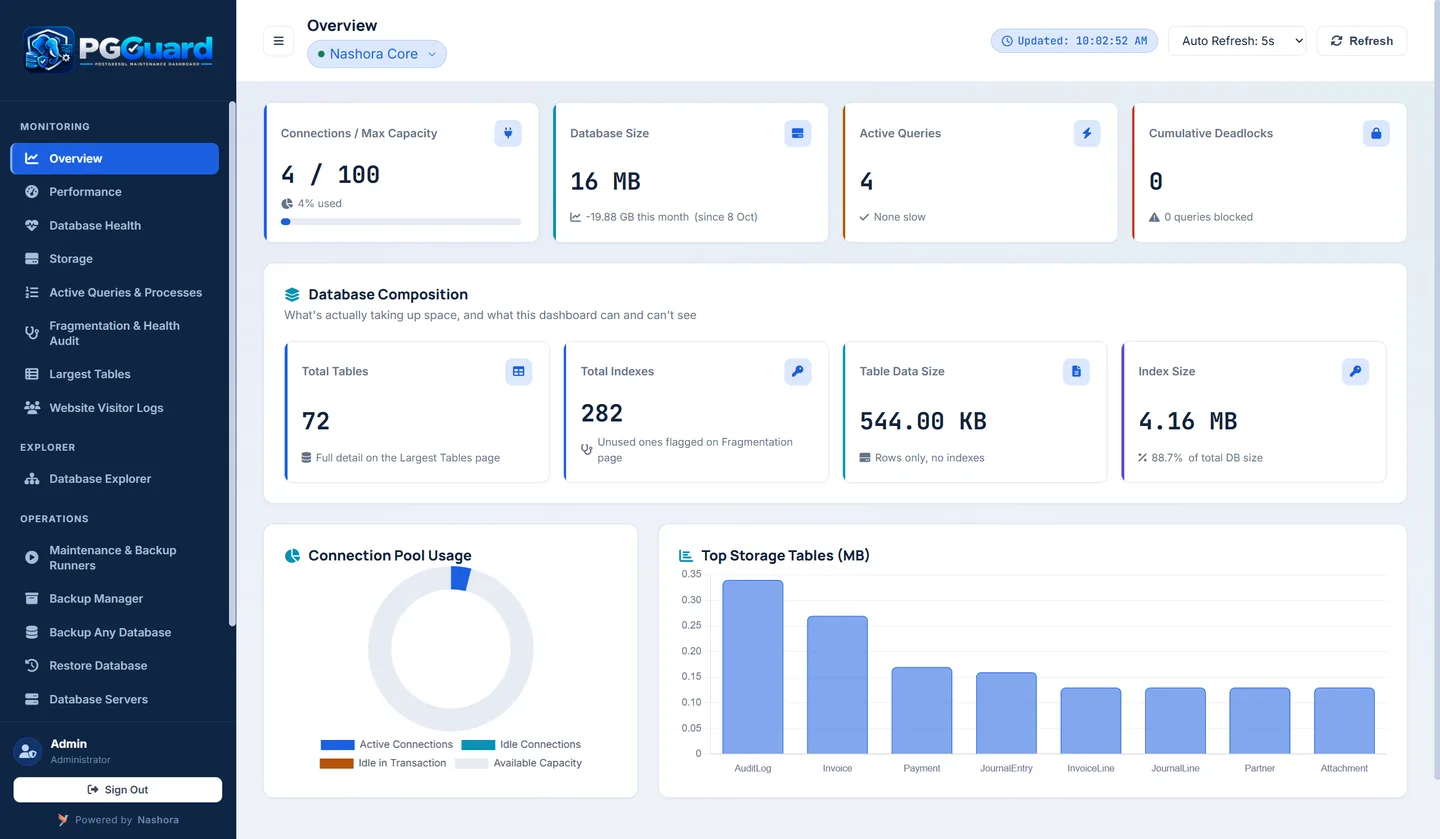
Connections against the maximum, database size and its growth, active queries, deadlocks, version and uptime — refreshed every few seconds.
Performance insight
Transactions and queries per second, cache hit ratio, and the slowest and most frequent queries.
Fix fragmentation (bloat)
See bloated tables, dead rows and unused indexes — then vacuum a table, vacuum all critical tables or drop unused indexes in one click.
Ready-made maintenance plans
Immediate, Weekly and Monthly plans that read your database first, so they work on any schema.
One-click backups
Compressed, plain SQL or schema-only backups, with a retention period that removes old files for you.
Google Drive sync
Every finished backup can be copied to your Google Drive automatically. PGGuard only sees the files it creates.
Safe restore
Restore any backup into the database you choose, on any server. You type the database name to confirm, so nothing is overwritten by mistake.
All your servers
Add as many PostgreSQL servers as you like, test the connection, and switch between them instantly.
Database Explorer
Browse tables, columns and functions and run SQL. Read-only queries run straight away; anything that changes data asks first.
Maintenance plans that do the right thing
Pick a plan, press Run, and watch the output in a live console. The app stays responsive while it works.
Quick wins
- Adds missing indexes on foreign keys
- Makes autovacuum run more often on busy tables
- Refreshes out-of-date statistics
Keep it clean
- VACUUM ANALYZE on tables with many dead rows
- Rebuilds indexes of the worst tables without locking
- A bloat report you can keep
Deep clean
- VACUUM FULL on badly bloated tables
- Finds unused indexes and out-of-sync sequences
- Full ANALYZE of the database
Built for teams, safe by design
Give each person the right access, and keep every password and backup on your own PC.
- Admin and User roles — users only see the servers you assign
- Account passwords stored hashed; data stays on your PC
- Backups, restores and maintenance run in a separate worker, and a cancelled backup never leaves a half-written file
- PostgreSQL tools (pg_dump, pg_restore, psql) are included
What you need
- Windows 10 or 11 (64-bit)Installs like any Windows program. No Python or PostgreSQL install needed on the PC.
- Access to your PostgreSQL serverVersion 9.2 or newer, reachable from the PC over your network.
- Internet connectionFor the dashboard's charts and for Google Drive backups.
Why PostgreSQL needs regular maintenance
PostgreSQL is reliable, but it is not maintenance-free. Every database that takes updates and deletes slowly collects leftovers, and if nobody looks after them, queries get slower and the files on disk keep growing. A good PostgreSQL maintenance tool shows you where that is happening and fixes it before your users notice.
Dead rows and table bloat
When PostgreSQL updates or deletes a row, it does not overwrite it straight away. The old version stays in the table as a "dead tuple" until VACUUM marks the space as free for reuse. That design lets readers and writers work at the same time, but it has a cost.
On a busy table, dead rows can pile up faster than they are cleaned. The table and its indexes grow larger than the live data needs. This is table bloat: more pages to read for the same result, more memory used for the same work, and backups that take longer than they should.
Stale statistics
The query planner decides how to run each query from statistics about your data, such as how many rows a table has and how values are spread. ANALYZE collects those statistics. After a large import or a heavy month of changes they go out of date, and the planner may pick a slow plan for a query that used to be fast.
Indexes that need attention
Indexes bloat too, and some are never used at all. An unused index still slows down every insert and update and takes up disk space. A missing index on a foreign key can make joins and deletes on the parent table much slower than they need to be. Rebuilding an index (what REINDEX does) gives you a compact copy again.
Where autovacuum fits
PostgreSQL has a background autovacuum process that runs VACUUM and ANALYZE for you. It helps a lot, but its default settings suit an average table, not your busiest one. On tables with heavy write traffic it can fall behind, which is why PGGuard's Immediate plan makes autovacuum run more often on busy tables.
How to set up a maintenance plan with PGGuard
You do not need to write scripts or remember VACUUM options. Here is how most teams get started:
- Install PGGuard on a Windows 10 or 11 (64-bit) PC. It installs like any Windows program, and pg_dump, pg_restore and psql are included.
- Add your PostgreSQL servers (version 9.2 or newer) and test each connection. Add as many as you manage.
- Read the health overview for each server: connections against the maximum, database size and growth, active queries, deadlocks and cache hit ratio.
- Open the bloat view to see bloated tables, dead rows and unused indexes. Vacuum a single table or all critical tables in one click if something stands out.
- Run the Immediate plan once. It adds missing foreign-key indexes, tunes autovacuum on busy tables and refreshes out-of-date statistics.
- Run the Weekly plan each week for VACUUM ANALYZE on tables with many dead rows, non-locking rebuilds of the worst indexes, and a bloat report you can keep.
- Run the Monthly plan at a quiet time. It runs VACUUM FULL on badly bloated tables, checks unused indexes and out-of-sync sequences, and runs a full ANALYZE.
- Set up backups: choose compressed, plain SQL or schema-only, set a retention period, and turn on the Google Drive copy.
Each plan reads your database first, so it works on any schema. You watch the output in a live console, and the app stays responsive while the plan runs.
Backups you can actually restore
A backup only matters on the day you restore it. PGGuard takes backups with PostgreSQL's own tools, and each finished file can be copied to your Google Drive automatically. That gives you an off-site copy without a separate sync job. PGGuard only sees the files it creates in your Drive.
Retention removes old backups for you, so the backup folder does not quietly fill the disk. Backups, restores and maintenance run in a separate worker, and a cancelled backup never leaves a half-written file that looks valid but isn't.
Restoring is just as careful. You can restore any backup into the database you choose, on any of your servers, which makes it easy to test a backup on a spare database. Before anything is overwritten, PGGuard asks you to type the database name to confirm.
Benefits of using PGGuard
One view of every server
Switch between servers instantly instead of opening a new session for each one. Problems like a connection count close to the limit or a growing deadlock count are visible at a glance.
Maintenance without the guesswork
The plans decide which tables need VACUUM, which indexes to rebuild and where statistics are stale. You get the result of an experienced DBA's routine without writing it yourself.
Fewer slow queries
The performance view lists the slowest and most frequent queries next to transactions per second and cache hit ratio, so you can see what is actually costing time.
Safer hands-on work
The Database Explorer runs read-only queries straight away and asks before anything that changes data. Admin and User roles mean each person only sees the servers you assign.
Your data stays with you
Server details and backups stay on your own PC, and PGGuard account passwords are stored hashed.
Who PGGuard is for
Small IT teams managing several servers
If two or three people look after a handful of PostgreSQL servers alongside everything else, PGGuard puts health checks, maintenance and backups in one place. Roles let you hand a server to a colleague without sharing the rest.
Software vendors whose customers run PostgreSQL on Windows
If your application ships with a PostgreSQL database on the customer's Windows machine, those databases rarely get proper care. PGGuard's plans read the schema first, so they suit whatever your application stores, and the Google Drive copy gives each site an off-site backup.
Businesses without a full-time DBA
Many companies run an important system on PostgreSQL but have no database specialist. PGGuard explains what needs attention and fixes it with a button, so a developer or IT admin can keep the database healthy.
Why PGGuard is easy to start with
There is no Python or PostgreSQL install on the PC and no command line to learn. When you buy, we help you install PGGuard and connect your first server, and your quote comes within one working day, priced by the number of PCs. Questions first? Contact the Nashora team or request a quote for PGGuard.
PGGuard is made by Nashora, the team behind Nashora ERP, our cloud business system for accounting, sales, inventory and payroll. You can read more about the company on the Nashora home page.
PGGuard vs manual scripts vs ad-hoc checks
How a dedicated PostgreSQL maintenance tool compares with home-made scripts run by Windows Task Scheduler, and with only looking when something breaks.
| Task | PGGuard | Manual scripts + Task Scheduler | Ad-hoc checks / nothing |
|---|---|---|---|
| Database health check | Live overview, refreshed every few seconds | Only what you query for | Noticed when users complain |
| Slow and frequent queries | Listed with TPS and cache hit ratio | Needs your own queries | Not tracked |
| Table bloat and dead rows | Shown per table, fixed in one click | Bloat queries you maintain | Found when disk fills up |
| Unused and missing indexes | Found by the plans | Possible with extra SQL | Rarely checked |
| VACUUM / ANALYZE / index rebuilds | Immediate, Weekly and Monthly plans | Scripts you write and test | Left to autovacuum defaults |
| Works on any schema | Plans read the database first | Often hard-coded table names | Not applicable |
| Backups | Compressed, plain SQL or schema-only | pg_dump batch file | Taken now and then |
| Off-site copy | Automatic Google Drive sync | Extra sync step to build | Usually none |
| Old backup clean-up | Retention period removes old files | Another script to write | Disk fills over time |
| Safe restore | Type the database name to confirm | pg_restore by hand | Untested until needed |
| Multiple servers and team access | All servers, Admin and User roles | One script set per server | Depends on one person |
Frequently asked questions about PGGuard
Short answers on PostgreSQL maintenance, backups and buying PGGuard. More general questions are on our Nashora FAQ page.
What is a PostgreSQL maintenance tool?
It is software that watches the health of your PostgreSQL databases and runs the housekeeping they need: VACUUM and ANALYZE, index rebuilds, bloat checks and backups. PGGuard does this from a Windows app, so you get the results without writing or remembering the SQL commands yourself.
Which Windows and PostgreSQL versions does PGGuard support?
PGGuard runs on Windows 10 or Windows 11 (64-bit) and works with PostgreSQL 9.2 and newer. The PostgreSQL server can be on another machine, as long as the PC running PGGuard can reach it over your network.
Do I need to install PostgreSQL or Python on the PC?
No. PGGuard installs like any other Windows program. The PostgreSQL tools it uses, pg_dump, pg_restore and psql, are included, so there is nothing else to install on the PC.
Can PGGuard manage several PostgreSQL servers?
Yes. You can add as many PostgreSQL servers as you like, test each connection when you add it, and switch between servers instantly. Admin users can assign servers to other users, who then see only the servers they were given.
How does PGGuard find and fix table bloat?
The bloat screen lists bloated tables, dead rows and unused indexes. From there you can vacuum a single table, vacuum all critical tables at once, or drop indexes that are never used. The Weekly plan also produces a bloat report you can keep.
What do the Immediate, Weekly and Monthly plans do?
Immediate adds missing indexes on foreign keys, makes autovacuum run more often on busy tables and refreshes out-of-date statistics. Weekly runs VACUUM ANALYZE where dead rows pile up and rebuilds the worst indexes without locking. Monthly runs VACUUM FULL on badly bloated tables and a full ANALYZE.
Will the maintenance plans work with my database schema?
Yes. Each plan reads your database first and decides what to do from what it finds, so it is not tied to a particular schema or application. You watch the output in a live console while it runs, and the app stays responsive.
Does VACUUM FULL lock my tables?
Yes. VACUUM FULL rewrites a table and holds an exclusive lock on it while it works, which is why PGGuard keeps it in the Monthly plan for badly bloated tables only. Run that plan at a quiet time when users are not writing to those tables.
How do Google Drive backups work in PGGuard?
Each finished backup can be copied to your Google Drive automatically. PGGuard only sees the files it creates in your Drive, not the rest of your files. Backups can be compressed, plain SQL or schema-only, and a retention period removes old files for you.
How do I restore a PostgreSQL backup safely?
Pick the backup and choose the target database on any server you have added. PGGuard asks you to type the database name to confirm before it restores, so nothing is overwritten by mistake. A cancelled backup never leaves a half-written file behind.
Is PGGuard part of Nashora ERP?
No. PGGuard is a separate Nashora product for anyone running PostgreSQL, whatever application sits on top of it. Nashora ERP is our cloud business system for accounting, VAT, sales, inventory, CRM, HR and payroll, and is sold separately.
How is PGGuard priced and how do I buy it?
PGGuard is priced by the number of PCs that need it. Send the purchase request form on this page or message us on WhatsApp, and we will send your quote within one working day. We also help you install PGGuard and connect your first server.
Prefer WhatsApp?
Send us a message and we'll reply with your quote and the installer.
Buy on WhatsApp- Quote within one working dayPriced by the number of PCs, with no surprises.
- Help to get startedWe help you install PGGuard and connect your first server.
- Or e-mail usnashoracore@gmail.com · +971 56 339 0265