
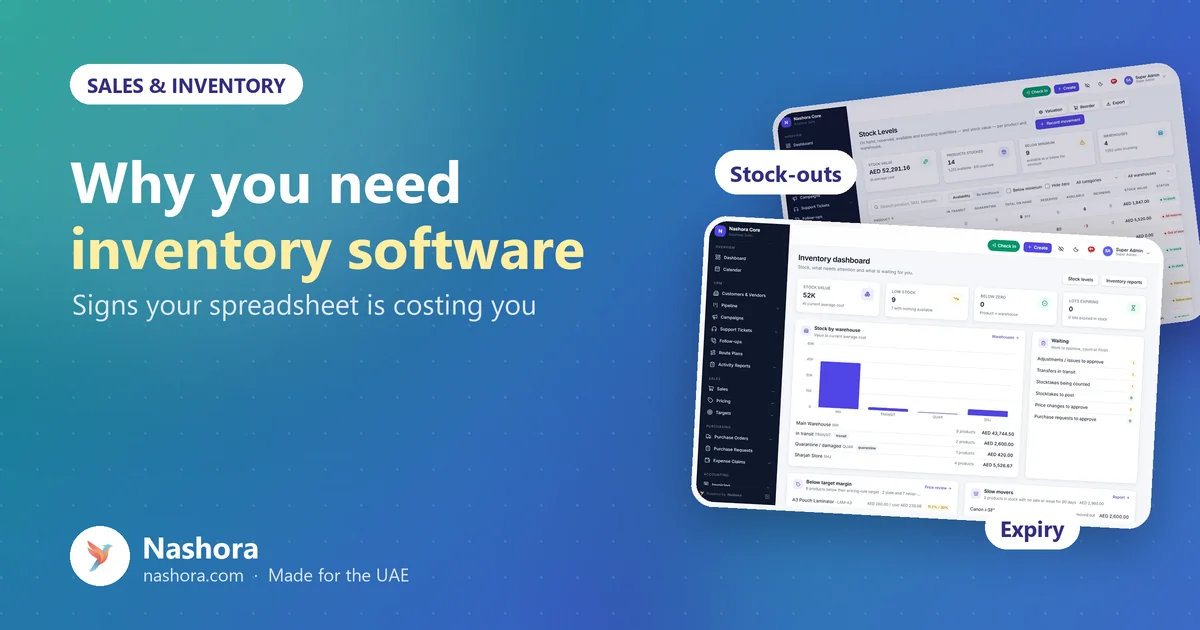
The stock sheet has five versions, and they are named "stock_final", "stock_final2", "stock_NEW" and so on. The storekeeper updates one, the salesman looks at another and the accountant has a third from the last stocktake. A customer asks for 100 units, somebody says "yes, we have it", and an hour later the warehouse says it does not. Everyone in the company knows this problem, and most of them have decided it is just how business works.
It is not. Inventory management software exists to replace those five files with one set of records that updates itself as stock arrives, moves and leaves. This guide explains what manual stock really costs, the signs that you have outgrown it, what to look for when you choose software, and how a system like Nashora connects stock to sales and accounts for UAE businesses.
What managing stock by hand really costs
Manual stock control rarely fails in one big way. It leaks money in five small ways, and because none of them shows up as a line on the profit and loss account, they are easy to ignore. The figures below are illustrative assumptions to show how the arithmetic works, not statistics about any business.
Stock-outs and lost sales
When a customer asks for something you have not got, you lose the sale and sometimes the customer. If a trading company misses 20 orders a month and each would have earned AED 300 profit, that is AED 6,000 a month, or AED 72,000 a year, that never appears in any report.
Overstock and dead stock
The opposite mistake costs just as much. Say AED 200,000 of slow stock sits in a warehouse. If the cost of cash tied up, rent, handling and insurance adds up to around 20% a year, the shelf is costing AED 40,000 a year, and the stock may still lose value.
Expiry and damage
For food, cosmetics and other dated goods, stock that nobody noticed becomes a write-off. One forgotten pallet of 40 cartons at a cost of AED 90 each is AED 3,600 gone, and that is a small pallet.
Shrinkage and theft
Goods that leave without paperwork, receiving errors and breakage all add up. On AED 400,000 of stock, a 2% loss is AED 8,000 a year, and without counts and records you will not know if the true figure is 2% or 6%.
Wrong stock valuation
If the stock figure in the accounts is built from an old sheet, profit is wrong too. If stock is overstated by 5% on AED 400,000, you are reporting AED 20,000 of profit that does not exist, and you may pay tax on it.
Signs you have outgrown the spreadsheet
Honestly, a spreadsheet is a perfectly good way to track stock when you have one small shop and a few dozen products. It stops being good in stages. Watch for these signs:
- There is more than one version of the stock file, or more than one person edits it.
- You tell customers an item is in stock and then find out it is not.
- You cannot say what your stock is worth today without a day of work.
- You hold stock in more than one place: two warehouses, a shop, vans or goods in transit.
- Products have expiry dates or serial numbers that someone has to remember.
- You reorder when somebody sees an empty shelf rather than when a report says so.
- The warehouse and the accountant disagree at month end, and finding the difference takes days.
- Staff spend a real part of the day looking for things or answering "do we have it?"
One or two of these is normal. Four or five means the cost of the spreadsheet is higher than the cost of software. Our article on Excel vs ERP software looks at the same decision from the accounting side.
What inventory management software does, day by day
Inventory management software keeps one record of every product, in every location, and updates it from the documents that move stock. In practice a day looks like this:
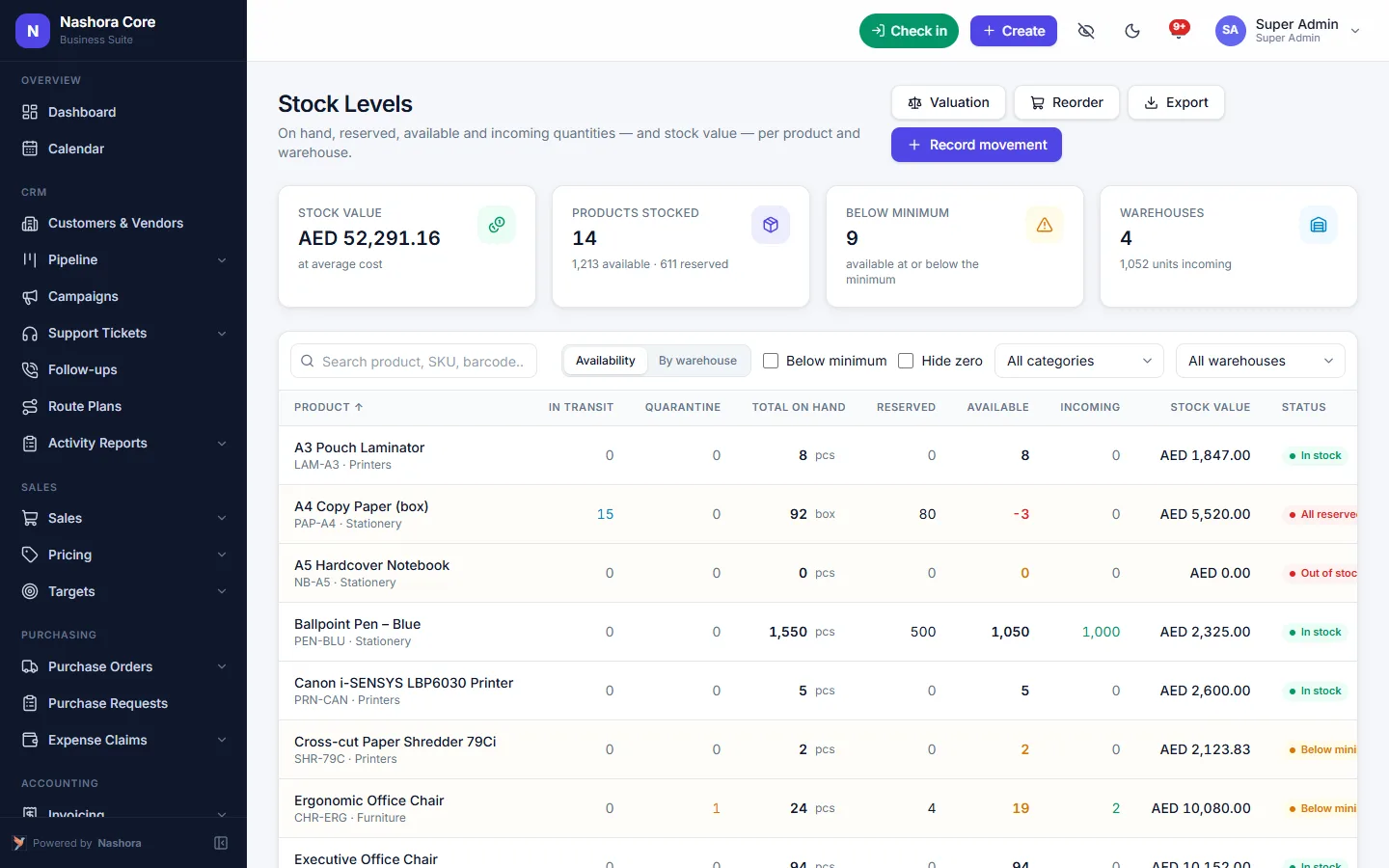
- Stock arrives. The goods received note, matched to the purchase order, adds quantities to the right warehouse.
- Stock is stored. Each item sits in a warehouse and bin, with lot, expiry or serial numbers where it matters.
- A sale is made. The salesperson sees what is available before promising it.
- Stock leaves. A delivery note reduces stock in the warehouse it ships from, by full or partial delivery.
- The system flags what is short. Low-stock alerts, backorders and reorder planning show what to buy.
- Counts and valuation keep it honest. Cycle counts and stocktakes correct differences, and the valuation is reconciled to the books.
Nobody retypes anything and nobody has to remember to update the sheet. Your stock figure is as current as the last document, not the last time someone opened a file.
Manual stock vs software vs separate apps
Three ways of running stock are common: a spreadsheet, a stand-alone inventory app and an ERP where stock shares its database with sales and accounts. Here is how they compare on the daily work.
| Task | Nashora | Spreadsheets | Separate inventory app |
|---|---|---|---|
| Stock updated on receipt | Goods received note adds stock in the warehouse | Someone types it in later | Yes, within that app |
| Stock reduced on sale | Delivery note reduces stock in its warehouse | Updated by hand, if at all | Only if linked to sales |
| Several warehouses and bins | Warehouses, bins and transfers built in | One tab per location | Usually yes |
| Batch, expiry and serial numbers | Lots, expiry dates and serial numbers; expiry reports | Extra columns, easy to miss | In some apps |
| Reorder alerts | Reorder planning, backorders and low-stock alerts | Remembered, or not | Yes, but sales may not see them |
| Stock counts | Stocktakes and cycle counts | Printed sheet and retyping | Usually yes |
| Landed cost | Freight and customs added to product cost | Worked out on the side | Often missing |
| Costing method | Average cost or FIFO | Custom formulas | Varies by app |
| Link to sales and invoices | Same database as quotations, orders and invoices | Separate file | Needs an integration |
| Stock value in the accounts | Valuation reconciled to the books | A separate sheet | Often out of step |
| Who can change stock | Roles, approvals and an audit log | Anyone with the file | Set up in each app |
What to look for: an inventory software checklist
All inventory software promises "real-time stock". The words mean very different things, so test them with your own products. Use this checklist in every demo.
| Capability | What to check | In Nashora |
|---|---|---|
| Receiving | Does a goods received note add stock and match the purchase order and bill? | Yes, with a three-way match: order, receipt, bill |
| Item master | Products, variants, categories and units of measure? | Products, variants, categories and units |
| Warehouses and bins | Several locations, bins and transfers? | As many warehouses as you need, with bins and transfers |
| Batch and expiry | Lots with expiry dates and reports on what is expiring? | Lots with expiry dates; expiry reports |
| Serial numbers | Can you trace one unit from receipt to delivery? | Serial numbers from goods received note to delivery note |
| Reorder | Alerts and a reorder list that buyers use? | Reorder planning, backorders and low-stock alerts |
| Counting | Stocktakes and cycle counts with approval? | Both, with adjustments that can go through approval |
| Costing | Landed cost, average cost or FIFO, revaluation? | All available; valuation reconciled to the books |
| Sales link | Do delivery notes reduce stock and invoices follow deliveries? | Yes: partial deliveries, invoice what was delivered |
| Accounting link | Does stock value post to the ledger with VAT handled? | Yes, UAE VAT on every invoice line |
| Access control | Can a salesperson see stock without editing it? | Custom roles with view, create, edit, approve and export rights |
| Reports | Stock value, movements, expiry and slow movers? | Inventory dashboard, stock and expiry reports; export to Excel and PDF |
| Ease of use | Browser-based, import from Excel, training? | Runs in the browser; Excel import, set-up help and training |
Batch, expiry and serial numbers
If your goods have a shelf life or a serial number, a spreadsheet is the first thing to fail. Software handles both from the moment the goods arrive.
Batch and expiry
Each delivery is recorded as a lot with an expiry date, per warehouse and bin. An expiry report shows what is closest to its date, so the sales team can offer it first, discount it or set it aside before it becomes a write-off.
Serial numbers
Serial numbers follow each unit from the goods received note to the delivery note. When a customer calls about a particular machine, you can see exactly which unit they got, and when. That matters for warranty claims and for spare parts and equipment businesses in particular.
Several warehouses without losing track
Stock in two places is not twice as hard to manage, it is ten times harder, because every move between locations is a chance for it to vanish. Software treats each warehouse, each bin and even each van as a separate location and records transfers with a sending and receiving side.
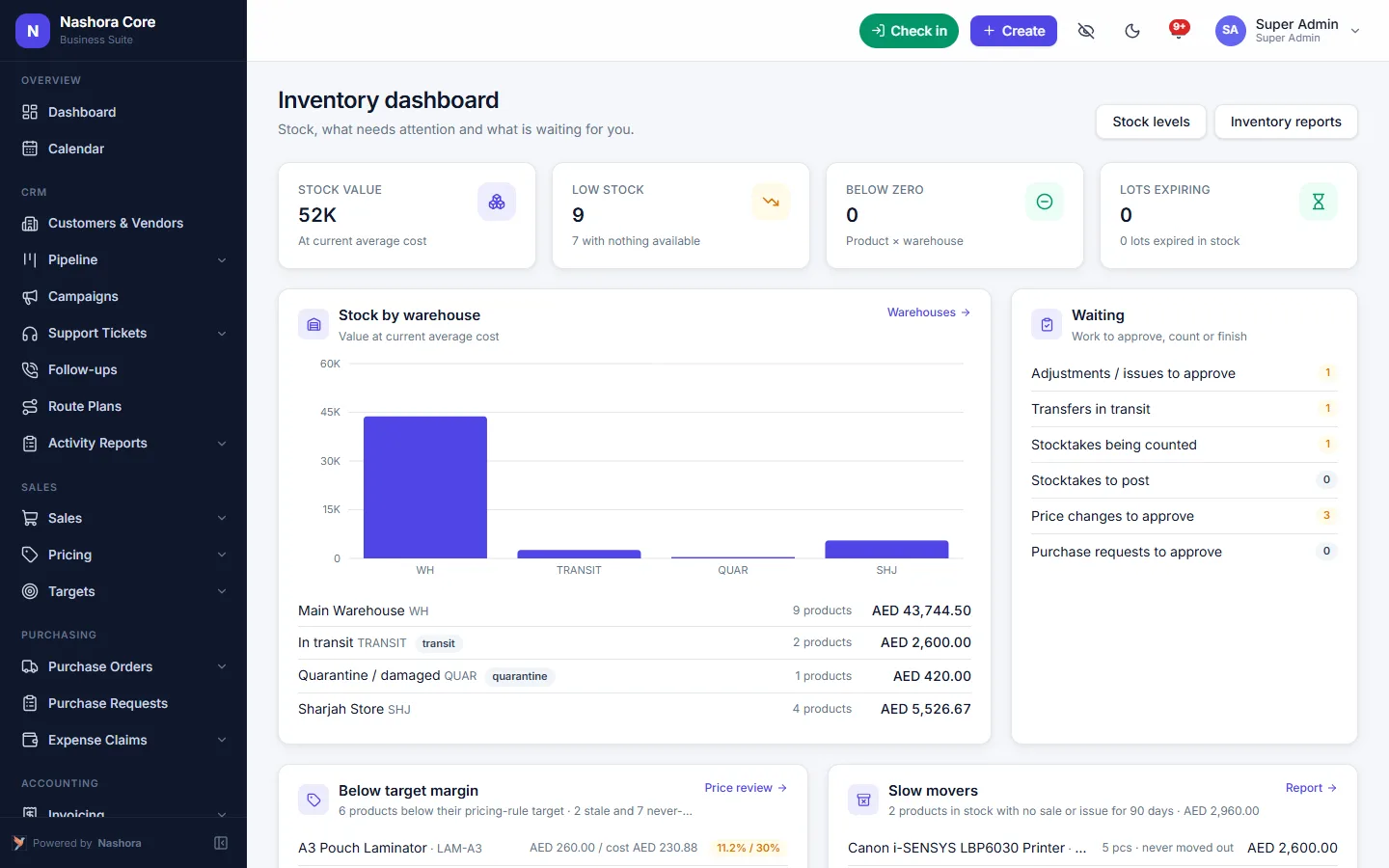
You can see what is in each location, what is on its way between them, and what is sitting in a quarantine or damaged location awaiting a decision. A customer who collects from Sharjah is quoted from the Sharjah stock, not from the company total. Access can be set to own, team, branch or all records by role, so a branch user can be limited to their branch while head office sees everything.
Connecting stock to sales, purchasing and accounts
This is where an ERP differs from a stock-only tool. When stock, sales, purchasing and accounts share one database, each document does several jobs at once. The delivery note reduces stock. The invoice posts to receivables and VAT. The purchase receipt adds stock and, when the bill arrives, matches it to the order. The valuation of what is on the shelf agrees with the balance sheet.
That means salespeople can check stock before they quote, buyers can see what customers are waiting for, and the finance team no longer rebuilds stock value at month end. For more on how this works in practice, read what is a stock-aware CRM and our guide to an inventory and sales system for the UAE. The routine for the warehouse itself is in how to manage inventory in a trading company.
Benefits, with three illustrative scenarios
These are pictures, not customer stories, and the numbers are invented to show the arithmetic.
A Sharjah electrical trader stops promising what it does not have
Before, the salesperson guessed. Now the quotation is made with stock by warehouse in view, and low-stock alerts tell the buyer to reorder cable and switches before the shelf is empty. The 20 missed orders a month from our earlier example shrink to a handful, and each one saved is AED 300 of profit.
A Dubai food importer sells the oldest lot first
Lots carry expiry dates and the expiry report is opened every Monday. Cartons close to their date are offered first and at a discount if needed, rather than discovered after they have expired. The AED 3,600 pallet gets sold at a smaller margin instead of written off.
A distributor with two warehouses finds its transfers
Transfers between the Sharjah and Dubai stores now have a sending and a receiving record, with the gap shown as stock in transit. A quantity that used to "vanish" for a week is visible the day it is late, and the count at year end has fewer surprises.
The common thread: faster answers, fewer write-offs and numbers that agree with the books. There is nothing exotic about any of it, which is why it works.
Who needs inventory management software
Traders and wholesalers
Fast-moving items, many customers and changing prices. You need landed cost, price lists, partial deliveries and reorder alerts.
Distributors with field sales
Salespeople on the road need to see what can be delivered, and the warehouse needs delivery notes as they happen.
Retail with more than one location
Branch stock, transfers and cycle counts keep each shop accurate without closing it for a stocktake.
Food and personal care
Lots, expiry dates and expiry reports are the main reason to move off spreadsheets.
Spare parts, equipment and contracting
Serial numbers, project costing and purchase approvals keep expensive items traceable.
Choosing and rolling out inventory software
Choosing is mostly about discipline, not features. Start with a list of the five situations that hurt most today: stock-outs on certain lines, expiry write-offs, a month-end stock argument and so on. Then ask each vendor to show those five situations, with your own data, and ignore the rest of the demo.
Rolling out is mostly about data. Clean the product list first: one code, one name, one unit for each item, and merge duplicates. Count your opening stock and give it to the system as the starting balance. Import customers, vendors and products from Excel, and train each team on their own documents. Run a cycle count in the first weeks to find products where the shelf and the system differ. Nashora is browser-based, so there is nothing to install, and we help with company set-up, VAT, users and roles, Excel import and training. Most companies go live within days to a few weeks.
Basic stock is in the Starter plan, at AED 2,508 a year for 3 users. Full inventory, purchasing and CRM start in the Business plan at AED 6,468 a year for 10 users. Each has a one-time installation fee (AED 1,500 and AED 5,000), and prices exclude 5% VAT. See the pricing page for details.
Inventory software for businesses across the UAE
Nashora is built in Al Nahda, Sharjah, for businesses in Dubai, Sharjah, Abu Dhabi, Ajman, Ras Al Khaimah, Fujairah, Umm Al Quwain and Al Ain. Stock held in Jebel Ali, a showroom in Dubai and a store in Sharjah can all work from the same live records, since the system runs in a browser.
The UAE context shows up in the paperwork. Invoices carry 5% VAT on every line and your TRN, the VAT 201 return is prepared from posted documents, and the FTA Audit File can be exported from the same records. Stock valuation that matches the books helps at year end too, when corporate tax at 9% above AED 375,000 of taxable profit makes cost of goods sold more important. The accounting and VAT module covers the finance side and the CRM, sales and inventory module covers sales and stock. Check the current rules with the FTA or your tax adviser.
What to do next
- Write down your five biggest stock problems. Stock-outs, expiry, transfers, counts, valuation: whichever really hurts.
- Put a rough number on each. Use the examples above to estimate the yearly cost of the worst two.
- Clean your product list. One code, one name and one unit per item, with duplicates removed.
- Use the checklist in a demo. Ask every vendor to show your five problems with your own products.
- Count your opening stock. Whatever system you pick, it is only as good as the first quantity you give it.
If you would like to see how Nashora handles your own products and warehouses, book a free demo. Bring a stock sheet and one real order and we will walk them through. You can also read the FAQ or contact us with questions, and the guide to calculating product profit margin shows what accurate cost does for pricing.