

A salesperson in Sharjah tells the owner that a product has a "30% profit". The owner is delighted. At the end of the quarter the accounts show far less money than 30% of sales, and nobody can say where it went. When the owner finally asks how the 30% was worked out, the answer is: "We add 30% to the cost." That is a markup of 30%, which is a margin of only 23.1%, and that is before freight, duty, discounts, returns and everything else that eats into the number.
This guide explains how to calculate product profit margin properly: the difference between margin and markup, gross and net margin, worked examples in AED, why landed cost and discounts matter, why VAT is not part of your revenue, and how to set up margin checks so a loss-making price does not reach the customer.
Why the price tag is not your profit
Profit is what is left after you have paid for the goods, and a price that looks healthy on a quotation can still lose money by the time the goods have been delivered, invoiced and paid for. Three things make the gap: the cost you used was not the real cost, the price you charged was not the price you kept, and some of the revenue you counted was never yours.
The real cost includes freight, customs and clearing charges for imports. The price you kept is after discounts, rebates and returns. And revenue should not include VAT, which you collect for the Federal Tax Authority. Once you correct all three, many products look different, a few look much better, and some are quietly losing money.
The good news is that the arithmetic is simple. It just needs to be done on the right numbers, the same way, every time.
Margin vs markup: same numbers, different answers
Both measures start from the same profit figure, which is the selling price minus the cost. They differ in what they divide by.
- Profit margin = profit ÷ selling price × 100. It tells you what share of each dirham of sales you keep.
- Markup = profit ÷ cost × 100. It tells you how much you added to cost to arrive at the price.
Say a product costs you AED 80 and you sell it for AED 100, excluding VAT. Profit is AED 20. The margin is 20 ÷ 100 = 20%. The markup is 20 ÷ 80 = 25%. Same product, same sale, two correct numbers, and they will never be equal unless the profit is zero.
The problem is mixing them up. Margin can never reach 100%, because you cannot keep more than the whole price. Markup can be 100% or 200% or more. If a supplier says "we work on 50% margin" and your team hears "50% markup", the price will be wrong by a wide margin: a 50% markup is only a 33.3% margin.
Converting markup to margin, and back
Two formulas let you move between the two, using decimals (30% = 0.30):
- Margin = markup ÷ (1 + markup)
- Markup = margin ÷ (1 − margin)
The table shows common markups, the margin each one really gives, and the selling price on an item that costs AED 100.
| Markup on cost | Selling price (AED) | Profit (AED) | Profit margin |
|---|---|---|---|
| 10% | 110 | 10 | 9.09% |
| 15% | 115 | 15 | 13.04% |
| 20% | 120 | 20 | 16.67% |
| 25% | 125 | 25 | 20.00% |
| 30% | 130 | 30 | 23.08% |
| 40% | 140 | 40 | 28.57% |
| 50% | 150 | 50 | 33.33% |
| 75% | 175 | 75 | 42.86% |
| 100% | 200 | 100 | 50.00% |
And in the other direction, if you want a particular margin, you need a larger markup than most people expect:
| Target margin | Markup needed | Price if cost is AED 100 (AED) |
|---|---|---|
| 10% | 11.11% | 111.11 |
| 20% | 25.00% | 125.00 |
| 25% | 33.33% | 133.33 |
| 30% | 42.86% | 142.86 |
| 40% | 66.67% | 166.67 |
| 50% | 100.00% | 200.00 |
Gross margin, operating margin and net margin
When people say "margin" without a qualifier they usually mean gross margin, which only deducts the cost of the goods sold. It is the right number for judging a product, a price list or a supplier. It does not tell you whether the company makes money, because rent, salaries, marketing and other costs sit below it.
- Gross margin = (revenue − cost of goods sold) ÷ revenue.
- Operating margin = (gross profit − operating expenses) ÷ revenue.
- Net margin = net profit ÷ revenue, after all expenses, interest and tax.
Here is an illustrative year for a small trading company, in AED, with revenue measured before VAT:
| Line | Amount (AED) | As % of revenue |
|---|---|---|
| Revenue (excluding VAT) | 500,000 | 100.0% |
| Cost of goods sold | 350,000 | 70.0% |
| Gross profit | 150,000 | 30.0% gross margin |
| Operating expenses (rent, salaries, transport and so on) | 110,000 | 22.0% |
| Operating profit | 40,000 | 8.0% operating margin |
A 30% gross margin sounds comfortable, yet the owner keeps 8% before tax. That is why you cannot price from gross margin alone. It also explains why a 5% discount, which feels small, can take a very large bite out of the operating profit: 5% off AED 500,000 is AED 25,000, which is more than half of the AED 40,000 left. From 2023, UAE corporate tax at 9% applies to taxable profit above AED 375,000, so for larger businesses the net figure has one more deduction. Ask your tax adviser how it applies to you.
What really changes the margin: landed cost, discounts and returns
Take a product you buy from a supplier at AED 55 and list at AED 100. On paper the margin is 45%. Now follow what happens in the real business, using 1,000 units.
| Step | Revenue | Cost | Profit | Margin |
|---|---|---|---|---|
| Planned: list price AED 100, supplier price AED 55 | 100,000 | 55,000 | 45,000 | 45.0% |
| Add landed cost of AED 7 a unit (freight, duty, clearing) | 100,000 | 62,000 | 38,000 | 38.0% |
| Add an 8% customer discount (net price AED 92) | 92,000 | 62,000 | 30,000 | 32.6% |
| Add 30 returned units refunded and not resaleable | 89,240 | 62,000 | 27,240 | 30.5% |
Check the last line: 970 units kept × AED 92 = AED 89,240 of revenue, against AED 62,000 of cost for all 1,000 units, leaving AED 27,240, which is 30.5% of revenue. A planned 45% became 30.5%. Nothing went wrong, nothing was stolen, and no one made a mistake. The business simply forgot to count the costs that arrive after the price list is printed.
Landed cost
Freight, insurance, customs duty and clearing charges belong in the unit cost for imported goods. Our article on managing inventory in a trading company has a worked landed cost example for a sea shipment through Jebel Ali or the Sharjah ports.
Discounts and rebates
Every dirham you take off the price comes straight out of profit, because the cost does not fall with it. A discount that looks like "only 8%" is 8% of revenue, but on a 45% margin it removes nearly a fifth of the profit. Volume rebates and early payment discounts work the same way even when they are settled at the end of the year.
Returns and write-offs
A returned item that can be resold is just a delay. One that is damaged, expired or out of fashion is a loss: you refund the customer, the goods cost you the same, and you cannot sell them again. Keep a record of returns by product, because the same few items usually cause most of them.
VAT is not revenue, so leave it out of your margin
When you sell with 5% UAE VAT, the customer pays your price plus the VAT. That VAT belongs to the Federal Tax Authority and you pass it on through your VAT 201 return. It is not income, and it is not cost. So margin must be calculated on the price excluding VAT.
Imagine you sell an item for AED 1,000 plus VAT of AED 50, and the customer pays AED 1,050. The item cost you AED 800. The right calculation is (1,000 − 800) ÷ 1,000 = 20%. If someone divides by AED 1,050 and uses AED 250 as the profit, they get 23.8%, which is wrong because AED 50 of the money was never theirs.
The same applies on the buying side. If you are VAT registered and the VAT on your purchases is recoverable input tax, your cost is the price excluding VAT. If you are not registered, or the input VAT is not recoverable, it can become part of cost. Check the current rules with the FTA or your tax adviser. For more on how VAT is worked out, see our guide on how to calculate VAT in the UAE.
How to calculate product profit margin, step by step
Use this routine for any product. It takes a few minutes in a spreadsheet and a few seconds if your system already holds the numbers.
- Find the true unit cost. Start with the supplier price in AED and add landed cost: freight, insurance, customs duty and clearing, divided by the number of units. Use the average cost or FIFO cost your books use.
- Take the net selling price. Use the price after discounts and exclude VAT.
- Work out the profit. Net selling price minus true unit cost.
- Divide by the net selling price. Profit ÷ net selling price × 100 is the gross margin.
- Allow for returns and direct selling costs. Deduct the cost of returns, delivery you pay for and sales commission if you want a contribution margin.
- Compare it with your target. If the result is below target, change the price, the cost or the discount policy, and check the new number before you send the quotation.
Setting a price from a target margin
Often you start with the margin you want and need the price. The formula is price = cost ÷ (1 − target margin). With a true unit cost of AED 62 and a target gross margin of 30%, the price is 62 ÷ 0.70 = AED 88.57 before VAT. Check it: profit is 88.57 − 62 = AED 26.57, and 26.57 ÷ 88.57 = 30.0%.
With 5% VAT, the customer pays 88.57 × 1.05 = AED 93.00. Notice the trap in the shortcut. If you simply added 30% to the cost, you would charge 62 × 1.30 = AED 80.60, and the margin would be only 23.1%. For a longer look at price lists and quotations, see our guide to a sales system for UAE businesses.
Price lists and pricing rules in Nashora
The hardest part of margin management is not the formula. It is doing it for every product, every customer and every quotation, while prices and costs keep changing. This is where the CRM, sales and inventory module in Nashora is useful, and the points below are things the product does today.
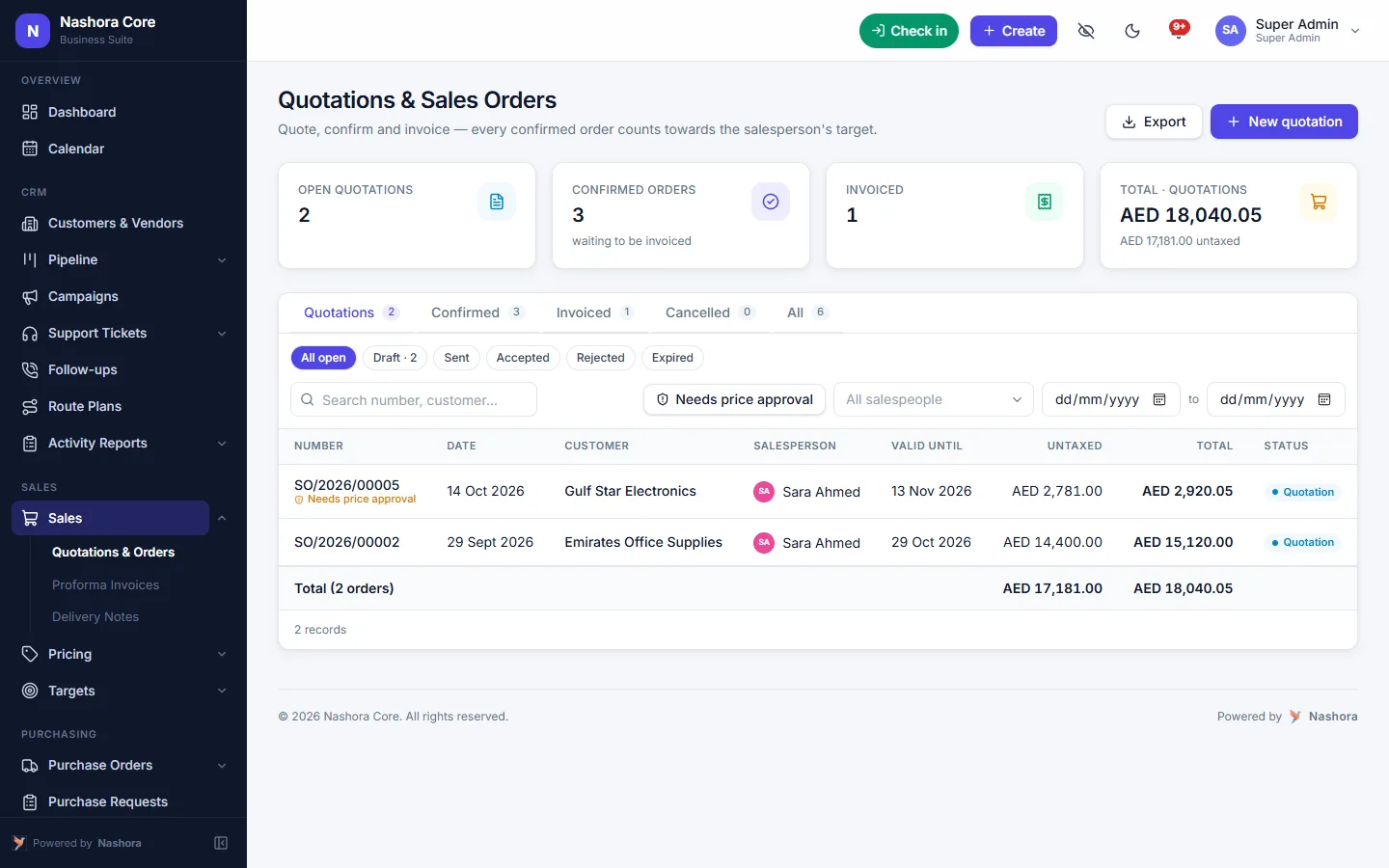
- Price lists can be set per customer, per branch and per currency, so a wholesale customer and a walk-in customer do not share one price.
- Pricing rules cover discounts and market prices, and set margin targets.
- Price changes can go through approval, with the impact shown before you publish them, so a new price list does not silently lower margin.
- Cost comes from the books. Freight and customs are added as landed costs, you choose average cost or FIFO, and the product cost history is kept.
On the quotation screen, a quote that needs price approval is flagged in the list, so a manager sees it before it goes to the customer.
Below-cost warnings and profitability reports
Pricing rules are only half the story. You also need to see what happened after the sale.
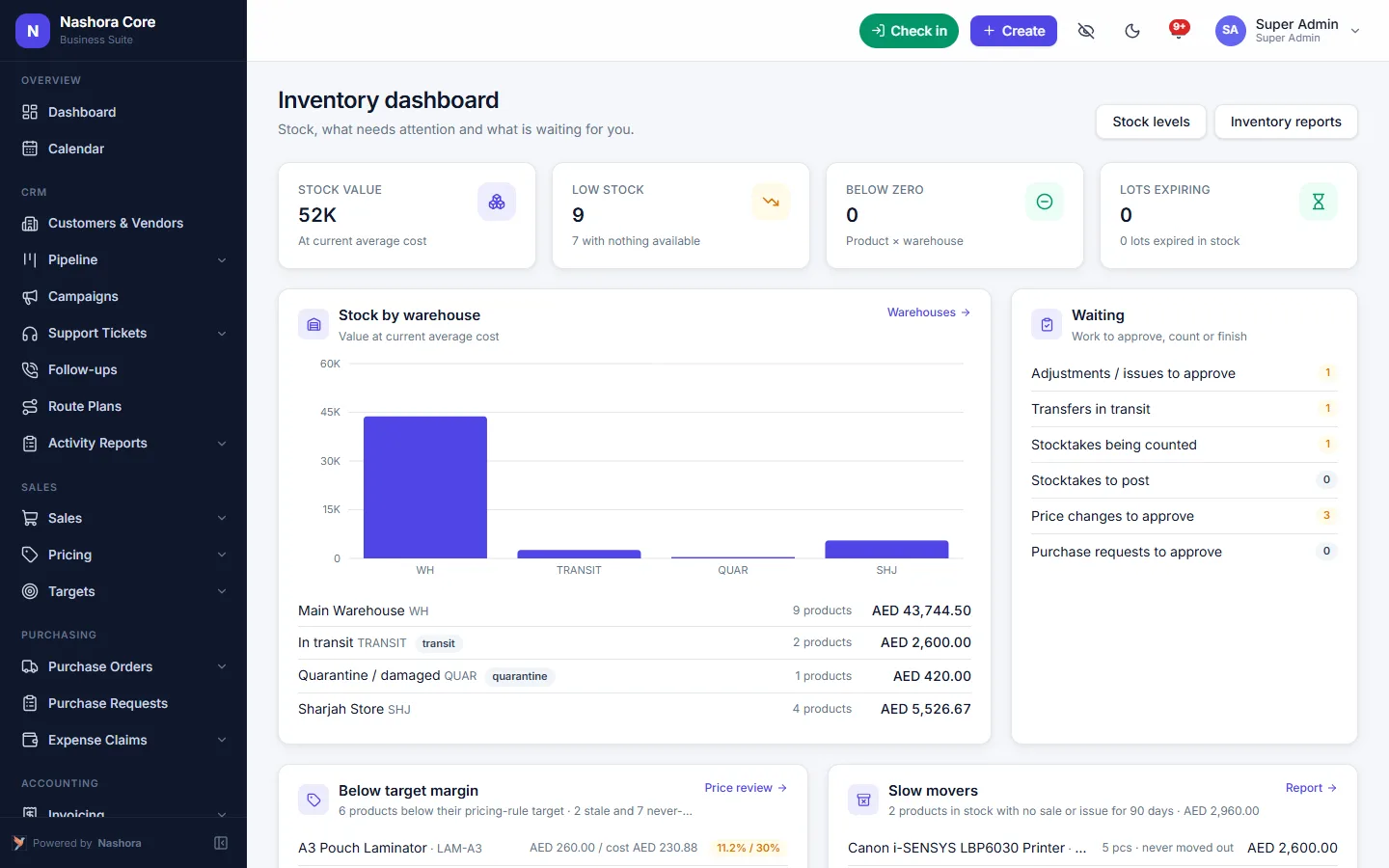
- Below-cost checks on quotations warn you before a discount makes a price lose money, instead of after the sale.
- Margin targets compare each price with the target you set. The inventory dashboard has a card for products below their pricing-rule target, showing selling price, cost, actual margin and target side by side.
- Profitability reports by product, customer and branch use sales, purchasing and inventory data together, so you can see which customers pay for the business and which ones cost you money.
- Reports export to Excel and PDF, for the owner or the accountant.
Because the stock valuation is reconciled to the books and the invoice posts to the ledger, the margin you see on a report is built from the same records your accountant uses, as described on our accounting and VAT software page. For more on how stock and sales fit together, read inventory and sales system for UAE traders.
Common mistakes when calculating margin
| Mistake | What happens | Better practice |
|---|---|---|
| Treating markup as margin | Prices are too low; a 30% markup is only a 23.1% margin | Use price = cost ÷ (1 − margin) when you start from a target margin |
| Using the supplier price as cost | Imports look more profitable than they are | Add freight, duty and clearing as landed cost |
| Ignoring discounts and rebates | Planned margin never appears in the accounts | Calculate margin on the net price after discounts |
| Including VAT in revenue | Margin looks about 5% better than it is | Work only with amounts excluding VAT |
| Forgetting returns and write-offs | Refunded goods cost you twice | Track returns by product and include them in margin |
| Mixing currencies at old rates | Cost in AED is out of date after a supplier price or rate change | Update cost on each receipt and review prices regularly |
| One average margin for everything | Hides loss-making products and customers | Check margin by product, customer and branch |
| Checking margin only at month end | Loss-making quotations are already delivered | Use below-cost and margin target checks while quoting |
Who needs to watch margin most
Traders and wholesalers
Margins are thin, cost changes with every shipment and prices differ by customer. Landed cost and price lists per customer are the priority.
Distributors with field sales
Salespeople negotiate on the spot. Approval limits on discounts and below-cost warnings keep a good relationship from becoming an expensive one.
Retail with more than one branch
Profitability by branch shows which location earns its keep. Branch price lists let you set prices that suit each market.
Food, personal care and other dated goods
Margin has to cover the stock you sell and the stock that expires. Lot and expiry tracking shows what is nearing its date so you can sell it first.
Service companies that resell goods
If materials are billed to customers, margin on materials still matters. Cost centres and projects help tie costs to the job.
Serving businesses across the UAE
Nashora is based in Al Nahda, Sharjah, and used by businesses in Dubai, Sharjah, Abu Dhabi, Ajman, Ras Al Khaimah, Fujairah, Umm Al Quwain and Al Ain. Companies often keep a mainland company and a free zone company side by side, and Nashora keeps each company's books and TRN separate.
For margin work, the UAE points that matter are simple. Calculate on prices excluding the 5% VAT. Keep your tax invoices and records in order for the period required, because the same figures feed your VAT 201 return and the FTA Audit File. And remember that corporate tax at 9% above AED 375,000 of taxable profit makes accurate cost of goods sold matter at year end. Always confirm the treatment of your own situation with the FTA or your tax adviser. Plan details are on the pricing page: price lists, quotations and full inventory start in the Business plan.
What to do next
- Pick your top 10 products by sales. Calculate each one's true margin using the six steps above.
- Add landed cost to anything imported. Re-run the margin and note the difference.
- Agree one definition. Decide as a team that "margin" means profit divided by price, excluding VAT, and print the conversion table.
- Set a minimum margin per category. Make it the rule that quotations below it need a manager's approval.
- Review by customer once a quarter. Find the customers whose discounts and returns leave you with little profit.
If you want to see price lists, below-cost checks and profitability reports with your own products, book a free demo and bring a recent price list. The FAQ covers setup and plans, and the guide to inventory management software explains the stock side.