
A customer in Sharjah asks for a quotation and you quote AED 2,000 plus VAT. The next customer walks into your shop and sees a price tag of AED 2,100. A supplier sends a bill for AED 5,250 and your accountant asks, "What is the VAT part?" It is the same 5% each time, but the sum runs in a different direction, and plenty of capable people reach for the wrong formula on the third one.
This guide explains how to calculate VAT in the UAE, with the two formulas you need, worked examples you can check with a calculator, and the mistakes that cause wrong returns. We cover the four VAT treatments, input and output VAT, discounts, reverse charge and the VAT 201 return, then show where Nashora does the arithmetic for you. It is general information, not tax advice: check the current rules with the FTA or your tax adviser.
How to calculate VAT in the UAE: adding it and taking it out
UAE VAT has been 5% on most goods and services since 2018. Almost every calculation you will ever do is one of two formulas, and the skill is knowing which one you need.
Adding VAT to a net price
When you start from the price before VAT (the net price), multiply by 1.05. That gives the total including VAT. If you want the VAT on its own, multiply the net price by 0.05.
Say you sell an item for AED 1,000 before VAT. The VAT is 1,000 × 0.05 = AED 50, and the customer pays 1,000 + 50 = AED 1,050. A consulting fee of AED 4,800 works the same way: VAT is AED 240 and the invoice total is AED 5,040.
Taking VAT out of a VAT-inclusive price
When you start from a price that already includes VAT (the gross price), divide by 1.05 to get the net price. The VAT part is the gross price minus the net price. There is a shortcut too: because 5 out of every 105 is one twenty-first, the VAT part of any VAT-inclusive amount is the gross amount divided by 21.
A shelf price of AED 2,100 including VAT: 2,100 ÷ 1.05 = AED 2,000 net, and the VAT is 2,100 − 2,000 = AED 100 (and 2,100 ÷ 21 = 100 gives the same answer). The supplier bill of AED 5,250 from the opening paragraph is AED 5,000 net plus AED 250 VAT.
Real prices do not always divide neatly. Take a VAT-inclusive total of AED 1,234.00. Divided by 1.05 it is 1,175.238..., so the net price rounds to AED 1,175.24. Work the VAT out as the difference, 1,234.00 − 1,175.24 = AED 58.76, and the two parts always add back to the total printed on the document.
Why you cannot just subtract 5%
This is the most common error in small-business VAT. Someone takes 5% of the VAT-inclusive price (5% of 2,100 is 105) and calls the rest the net price (1,995). But the 5% was charged on the net price, not on the gross one. The real VAT in that AED 2,100 is AED 100, not 105.
It looks like a small slip until you multiply it. A shop with AED 31,500 of VAT-inclusive takings in a day has AED 30,000 net and AED 1,500 VAT. Subtract 5% instead and you declare AED 1,575 of VAT, which is AED 75 too much from a single day.
Standard-rated, zero-rated, exempt and out of scope
Before any arithmetic, there is a decision: what kind of supply is this? The 5% only applies to standard-rated supplies. Everything else falls into one of three other buckets, and the difference between them matters for the VAT you can reclaim, not just the VAT you charge.
| Treatment | VAT charged | Plain examples | Input VAT on your costs |
|---|---|---|---|
| Standard-rated | 5% | Most goods and services sold in the UAE: furniture, electronics, repairs, consulting, restaurant meals | Generally reclaimable, with a valid tax invoice |
| Zero-rated | 0% | Exports of goods outside the GCC, international transport, the first sale of a new residential building, certain education and healthcare services | Generally reclaimable |
| Exempt | No VAT | Residential rent and resale, bare land, local passenger transport, some financial services | Generally not reclaimable where it relates to exempt sales |
| Out of scope | No VAT | Salaries paid to employees, supplies whose place of supply is outside the UAE | Depends on the activity; ask your adviser |
The examples are meant to help you recognise the buckets, not to settle a borderline case. The exact lists and conditions are set by UAE VAT law and can change, so confirm anything unusual with the FTA or your tax adviser.
The zero-rated versus exempt trap
Both charge no VAT to the customer, so they look the same on the invoice. The difference is behind the scenes. A zero-rated seller still reclaims the VAT on its purchases. An exempt seller generally cannot.
Picture an exporter that buys goods for AED 10,000 plus AED 500 of VAT and sells them abroad. The sale is zero-rated, so output VAT is zero, input VAT is AED 500 and the return shows AED 500 refundable. If the same business had made an exempt supply, that AED 500 would generally sit in the cost of the goods instead. Same invoice layout, different money.
Input VAT, output VAT and the net amount you pay
Output VAT is the VAT you charge customers on your sales. Input VAT is the VAT your suppliers charge you on purchases and expenses, evidenced by a valid tax invoice. Each return period you subtract one from the other:
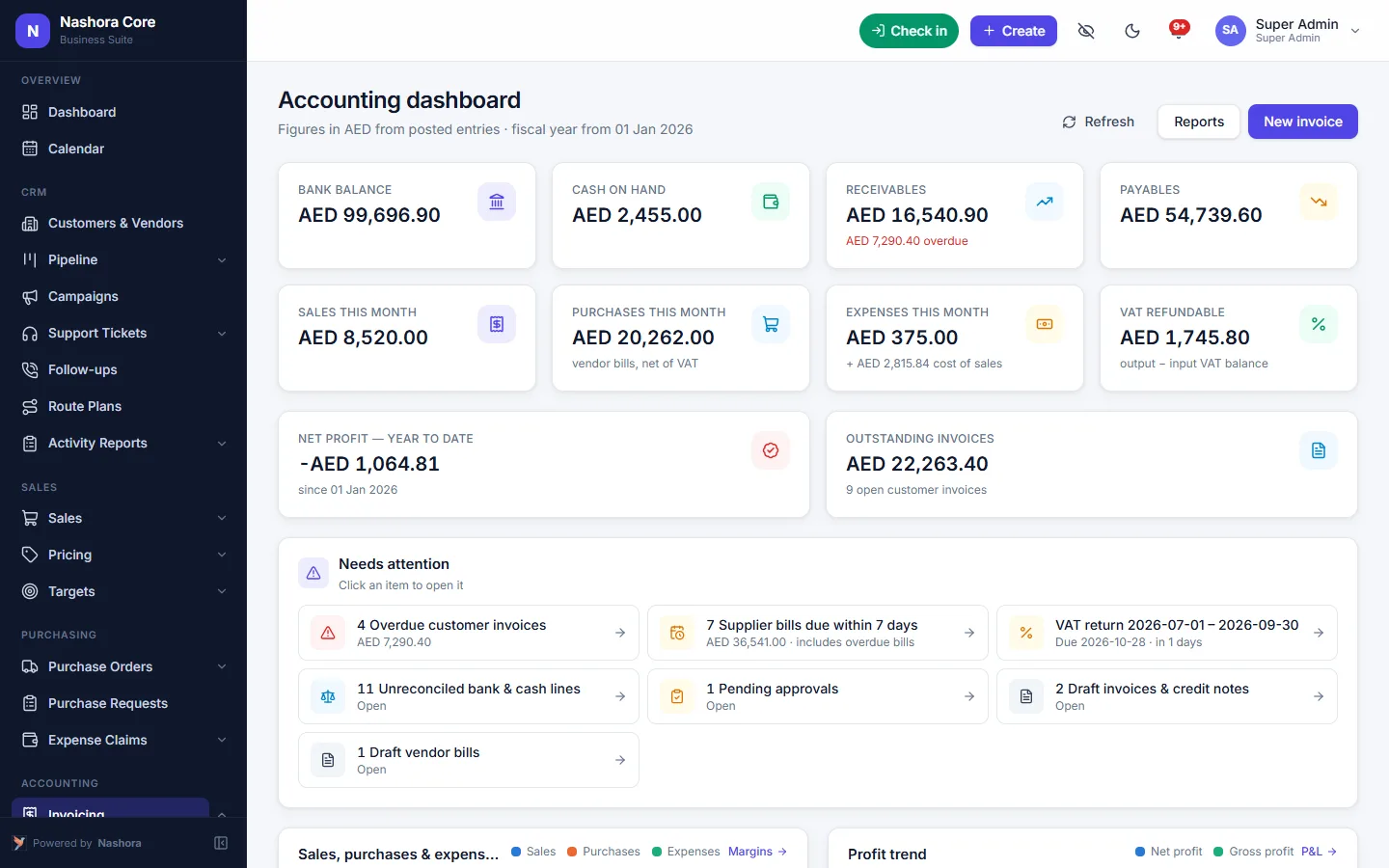
Net VAT = output VAT − input VAT. If the answer is positive you pay it to the FTA. If it is negative you have a refundable position, subject to the FTA's rules.
Here is an illustrative quarter for a trading company in Sharjah. The numbers are invented to make the arithmetic easy to check.
| Line | Net amount | VAT |
|---|---|---|
| Standard-rated sales | 400,000 | 20,000 |
| Zero-rated export sales | 80,000 | 0 |
| Exempt sales | 10,000 | 0 |
| Total output VAT | 20,000 | |
| Stock purchases with VAT | 250,000 | 12,500 |
| Rent, utilities and services with VAT | 40,000 | 2,000 |
| Total input VAT | 14,500 | |
| Net VAT payable (20,000 − 14,500) | 5,500 |
One honest caveat: a business with exempt sales usually has to apportion its input VAT, which this table ignores to keep the sums clear. If you make both taxable and exempt supplies, this is a conversation for your adviser.
Not every purchase carries reclaimable VAT either. You need a valid tax invoice showing the supplier's TRN, and some costs, such as certain entertainment, are restricted. A bill from a supplier that is not VAT-registered carries no VAT to reclaim at all.
Invoices with discounts and credit notes
The general idea is that VAT is charged on what the customer actually pays for the supply. When a discount is given at the time of supply and shown on the tax invoice, the 5% is calculated on the amount after the discount. Discounts agreed later are usually handled with a credit note, and conditions can apply, so check unusual arrangements with your adviser.
Here is an invoice with three lines, one of them discounted and one zero-rated:
| Line | Before discount | Discount | Net after discount | VAT rate | VAT |
|---|---|---|---|---|---|
| A: 10 units at 120 | 1,200.00 | 120.00 (10%) | 1,080.00 | 5% | 54.00 |
| B: 4 units at 250 | 1,000.00 | 0.00 | 1,000.00 | 5% | 50.00 |
| C: export goods | 500.00 | 0.00 | 500.00 | 0% | 0.00 |
| Invoice totals | 2,700.00 | 120.00 | 2,580.00 | 104.00 |
The customer pays 2,580.00 + 104.00 = AED 2,684.00. If someone had calculated VAT on the standard-rated lines before the discount (2,200 × 5% = 110), the invoice would carry AED 6 too much VAT. Small on one invoice, awkward when the customer's accountant spots it on every one.
Credit notes work backwards
Suppose the customer returns 2 of the 4 units on line B. The credit note is for 2 × 250 = AED 500 net, plus AED 25 VAT, so AED 525 in total. It reduces your output VAT for the period in which it is issued, and the customer's input VAT falls by the same amount. Never fix a posted invoice by overwriting it: a credit note leaves a trail the FTA can follow.
Reverse charge in plain words
Normally the seller charges VAT and pays it over. With the reverse charge, the buyer accounts for the VAT instead. It most often appears when a UAE business buys services from a supplier abroad that does not charge UAE VAT, and in some import and domestic cases the law lists, so check the current rules for your purchase.
Say your company in Dubai pays an overseas consultant AED 30,000 and the reverse charge applies. You work out 5% yourself: 30,000 × 5% = AED 1,500. You declare AED 1,500 as output VAT, and, if the purchase is one you can fully reclaim, the same AED 1,500 as input VAT. The net effect on the return is zero.
Two points are easy to miss. The effect is only zero if the input VAT is recoverable, and the entries still have to appear on the return, in their own boxes. Skipping them because the net is zero leaves the return incomplete.
How the VAT 201 return is built
The VAT 201 is the return you file with the FTA for each tax period, monthly or quarterly depending on how you are registered. It is simply the earlier sections added up. Here is the sequence, whether you do it in a spreadsheet or in software:
- Fix the period. Confirm the start and end dates of the tax period you are filing, and that every document in it has been entered.
- Total your sales. Standard-rated sales are reported by the emirate where the supply was made, then tourist refunds, zero-rated supplies and exempt supplies. Credit notes you issued reduce these figures.
- Add reverse charge and imports. Supplies where you account for the VAT, and goods you imported, go in their own lines.
- Total your purchases and expenses. Standard-rated purchases with valid tax invoices give your input VAT, and reverse-charge purchases are added on this side as well.
- Work out the net figure. Total output VAT minus total recoverable input VAT. Positive means payable, negative means refundable.
- Reconcile, file and pay. Check the totals against your ledger, submit the return on the FTA portal, and pay any balance. Returns and payments are due 28 days after the end of the tax period.
The return itself follows the same pattern as the sections above: VAT on sales and other outputs, VAT on expenses, then the net amount due or recoverable. Section and box layouts can change, so always work from the current form on the FTA portal.
Who gets caught out: retailers, exporters, traders and service firms
Retailers and restaurants
Tills record VAT-inclusive prices, so the daily question is the gross-to-net formula. Check that the till's VAT line and your accounting entries agree, especially when promotions change the price.
Exporters
The risk is evidence. A zero-rated sale needs the paperwork that proves the goods left, and a sale that cannot be proved may be treated as standard-rated. Keep the shipping documents with the invoice.
Traders and wholesalers
Volume is the problem. Hundreds of invoices a month, mixed supplier bills, some with VAT and some without, and discounts agreed on the phone. The wrong code on a handful of lines does not show until the return is filed.
Service firms and contractors
Overseas subscriptions and consultants are the usual reverse charge cases. Many service firms also bill in stages, so the VAT date and the period it lands in need attention. Our guide to calculating product profit margin shows why VAT should stay out of your margin sums.
Common VAT calculation mistakes
- Subtracting 5% from a VAT-inclusive price. Divide by 1.05 instead, as shown above.
- Treating zero-rated as exempt. It changes whether you can reclaim input VAT, so the return and your cash both change.
- Claiming input VAT without a valid tax invoice. A card slip or a statement line is not enough. You need the document with the supplier's TRN and the VAT shown.
- Forgetting the reverse charge. The net is often zero, which makes it easy to skip, but the entries still belong on the return.
- Charging VAT on the price before the discount. Tax the discounted amount when the discount is on the invoice.
- Putting a document in the wrong period. A late bill posted to the wrong month changes two returns. Use the tax point, not the day you entered it.
- Using the wrong emirate. Standard-rated sales are reported by emirate, so check where the supply was made.
- Ignoring foreign currency. The VAT amount on the return must be in AED. Convert at the rate your adviser or the FTA guidance tells you to use.
- Fixing a posted invoice with an overwrite. Issue a credit note and a new invoice instead.
- Filing late. The 28-day deadline passes quickly. Put it in a shared calendar.
Quick reference: VAT formulas and examples
Keep this table near whoever raises invoices. Every example uses numbers from this guide, so you can check them against the working above.
| Task | Formula | Example |
|---|---|---|
| Add VAT to a net price | Net × 1.05 | 1,000 becomes 1,050 |
| VAT on a net amount | Net × 0.05 | 4,800 gives VAT of 240 |
| Net price from a VAT-inclusive price | Gross ÷ 1.05 | 2,100 gives 2,000 |
| VAT part of a VAT-inclusive price | Gross ÷ 21 | 2,100 gives 100 |
| VAT on a discounted line | (Net − discount) × 0.05 | 1,200 less 10% is 1,080, VAT 54 |
| Credit note | Returned net × 1.05 | 500 net gives a 525 credit note |
| Reverse charge | Net × 0.05, as output and input | 30,000 gives 1,500 each way |
| Net VAT payable | Output VAT − input VAT | 20,000 − 14,500 = 5,500 |
UAE VAT essentials: registration, deadlines and records
VAT registration is mandatory when your taxable supplies pass AED 375,000 in a year, and voluntary from AED 187,500. Once registered you have a Tax Registration Number (TRN), which must appear on your tax invoices and, importantly, on your customers' and suppliers' records too.
A tax invoice generally needs the words "Tax Invoice", your name, address and TRN, the customer's details, the date, a description of what was supplied, the amounts, the VAT rate and the VAT amount in AED. Records are kept for five years. Businesses with a presence in Dubai, Sharjah, Abu Dhabi, Ajman, Ras Al Khaimah, Fujairah, Umm Al Quwain or Al Ain report the emirate where supplies are made, and free zone companies should check whether special rules apply to them. Corporate tax at 9% sits on top of all this, and it runs off the same books, so a mistake in VAT often becomes a mistake in profit.
For the other half of UAE compliance, read our guides on the FTA Audit File and preparing for UAE e-invoicing.
Where Nashora does the VAT arithmetic
The point of software is that nobody should be multiplying by 1.05 on a calculator at 6pm on the 27th. In the accounting and VAT module, the VAT treatment sits on every line of an invoice or bill: standard-rated, zero-rated, exempt or reverse charge. When you post the document, Nashora works out the 5% and records output or input VAT in the ledger.
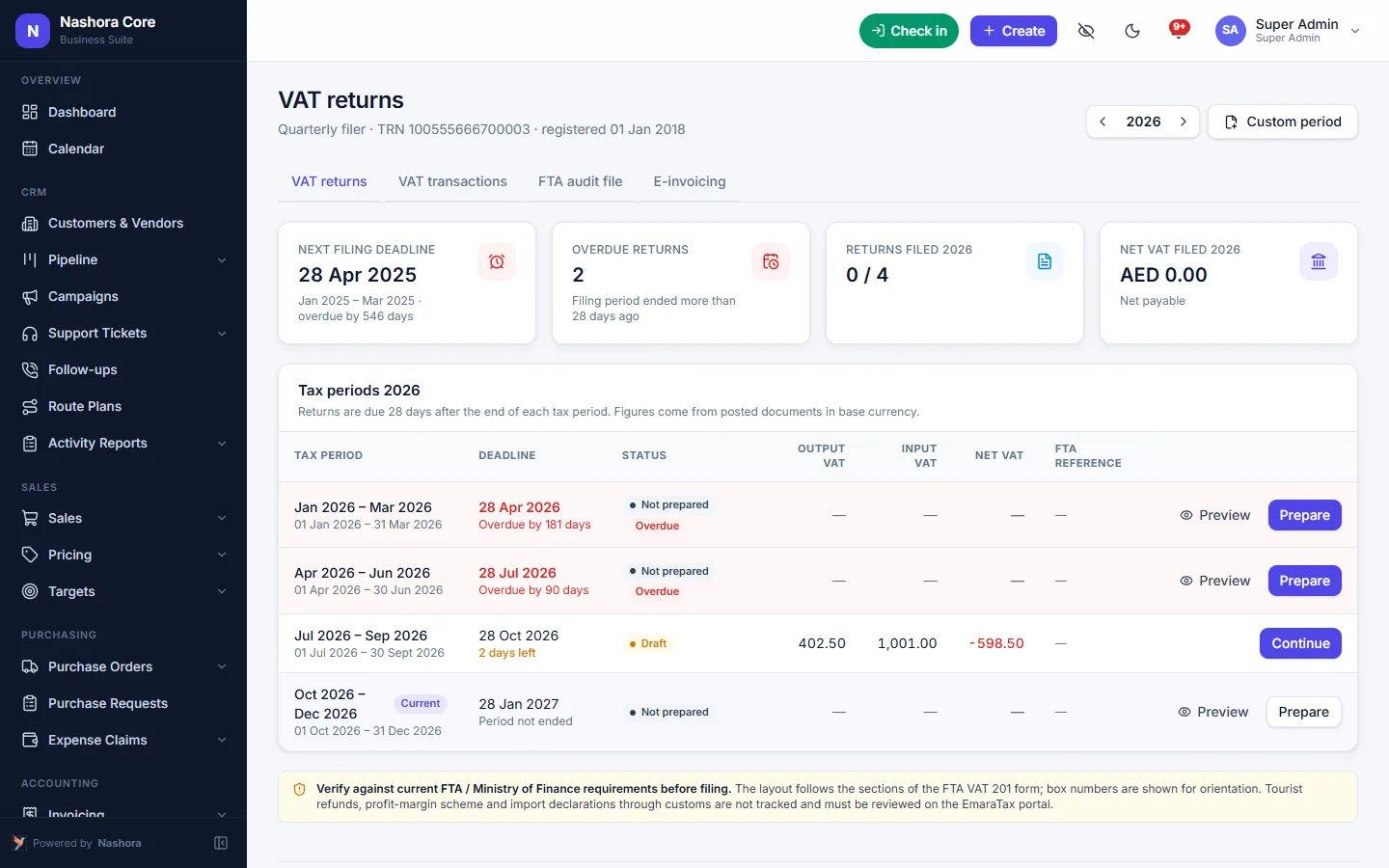
The VAT return is then prepared by period from posted invoices, bills, credit notes and debit notes, and drafts change nothing until they are posted. Standard-rated sales are split by the emirate of the selling branch, goods imports and reverse-charge purchases go into their own boxes, and you can drill from a box to the documents behind it. A tax transaction report shows the same lines in list form, and the return values are what you enter on the FTA portal when you file your VAT 201.
The screen above is from Nashora's demo data. It shows a quarterly filer's tax periods with deadlines, status, output VAT, input VAT and net VAT, and a draft period where input VAT exceeds output VAT, giving a negative net figure. The note at the bottom of the screen is worth repeating: verify against current FTA requirements before filing, because some items, such as tourist refunds and import declarations through customs, are not tracked and must be reviewed on the FTA portal.
Once a return is filed you can lock the period, and posted documents stay locked, with corrections made by credit notes, debit notes or reversals. If you are choosing between tools, our articles on the best accounting software for small businesses in the UAE and accounting software versus ERP are good places to start. The Starter plan includes accounting, VAT, invoices and basic stock; see pricing for the licence and one-time installation fee, with prices excluding 5% VAT.
What to do next
- Test yourself on the formulas. Take three recent documents (a VAT-inclusive receipt, a supplier bill and a discounted invoice) and recalculate their VAT using the table above.
- Review your treatments. List your product and service types and mark each as standard-rated, zero-rated, exempt or out of scope, then check any doubtful ones with your adviser.
- Check your supplier invoices. Make sure each bill you reclaim VAT on has the supplier's TRN and a VAT amount.
- Look at your last return. Trace each box back to documents. If that takes more than a morning, your books or your spreadsheet are doing too much of the work.
- See it done in the system. If you want VAT per line, a return built from posted documents and an accounting and CRM system in one place, book a free demo and bring a month of real invoices. The FAQ covers setup, and you can talk to us any time.