
Monday, 9:15. The sales manager asks, "Where are we on the Sharjah warehouse quotation?" One salesperson thinks it was sent, another says the customer asked for a revised price last week, and the quotation itself is somewhere in a WhatsApp chat on a phone that is switched off. Nobody lied, and nothing was wrong with the product. The deal is simply slipping because nobody can see it.
That is the real answer to how CRM software improves sales performance. It does not make people better at selling. It stops good sales work from being lost, shows the manager what is happening while there is still time to act, and gives you numbers worth arguing about. This guide goes through the concrete mechanisms, the KPIs to measure with their formulas, the limits you should be honest about, and what makes a CRM stick in a UAE team.
How CRM software improves sales performance: what it changes and what it does not
A CRM is a shared memory for your sales team. Leads, customers, conversations, follow-ups, quotations and results live in one place instead of in personal phones, notebooks and inboxes. Everything useful it does comes from that single fact.
It helps in five practical ways: nothing gets forgotten, anyone can pick up a customer's history, deals show up in stages with a value and a probability, quotations go out faster and more consistently, and managers coach from facts. It does not generate demand, fix an uncompetitive price list or turn a team that dislikes calling customers into a team that enjoys it. We come back to that honestly later.
For context, our article on a sales system for UAE businesses follows one sale from enquiry to cash. This guide is about the performance side: why results change and how you can tell.
Nothing falls through the cracks: follow-ups and ownership
Most lost deals are not lost to a competitor. They are lost to silence. The customer asked for a quotation, the salesperson meant to chase it on Thursday, Thursday was busy, and by the following week the customer had bought elsewhere. Nobody recorded the loss, so nobody learnt from it.
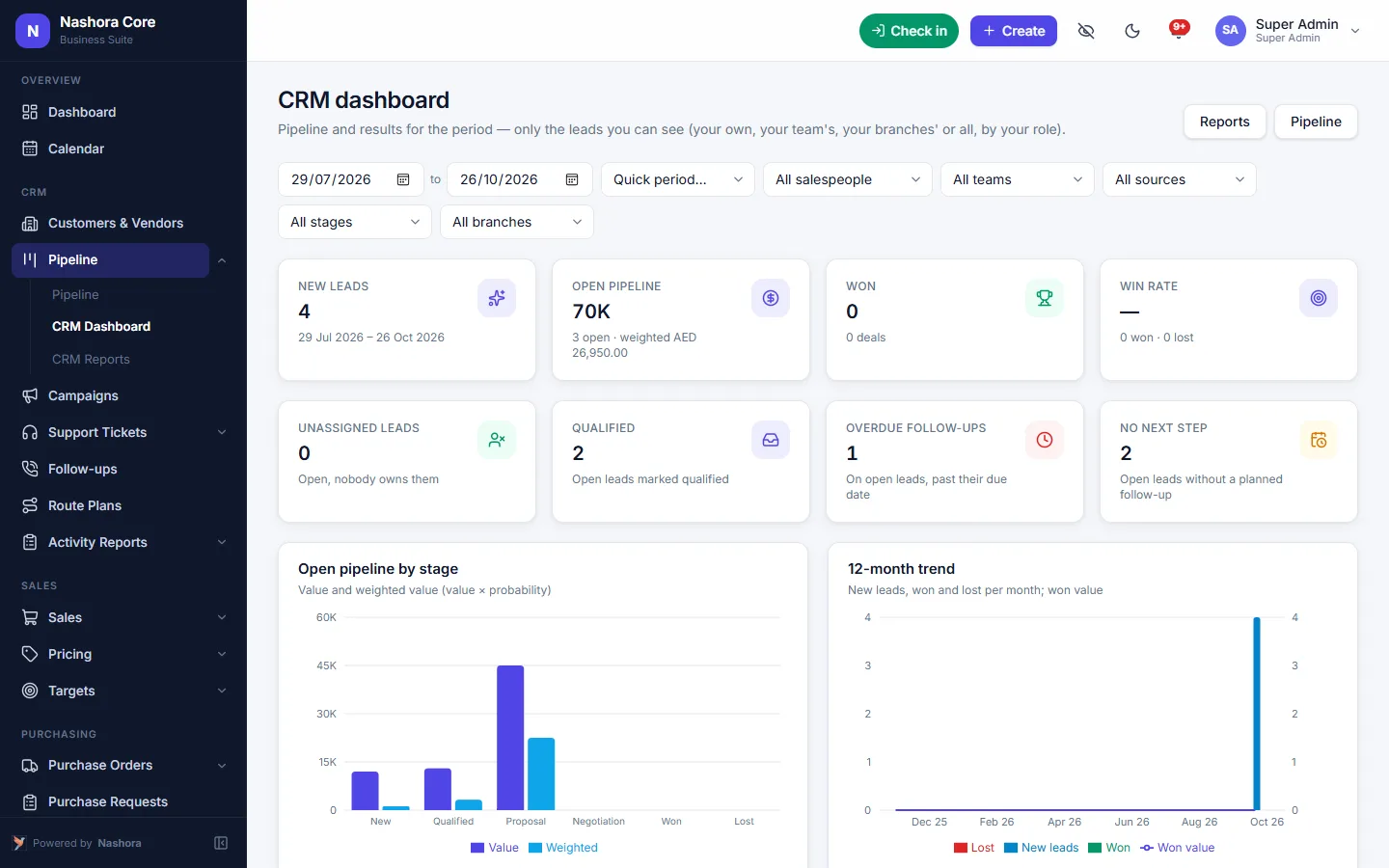
A CRM fixes this with two simple rules. Every lead has an owner, and every open lead has a dated next step. In Nashora, assignment rules decide which salesperson or team receives each new lead, follow-ups and activities sit on a shared calendar, and the CRM dashboard shows leads nobody owns, overdue follow-ups and open leads with no planned follow-up, filterable by period, salesperson, team, source or branch. Click a number and the leads behind it open.
That changes the Monday conversation from "anything pending?" to "these two leads have no next step, who takes them?". It is a small shift, and it is probably the single biggest reason a CRM pays for itself.
One view of the customer
When a customer calls, the person who answers should know what they bought, what is open and what was promised. Without a CRM, that knowledge belongs to whoever dealt with them last. If that salesperson is on leave, in a meeting or has left the company, the customer starts again from scratch.
Customer 360 in Nashora shows the customer's sales, open orders, pipeline and the products they have bought. Because the same system holds quotations, orders and invoices, the answer to "do they owe us money?" or "what did we quote last time?" is a click away. That matters in a market where relationships are personal and customers expect the person on the phone to remember them. It also makes the repeat order easy: "same as last month" becomes a quotation in a couple of minutes instead of a search through old messages.
For deeper background on joining sales to stock, see what a stock-aware CRM is.
Pipeline stages and probability: seeing what might sell
A list of hopeful leads is not a pipeline. A pipeline puts each deal in a stage, gives it a value and attaches a probability to the stage. Add them up and you get two figures: the expected value if everything closes, and the weighted value, which is each deal's value multiplied by its stage probability.
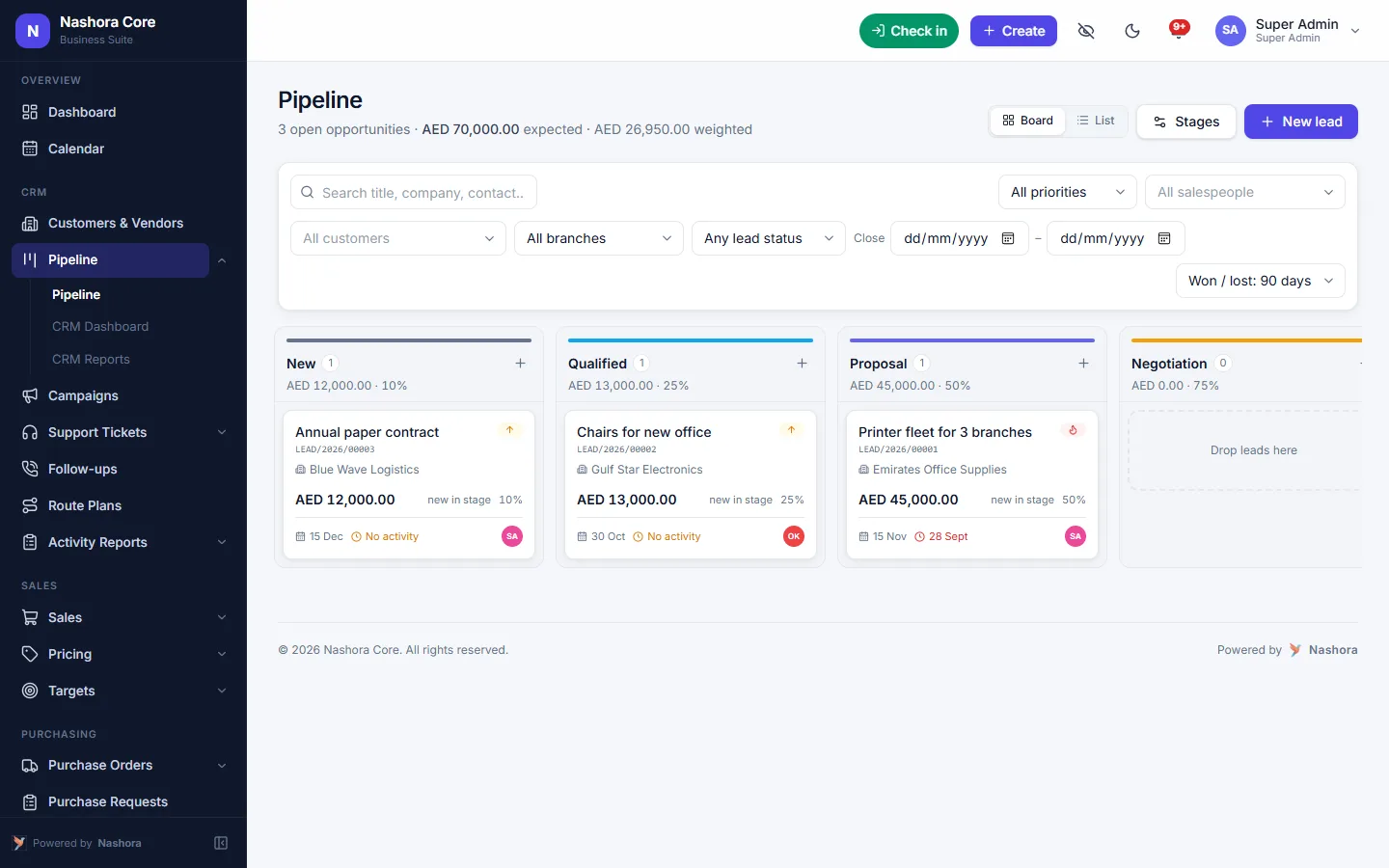
You choose your own stages. The board in the screenshot below has New at 10%, Qualified at 25%, Proposal at 50% and Negotiation at 75%, and the figures at the top show the total expected and weighted value. Cards that have gone quiet show a "no activity" flag, which is what a manager should be scanning for.
A short illustration. Say your open pipeline looks like this:
| Stage | Probability | Open value | Weighted value |
|---|---|---|---|
| New | 10% | 200,000 | 20,000 |
| Qualified | 25% | 160,000 | 40,000 |
| Proposal | 50% | 120,000 | 60,000 |
| Negotiation | 75% | 80,000 | 60,000 |
| Total | 560,000 | 180,000 |
The weighted figure of AED 180,000 is a more honest guide to next quarter than the AED 560,000 headline. The probabilities are your estimates, so review them against what actually closes. Over a few months you will see whether your "Proposal" stage deserves 50% or nearer 30%.
Faster, more consistent quotations
Speed matters in quoting, and so does consistency. A customer who asks three suppliers for a price often buys from the one who replied first with a clear, correct document. A quotation that takes two days because someone is looking up prices in a spreadsheet loses to one that takes two hours.
In Nashora, quotations are built from the customer's price list, kept in versions, e-mailed to the customer and sent for approval when your rules say so. Price lists can be set per customer, branch and currency, and margin targets and below-cost checks warn you before a discount eats the profit. The accepted quotation becomes the sales order, so nothing is retyped. Two salespeople quoting the same customer produce the same price, which protects your margin and your credibility.
One caution: approvals only help if they are quick. If a manager sits on requests for two days, the salesperson will quote from memory on WhatsApp again. Decide who approves and who covers when they are away.
Field sales and route plans
For teams that visit customers, performance is partly about where people spend the day. Route plans say who is visiting whom, and activity reports capture what happened at each visit. That gives the manager two things a notebook never does: a view of whether the week's visits actually went to the customers that matter, and a written record of what was agreed.
Nashora runs in the browser on a phone, so a salesperson can log a visit and set the next follow-up in the car park, not that evening at a desk. The next step is recorded when the memory is fresh, which is when it is most accurate.
Targets, forecasting and handover
Targets people can see
Targets set per person and per team, and tracked live, change the monthly sales meeting. Instead of an hour spent collecting figures, you spend it deciding what to do about the gap. A target that only exists in the manager's spreadsheet is a rumour. One that the salesperson sees every day is a goal.
A forecast from facts
Forecasting does not need a complicated model to be useful. Open pipeline by stage, weighted value, win rate and the 12-month trend of new, won and lost leads already give you a grounded view. Compare the weighted pipeline with what remains of the target and you know whether to push, or to hire, before the quarter ends and not after.
Handover without a crisis
People go on leave, change territories and resign. In a team without a CRM, their customers go quiet for a month. With one, you reassign the leads and the new owner opens the history: contacts, activities, quotations and what the customer bought. However it happens, this alone can save accounts.
What to measure: sales KPIs with formulas
Once the data lives in one place, you can measure it. Pick a handful of numbers, review them weekly and resist the urge to track thirty. Here are the ones that are most useful for a small or mid-sized UAE team.
| KPI | Formula | Example | What it tells you |
|---|---|---|---|
| Response time | Time from enquiry to first reply | Measured in hours or minutes, per source | How quickly new interest is met; slow replies lose enquiries |
| Stage conversion | Leads reaching a stage ÷ leads in the previous stage | 40 qualified ÷ 100 leads = 40% | Where deals drop out |
| Overall conversion | Deals won ÷ total leads | 8 ÷ 100 = 8% | The yield of your lead sources |
| Win rate | Won ÷ (won + lost) | 8 ÷ (8 + 12) = 40% | How good you are at closing quotations |
| Average deal size | Value of won deals ÷ number of won deals | AED 240,000 ÷ 8 = AED 30,000 | Whether you win big or small deals |
| Sales cycle | Average days from lead created to won | Per product or customer type | How long cash takes to arrive, and how far to plan ahead |
| Pipeline coverage | Open pipeline ÷ remaining target | AED 560,000 ÷ AED 150,000 = 3.7 times | Whether there is enough in the pipeline to hit the target |
| Target attainment | Actual sales ÷ target | AED 210,000 ÷ AED 300,000 = 70% | Progress for a person, team or branch |
| Follow-up discipline | Overdue follow-ups and open leads with no next step | Counts, by salesperson | Leading indicator: problems appear here first |
The conversion numbers in the table fit together. If 100 leads give 40 qualified leads (40%), 20 quotations (50% of qualified) and 8 wins (40% of quotations), the overall conversion is 0.40 × 0.50 × 0.40 = 8%. That also shows where to look: lifting the quotation step from 50% to 60% matters, but so does adding another source of leads.
A rule of thumb on coverage: if you win about 40% of what you quote, you need roughly 1 ÷ 0.40 = 2.5 times your remaining target in the pipeline. The widely quoted "three times" is just a general starting point. Your own win rate gives the right figure for your business, and the CRM dashboard shows it for the period you choose.
Leading and lagging numbers
Revenue, win rate and average deal size are lagging: they tell you what already happened. Response time, overdue follow-ups and leads with no next step are leading: they warn you early. A manager who watches only the lagging ones is always a month late.
The honest limits: a CRM does not fix a weak offer
We sell CRM software, so let us be straight about it. If your prices are uncompetitive, your delivery is unreliable or the product is not what customers want, a CRM will show you that clearly, and it will not fix it. It will tell you that you win 15% of what you quote and exactly which stage is the problem. What you do about it is a business decision.
It also will not work on bad data or empty promises. A pipeline full of deals that were never real produces a forecast that is never right. And it cannot replace the manager's job: numbers do not coach anybody, conversations do.
Finally, a CRM that only the manager looks at is a reporting chore for everyone else. If salespeople see no benefit, they will do the minimum, and the data will reflect that. The tool has to save them time, with quotations that are faster to make and customer history that is already there, or it will not be used.
Getting a UAE sales team to actually use it
Treat WhatsApp as the door
Much of UAE selling happens on WhatsApp, and banning it just hides activity. A workable habit: the chat can start there, but the lead, the quotation and the next follow-up go into the CRM the same day. Prices come from the quotation, not from memory, and an agreement in a chat is logged as an activity. To be clear, we are not claiming a WhatsApp integration. We are suggesting a team habit, and Nashora offers webhooks for your mail and phone systems.
Multi-nationality teams
Sales teams in the UAE often include people from many countries with different first languages and different habits around record-keeping. Keep the screens and fields simple, use the words your team uses for stages and run the training in short sessions with real examples, not one long presentation. Assign a friendly "CRM buddy" for the first month.
Start small and make it useful
Do not begin with fifty custom fields. Start with leads, stages, follow-ups and quotations, and add the rest later. Show salespeople the benefit on day one: their own overdue follow-ups on their dashboard, and a repeat quotation in two minutes.
Managers go first
If the weekly sales meeting runs from the CRM dashboard, people update the CRM. If the meeting runs from a spreadsheet, they update the spreadsheet. Hold the meeting from the system from the first week. Roles can limit a salesperson to their own leads and a branch manager to their branch, while the owner sees everything.
Nashora CRM, feature by feature
Here is how the mechanisms above map to the CRM, sales and inventory module, with an honest comparison to the alternatives.
| Mechanism | Nashora | Spreadsheets | Separate apps |
|---|---|---|---|
| Lead intake and owner | Website form or API, assignment rules | Typed in by hand | In the CRM app |
| Follow-up reminders | Shared calendar, overdue list on the dashboard | Personal notes and memory | In the CRM app |
| Pipeline and weighted value | Stages with probabilities, expected and weighted value | Manual formulas | In the CRM, not linked to stock |
| Customer history | Customer 360: sales, open orders, pipeline, products bought | Scattered across files | Partly, sales data in another app |
| Quotations | Price lists, versions, approvals, e-mail, below-cost checks | Files saved as final_v3 | In some quoting tools |
| Field visits | Route plans and activity reports | Paper or chat messages | In some CRM apps |
| Targets | Per person and team, tracked live | Updated by hand each month | In the CRM only |
| Order, delivery and invoice | Quotation becomes order, delivery note, VAT invoice | Retyped at each step | Only if the integration works |
| Who sees what | Own, team, branch or all records, per role | Whole file shared | Set up in each app |
Beyond sales, the same module includes marketing campaigns and support tickets with SLA timers, so the customer's complaints and the customer's quotations are in the same record. Stock, accounting and VAT live on the same database, which is what our guide on accounting and CRM software is about.
Who benefits most, and from what
Trading and distribution
Many customers, repeat orders and customer-specific prices. Customer 360 and price lists speed up repeat quotations, and the pipeline separates big opportunities from routine reorders.
Field sales teams
Route plans, visit reports and live targets show where the week went, and updates from a phone mean the CRM is current without evening data entry.
Wholesale and multi-branch businesses
Filter results by branch and team, and let branch managers see their own people while head office sees everything. Our guide to managing multiple branches in one ERP goes further.
Service and project businesses
Long cycles with several contacts per deal. Dated next steps, activities and quotation versions keep a six-month deal alive, and support tickets with SLA timers track the work after the sale.
A simple rollout plan
You do not need a six-month project. This is a rollout we would suggest to a team of five to fifteen salespeople.
- Define your stages. Use the words your team uses, then give each stage a probability you will review later.
- Import customers and products from Excel. Clean duplicates first, because a messy import is hard to undo.
- Load open deals. Enter every live opportunity with a value, a stage, an owner and a dated next step.
- Set price lists and approval rules. Decide the discount a salesperson can give alone.
- Connect lead sources. Point your website form at the CRM and set assignment rules.
- Set targets and roles. Enter targets per person and team, and limit visibility to what each role needs.
- Run the weekly meeting from the dashboard. From week one, and review the KPIs in the table above monthly.
CRM for businesses across the UAE
Sales teams in Dubai, Sharjah, Abu Dhabi, Ajman, Ras Al Khaimah, Fujairah, Umm Al Quwain and Al Ain share the same practical needs: VAT invoices with the customer's TRN, quotations in AED and sometimes in dollars, and for many traders post-dated cheques as a payment method. A CRM connected to accounting means the quotation, the invoice and the receipt are one chain, and the VAT 201 return is prepared from invoices already in the system. With UAE corporate tax at 9% above the AED 375,000 threshold, seeing margin by product and customer is another reason to keep sales and accounts in one place. The accounting and VAT software page covers that side.
Nashora runs in the browser, so there is nothing to install, and we help with setup, Excel import and training. CRM, quotations, purchasing and full inventory are included from the Business plan at AED 6,468 a year for 10 users, with a one-time installation fee of AED 5,000 in the first year. Prices exclude 5% VAT. See the pricing page, or the full features list.
What to do next
- Count your open quotations and write the owner and next follow-up date beside each. The ones without either are your first fix.
- Calculate three numbers from last quarter: win rate, average deal size and overall conversion. Rough figures are fine.
- Choose three KPIs from the table above and agree who reviews them each week.
- Agree the WhatsApp rule: every enquiry becomes a lead the same day.
- See it with your own deals. Book a free CRM demo and bring a live quotation, or talk to us first. The FAQ answers setup and pricing questions.