
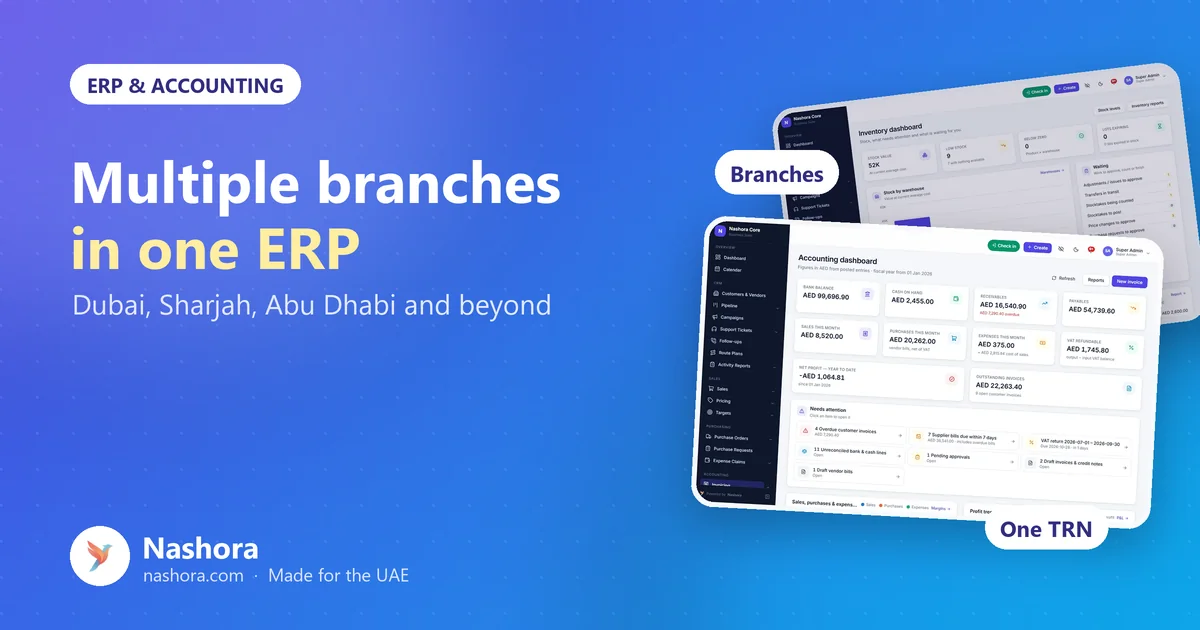
The Sharjah branch closed March with a healthy margin. The Dubai showroom says it was a bad month. Head office is working from three spreadsheets, each correct on the day somebody e-mailed it, and nobody can say with confidence which branch actually earned what. Add a small warehouse in Abu Dhabi that sells to its own customers, plus a quarterly argument about which emirate a sale belongs to for VAT, and you can see why owners start searching for a multi-branch ERP.
In plain words, a multi-branch ERP is one system where every branch works on the same customers, products, stock and books, while each document still records which branch it belongs to. Below we explain how that works day to day, show a worked branch profit example with numbers, deal with the VAT and TRN questions that trip people up, and say honestly when separate companies are the better answer than separate branches.
What a multi-branch ERP actually has to do
Strip away the brochure language and the job has three parts. It has to separate, so you can see what each branch sold, bought and spent. It has to share, so customers, products, prices and suppliers are created once instead of five times. And it has to combine, so the owner can look at the whole business without pasting workbooks together.
Most spreadsheet set-ups manage the first part by giving each branch its own file, which then kills the second and third. Most separate accounting packages do the opposite: they share everything and cannot tell you which branch made the money. A good multi-branch ERP keeps one set of records and adds the branch as a label on each transaction.
One honest caveat before we go on. If your branches never share customers, stock or staff, and each one is a separate legal entity with its own licence, you may not want one system with branches at all. We cover that choice in its own section below, because getting it wrong is expensive to undo.
Branch as a dimension on every document
The idea that makes multi-branch work is simple: the branch is a dimension, a tag carried by every document. A sales invoice, a vendor bill, a receipt, an expense claim and a stock movement each say which branch they belong to. The ledger is still one ledger. The report is just a filter.
That is very different from keeping one workbook per branch. With a dimension, a question like "what did Sharjah spend on freight last quarter?" is a report you open, not a project you start. With separate workbooks it is a morning of copying columns, and the answer is already out of date when you finish.
Branch, cost centre and project are cousins
Branches answer "where". Cost centres answer "which department or activity", and projects answer "which job". In Nashora, branches, cost centres and projects sit on documents so you can analyse income and cost the way you actually run the business and compare results against budgets. A showroom in Dubai, a warehouse in Sharjah and a long fit-out contract can each show their own profit.
Agree one rule for which branch gets the sale
The software cannot settle this for you, so settle it on paper first. Our suggestion is the branch that made the sale, not the branch whose bank account received the money, and the branch whose warehouse supplied the goods for the cost. Write the rule down. Most arguments between branch managers are really arguments about a rule nobody wrote.
Users, roles and who sees which branch
The next worry is access. A cashier in one branch should not be browsing another branch's margins, and a head-office accountant should not need five logins. In Nashora, custom roles set view, create, edit, delete, approve and export rights for every module. On top of that, each user can see their own records, their team's, their branch's, or everyone's.
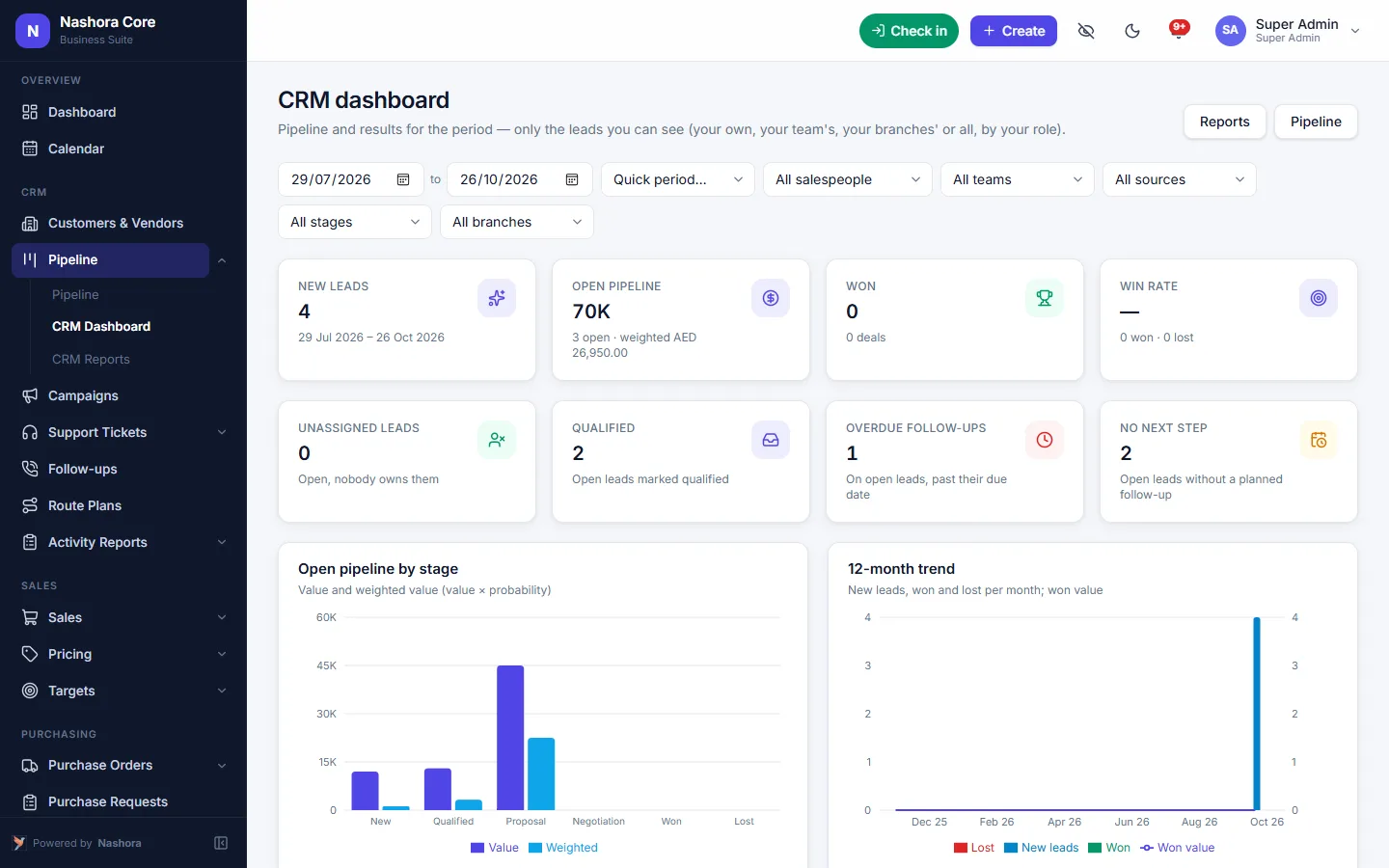
Those four scopes, own, team, branch and all, cover most real structures. A typical pattern looks like this.
- Counter or field salesperson: own records only, so they see their quotations and customers and nothing else.
- Branch sales manager: team or branch scope, so they see the whole branch pipeline and orders.
- Warehouse supervisor: branch scope for stock, with rights to create delivery notes and transfers but not to approve stock adjustments.
- Head-office finance: all records, with approve and export rights, plus approval limits by amount for bills and payments.
- Owner: all records, read-mostly, with the dashboards open every morning.
Approval limits matter more as you add branches. A branch manager can raise purchase orders up to a threshold; anything above it waits for head office. Add two-factor sign-in and the audit log, which records the user and IP address of every change, and you can answer "who changed that?" without a hunt.
Stock per warehouse and transfers between branches
Stock is where multi-branch gets physical. Each branch usually has its own warehouse or shelf, sometimes several, and customers in one emirate want goods that happen to sit in another. The system has to know exactly where each unit is.
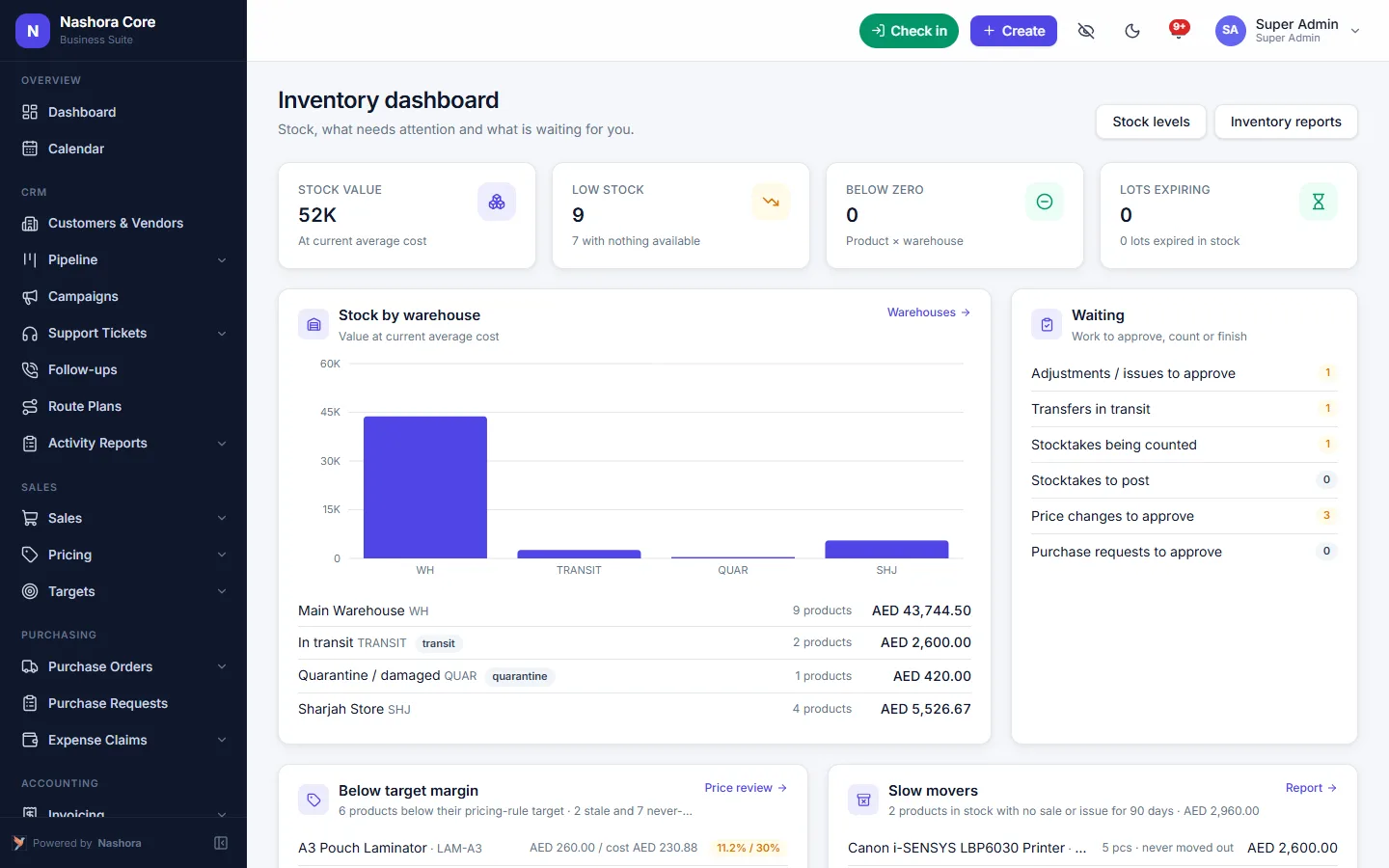
Nashora holds stock per warehouse and bin, with transfers to move it between them. A delivery note reduces stock in the warehouse it ships from, and a goods received note adds it to the warehouse that received it. A salesperson in Sharjah can check what Dubai holds before promising a customer a date, and the buyer can see which warehouse is running low and needs a purchase order.
A transfer is not a sale
Moving 100 cartons from the Dubai warehouse to the Sharjah branch within the same company does not make anybody a profit. It is a transfer: stock leaves one location and arrives in another, usually at cost, with a document at each end so the stock in transit is visible. The screenshot below shows the idea in the inventory dashboard, where stock value is listed per warehouse, including a transit location, and a counter shows transfers still on their way.
Whether a transfer between branches of one legal entity has any VAT consequence is a question for your tax adviser, because the details can depend on the structure. As a general principle, moving your own stock within one legal entity is not a sale to anyone. A sale between two separate companies is a real sale, with a tax invoice.
Stuck in transit
The commonest stock problem in multi-branch businesses is a transfer that left the sending warehouse and was never received. The stock is nowhere: not in Dubai, not in Sharjah. A weekly look at transfers still in transit, with a name against each, fixes most of it. Cycle counts and stocktakes then catch whatever is left.
Branch profit versus consolidated profit: a worked example
Here is the report owners usually want, with illustrative figures. Picture a trading company with three branches. All numbers are made up for the example, in AED, for one quarter.
| Line | Dubai | Sharjah | Abu Dhabi | Company |
|---|---|---|---|---|
| Sales | 600,000 | 400,000 | 250,000 | 1,250,000 |
| Cost of goods sold | 390,000 | 270,000 | 170,000 | 830,000 |
| Gross profit | 210,000 | 130,000 | 80,000 | 420,000 |
| Branch expenses (rent, staff, utilities) | 110,000 | 80,000 | 70,000 | 260,000 |
| Branch profit | 100,000 | 50,000 | 10,000 | 160,000 |
| Branch profit as % of sales | 16.7% | 12.5% | 4.0% | 12.8% |
| Head-office costs (not allocated) | 90,000 | |||
| Company profit | 70,000 | |||
Check the arithmetic the way your finance manager would. Dubai: 600,000 less 390,000 is 210,000 gross profit, less 110,000 of branch expenses leaves 100,000. Sharjah: 400,000 less 270,000 is 130,000, less 80,000 leaves 50,000. Abu Dhabi: 250,000 less 170,000 is 80,000, less 70,000 leaves 10,000. The three branch profits add up to 160,000, which matches the company column, and after 90,000 of head-office costs the company earns 70,000.
What does the table tell you? Abu Dhabi looks weak at a 4.0% branch margin, but its gross margin is 32%, almost the same as Sharjah's 32.5%. The difference is expenses: 70,000 of cost against 250,000 of sales. That is a rent or staffing conversation, not a pricing one. Without a branch dimension you would see only the company's 70,000 profit and guess.
To allocate head office or not
Head-office costs are the contested line. Spreading them across branches by sales, by headcount or by floor area can make a branch look worse than the cash it actually controls. Our view: judge branch managers on branch profit before head-office costs, and judge the company on the final line. If you do allocate, choose a rule once and keep it for the year, or the trend means nothing.
In Nashora the profitability reports cover product, customer and branch, and the profit and loss can be run by branch as well as for the company, with export to Excel and PDF. Profit by branch uses real product costs, with average cost or FIFO and landed costs such as freight and customs added, so the margin is not flattered by missing freight.
VAT, TRN and the emirate question
VAT is the part of multi-branch that makes owners nervous, so take it slowly. A legal entity registered for VAT in the UAE has a Tax Registration Number, a TRN, and files a VAT 201 return with the Federal Tax Authority. A single company with branches in several emirates normally has one TRN and one return. Check your own structure with your tax adviser, because groups, free zone entities and special cases can differ.
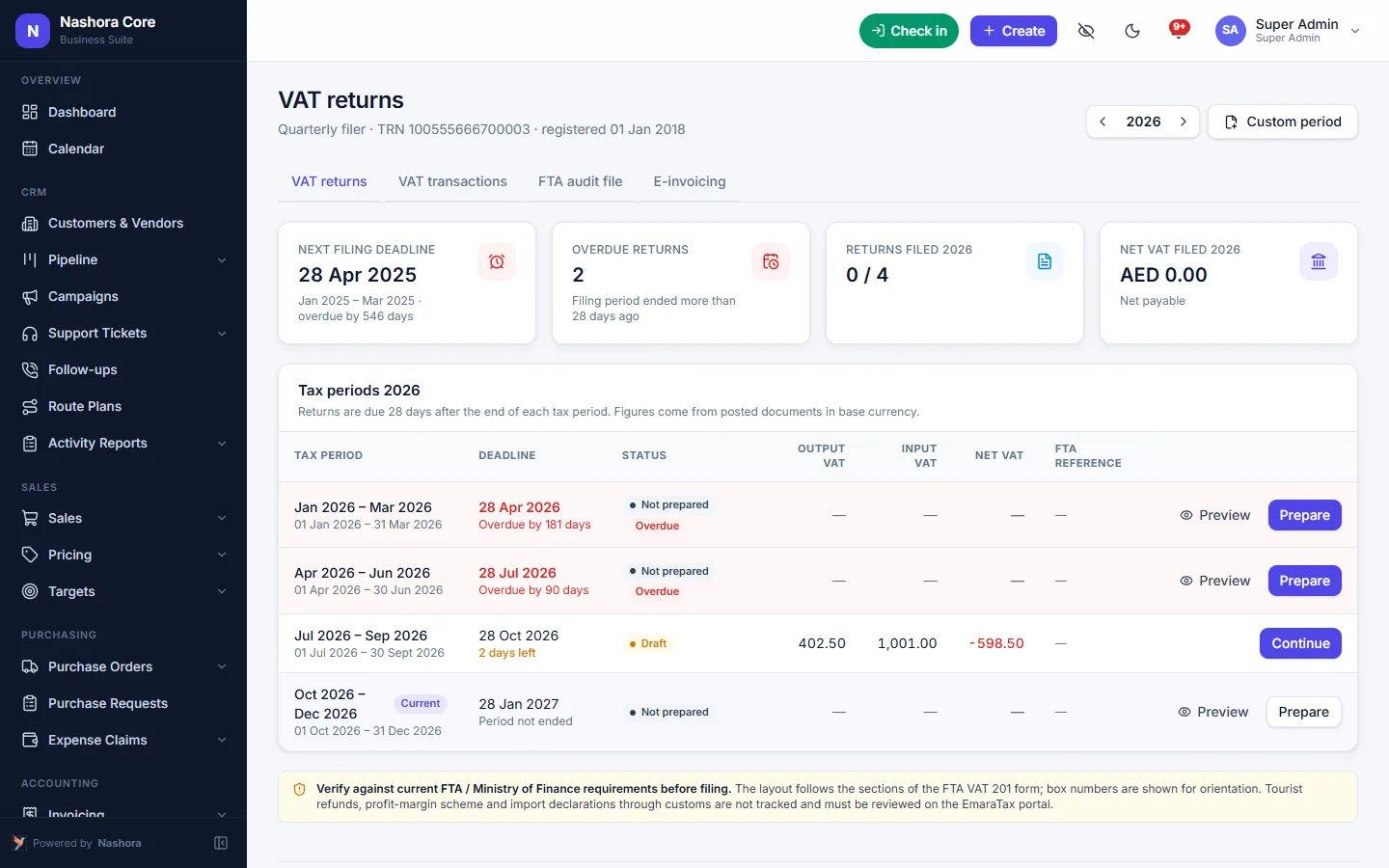
The return, though, asks where standard-rated sales were made, by emirate. Nashora's VAT 201 boxes follow the selling branch's emirate, so a business with outlets in several emirates files from one set of books. Here is the same illustrative company, assuming for simplicity that every sale is standard-rated at 5%.
| Selling branch | Emirate | Sales before VAT | Output VAT at 5% |
|---|---|---|---|
| Dubai showroom | Dubai | 600,000 | 30,000 |
| Sharjah branch | Sharjah | 400,000 | 20,000 |
| Abu Dhabi warehouse | Abu Dhabi | 250,000 | 12,500 |
| Total | 1,250,000 | 62,500 |
Five per cent of 600,000 is 30,000; of 400,000, 20,000; of 250,000, 12,500; together 62,500, which is also 5% of 1,250,000. In practice some of your sales may be zero-rated or exempt, and you set the VAT treatment on each line of the document. Input VAT on purchases is deducted in the same return, so what you pay to the FTA is output minus input for the whole company.
The screen below shows the VAT returns page, where each tax period has a deadline, a status and the output, input and net VAT figures, ready to prepare and check. From a box you can drill down to the documents behind it. If you want the arithmetic of a single invoice first, read how to calculate VAT in the UAE. Always compare the layout with the FTA's current guidance before filing.
One company with branches, or separate companies?
This is the structural question that decides everything else. A branch is a location inside one legal entity. A separate company is its own legal entity, with its own trade licence, TRN, bank accounts and books. Sometimes the law or the licence forces the answer: a mainland company and a free zone company are different entities even when the same family owns both.
| Question | One company, several branches | Separate companies |
|---|---|---|
| Legal entity and licence | One entity; branches sit under it | Each company has its own licence |
| TRN and VAT 201 | Usually one TRN and one return; sales split by emirate | One TRN and one return per company |
| Books | One set of books; branch is a tag on documents | Separate books for each company |
| Customers, products and prices | Shared, created once | Kept separately in each company |
| Stock between locations | A transfer between warehouses | A real sale with a tax invoice between the companies |
| Combined view of the group | A report filter: branch or all | Combine the figures outside the system, or in a group report |
| User access | Roles with own, team, branch or all scope | Users and roles set up in each company |
| In Nashora | One Nashora, branches on every document | Several companies in one Nashora, each with its own books, TRN, VAT return and staff, one login |
On the Nashora side of that last row, the companies sit in one Nashora: your team signs in once and switches company, each company keeps its own books and TRN, and each extra company has a fixed yearly price (AED 5,394 on Business; Enterprise includes 3). If a group sells between its companies, treat those sales like any other: tax invoices, VAT, and receivables and payables that have to agree at year end. Nashora creates the matching bill in the other company, checks that both sides agree, and leaves those sales out of the group report. Ask your accountant how to treat them.
A practical rule: if the branches share customers, staff and stock and sit under one licence, use branches. If they are separate legal entities with separate owners or separate bank mandates, keep separate companies and combine the results for reporting.
A setup checklist for your first multi-branch rollout
You do not need to bring every branch on the same day. Most multi-branch rollouts go better with one pilot branch and a clear order of work, and a few decisions made up front save a lot of rework.
- List branches and warehouses. Write down every branch, the emirate it sells in, and every warehouse or stock location, including transit and damaged stock.
- Decide the rules. Which branch gets a sale, which gets a cost, and how transfers are valued. Keep it to one page.
- Design roles and scopes. For each job title decide the module rights and whether the person sees own, team, branch or all records.
- Clean and import the master data. Customers, vendors, products and opening balances come in from Excel; our team helps with the import during setup.
- Load opening stock per warehouse. Count first, then import, so each warehouse starts from the true quantity.
- Run a pilot branch for a month-end. Raise real invoices, bills and transfers there, and compare with the old figures before adding the rest.
- Roll out the remaining branches. Short training per branch, then check the branch profit report against the managers' expectations.
| Area | Decision to make | Who decides | What you get |
|---|---|---|---|
| Branches | Names, codes and the emirate each one sells in | Owner and finance | A clean branch list on every document |
| Warehouses | One per branch, plus transit and damaged stock | Operations | Stock per location |
| Chart of accounts | Shared accounts; branch carried as a dimension, not as separate accounts | Finance manager and accountant | One chart, branch reports by filter |
| Roles and scopes | Own, team, branch or all, by job title | Owner and IT lead | Branch-limited users |
| Price lists | One list for all, or lists per branch | Sales head | Consistent or deliberately different prices |
| Approval limits | Amount thresholds for purchase orders, bills and payments | Owner and finance | Spend control without chasing |
| Opening balances | Per warehouse stock, per customer and vendor open items, bank balances | Finance with branch managers | Books that start in agreement with reality |
| Transfers | Who sends, who receives, how often in-transit stock is reviewed | Warehouse supervisors | No stock lost in transit |
| VAT | VAT treatment per line, TRN on the company, emirate per branch | Finance and tax adviser | A VAT 201 that follows the selling branch |
| Reports | The three or four reports you open every month | Owner | Branch profit, company profit, aging, stock value |
What to centralise and what branches can decide
Branch managers want freedom to do business, and head office wants control. The trick is to centralise what has to be consistent and leave the rest. Here is where we would draw the line, and you should move it to match your culture.
| Area | Centralise at head office | Let branches decide |
|---|---|---|
| Customers and vendors | Creation and clean-up, to avoid duplicates | Day-to-day contact and follow-up |
| Products and costs | Product codes, units and cost method | Local stock levels and reorder requests |
| Pricing | Base price lists, margin targets, below-cost rules | Discounts within an approved limit |
| Purchasing | Approved suppliers; orders above a limit | Small, urgent purchases below the limit |
| Accounting policy | Chart of accounts, period close, VAT filing | Coding transactions to the right branch |
| Staff access | Role design and approval of new users | Asking for access for their own team |
| Collections | Credit terms policy and write-offs | Chasing the branch's own customers |
Notice the pattern. Head office owns the master data and the rules, because errors there repeat everywhere. Branches own the daily transactions and the customer relationships, because that is where local knowledge is. A system with approval limits by amount lets you make this a setting instead of a policy memo people ignore.
Common multi-branch problems and how to avoid them
Transactions coded to the wrong branch
It happens when a head-office accountant keys a bill without asking which branch it belongs to. Prevent it with the rule from the start of this guide, and review the branch report in the first month-end when mistakes are still easy to correct. Posted documents are locked, so corrections go through credit notes or reversals, and the audit log shows what changed.
Duplicate customers across branches
Two branches create the same customer under slightly different names, and the credit position is split in two. Centralise customer creation or at least search before you add. A one-time clean-up before import is cheaper than a clean-up after a year of postings.
Everyone sees everything
The easy set-up is to give every user all-records access. It also means a trainee sees margins by customer. Use the branch scope for branch staff and keep all-records for the few people who need it.
Head-office costs buried in one branch
Rent for the head office posted to the Dubai showroom makes Dubai look worse and hides the true cost of the centre. Give head office its own branch or cost centre so these costs stand on their own line, as in the worked example above.
Different prices for the same customer
If the Sharjah branch and the Dubai branch quote the same customer different prices, the customer notices first. Price lists per customer, branch and currency allow differences on purpose, with approval for price changes and an impact view before you publish.
How Nashora handles multiple branches
Everything above is built on features that are on our public list, so here is a short, factual account of what Nashora does for a multi-branch business.
- Branches on every document. Branches and cost centres sit on documents, so profit and loss by branch is a report, and results can be compared with budgets.
- Branch-limited users. Custom roles with view, create, edit, delete, approve and export rights per module, and own, team, branch or all-records access.
- Stock per warehouse. Multiple warehouses, bins and transfers, with stock valuation reconciled to the books and cycle counts to check each location.
- Branch profitability. Profitability by product, customer and branch, on real product costs, with export to Excel and PDF.
- VAT by emirate. The VAT 201 return follows the selling branch's emirate, with drill-down to documents, plus the FTA Audit File export, validated before download.
- Price lists per branch. Price lists per customer, branch and currency, with margin targets and below-cost checks.
- Separate companies, one login. Several companies in one Nashora, each with its own books, TRN, VAT return and staff; inter-company invoices and a group view; Enterprise includes 3 companies.
You can read the full detail on the accounting and VAT software page and the CRM, sales and inventory page, or browse everything on the features list. Nashora runs in the browser, so a branch manager in Abu Dhabi and an accountant in Sharjah are looking at the same live figures.
What our feature list does not describe is a dedicated consolidation tool for several legal entities, such as intercompany eliminations. If your group needs that, say so in a demo and we will show you what the system does today rather than guess.
Serving multi-branch businesses across the UAE
We are based in Al Nahda, Sharjah, and Nashora is built for businesses in Dubai, Sharjah, Abu Dhabi, Ajman, Ras Al Khaimah, Fujairah, Umm Al Quwain and Al Ain. A retailer with outlets in three emirates and a distributor with a warehouse in an industrial zone can both work from the same browser, with nothing to install at each site.
The UAE specifics matter more with branches, not less. VAT is 5%, your TRN belongs to the company, and the sales split by emirate follows the selling branch. Payroll for branch staff runs through WPS payroll in Nashora, where work locations are set per office or site and branch managers see their own team's or branch's records while head office sees everyone. Corporate tax at 9% rewards books that show real branch profit rather than a guess. Mainland and free zone structures can differ, so confirm yours with your adviser. For the wider picture on moving stock and orders, read our guide to an inventory and sales system for UAE businesses, and for the finance side accounting software versus ERP.
What to do next
- Write the branch rules on one page. Which branch gets a sale, a cost and a transfer, and who may create customers and vendors.
- Decide branch or company. Check with your accountant whether each location is a branch of one entity or a separate legal entity.
- Draft your roles. List job titles and decide own, team, branch or all access for each.
- Count stock per warehouse. A clean opening count for every location is the foundation of branch reports.
- See it with your own branches. Book a free demo, bring your branch list and one month of figures, and we will show the branch profit and VAT split on them. The pricing page and FAQ cover plans and setup, or you can contact us directly.