
ERP software that runs your UAE business in one simple system
Nashora is cloud ERP software for UAE businesses. It brings accounting, VAT, sales, purchasing, inventory, CRM, HR and payroll together — so your team stops juggling spreadsheets and every number is in one place.
- UAE VAT & FTA audit file
- WPS payroll & gratuity
- Works in any browser
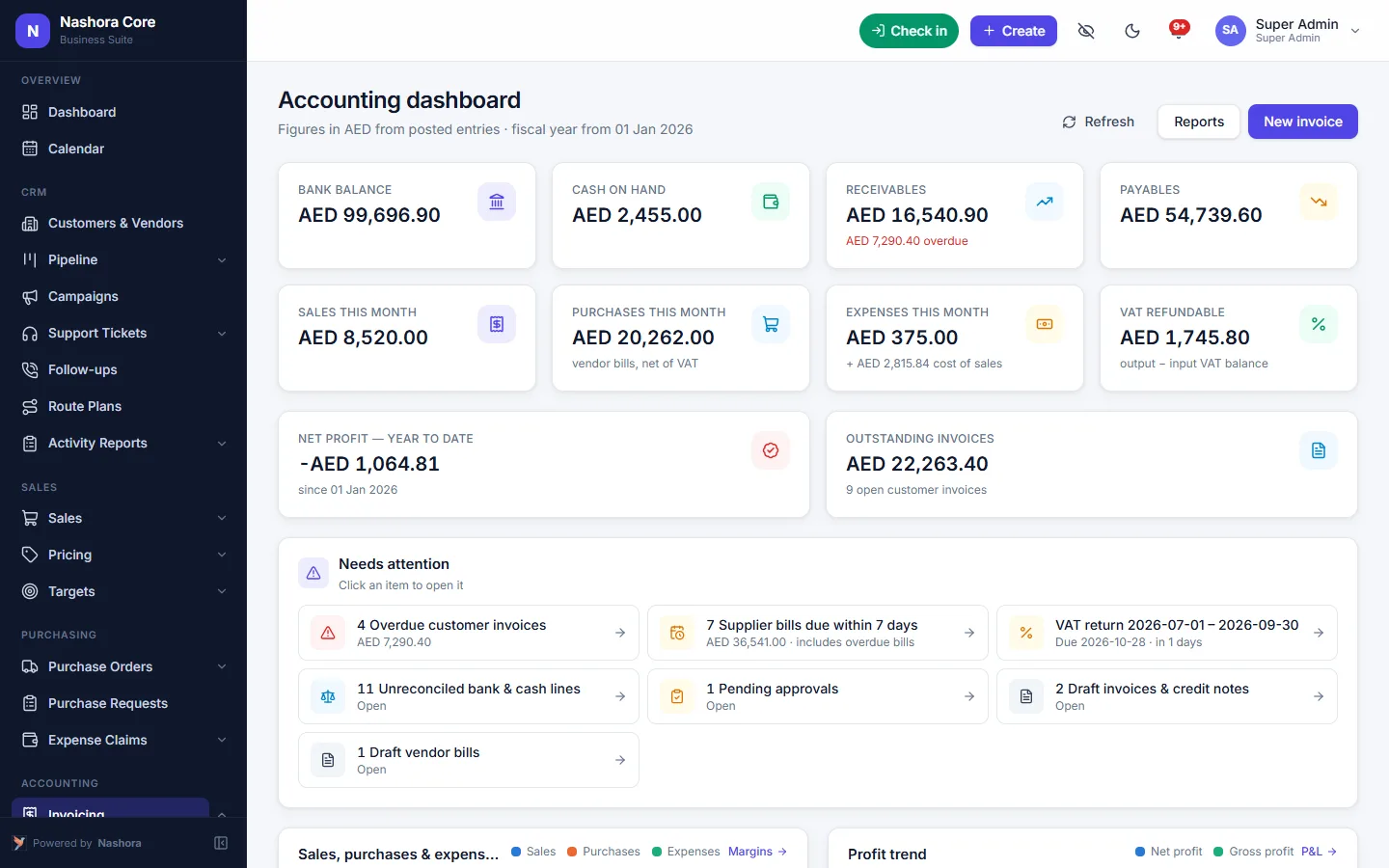
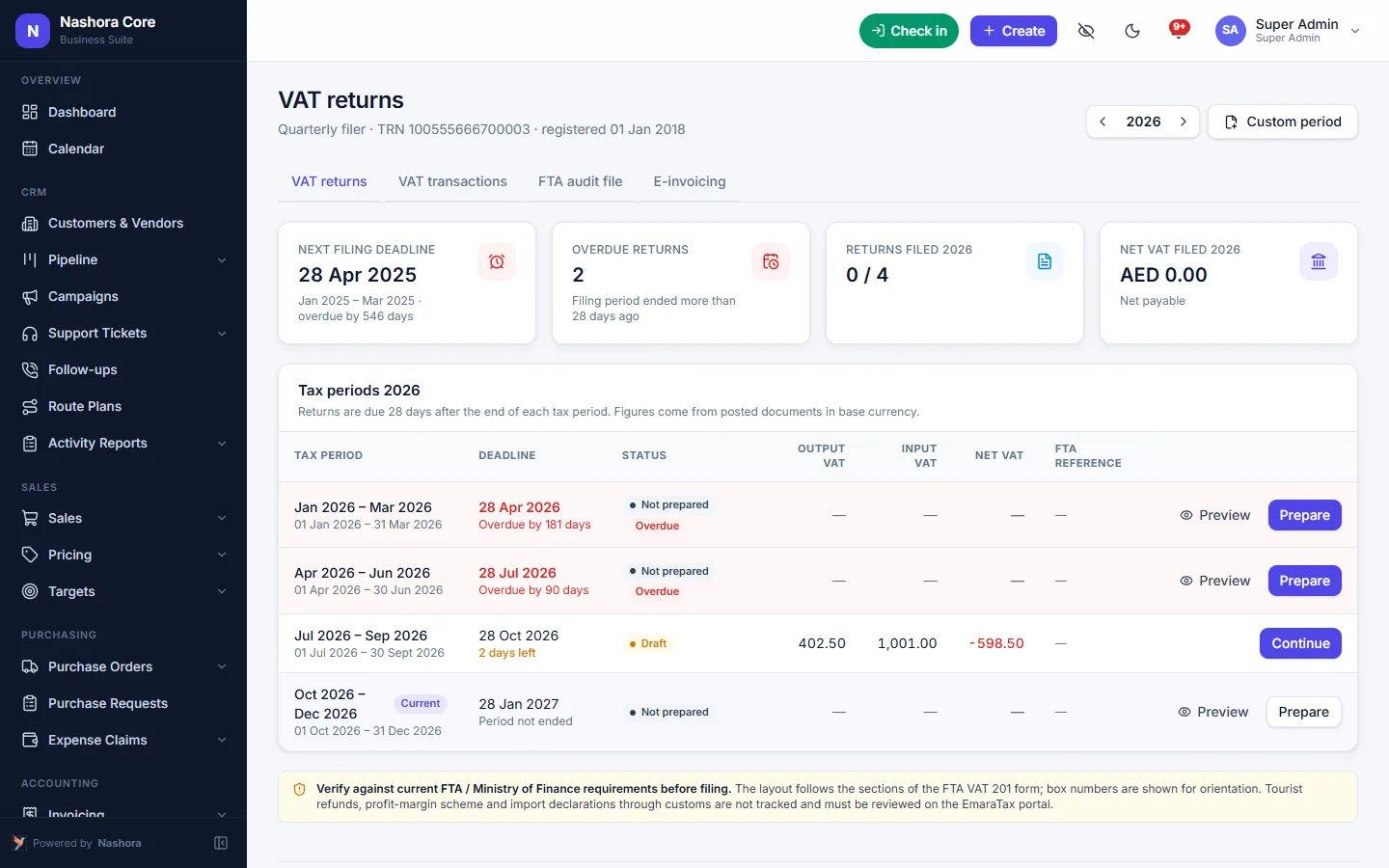
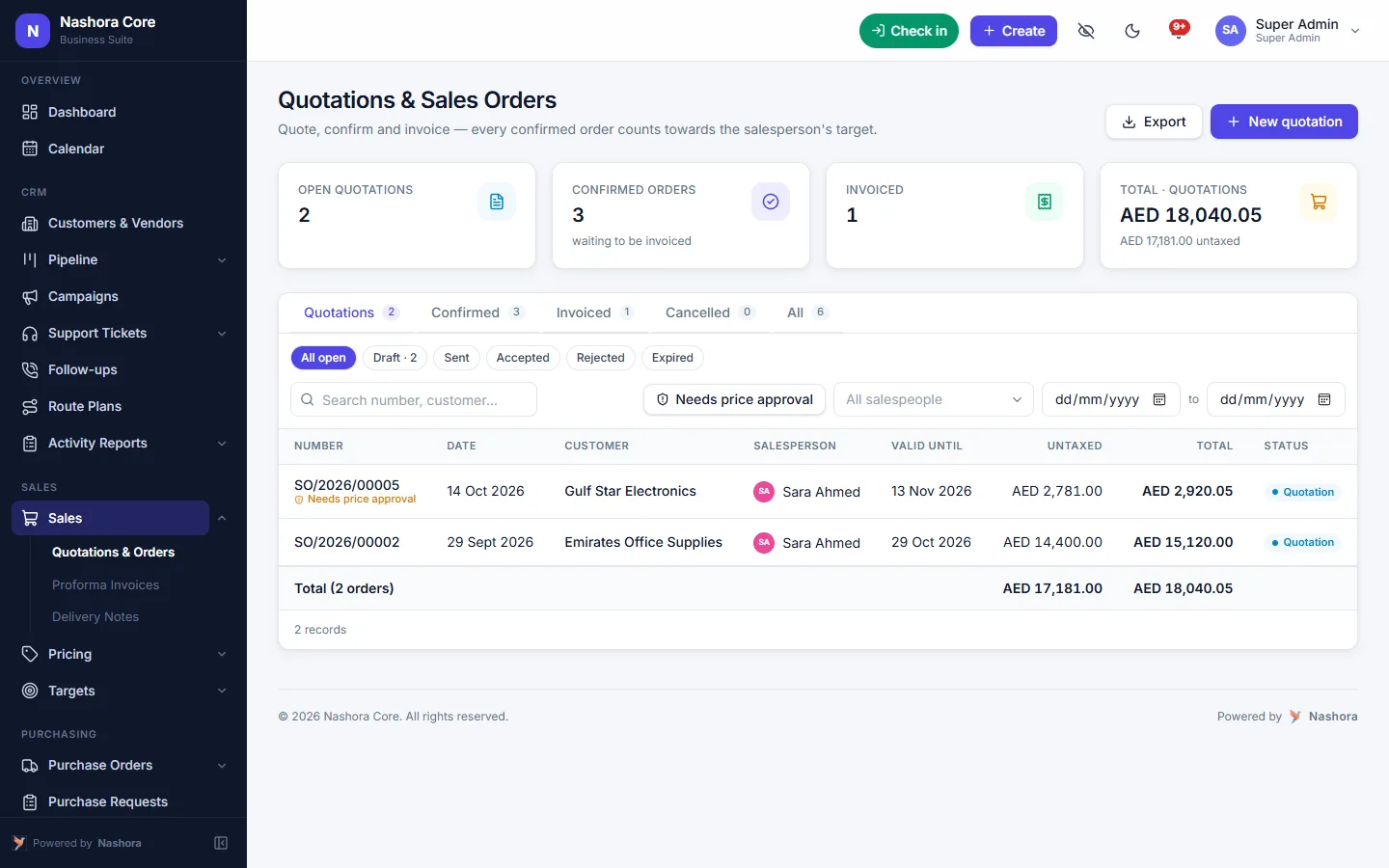
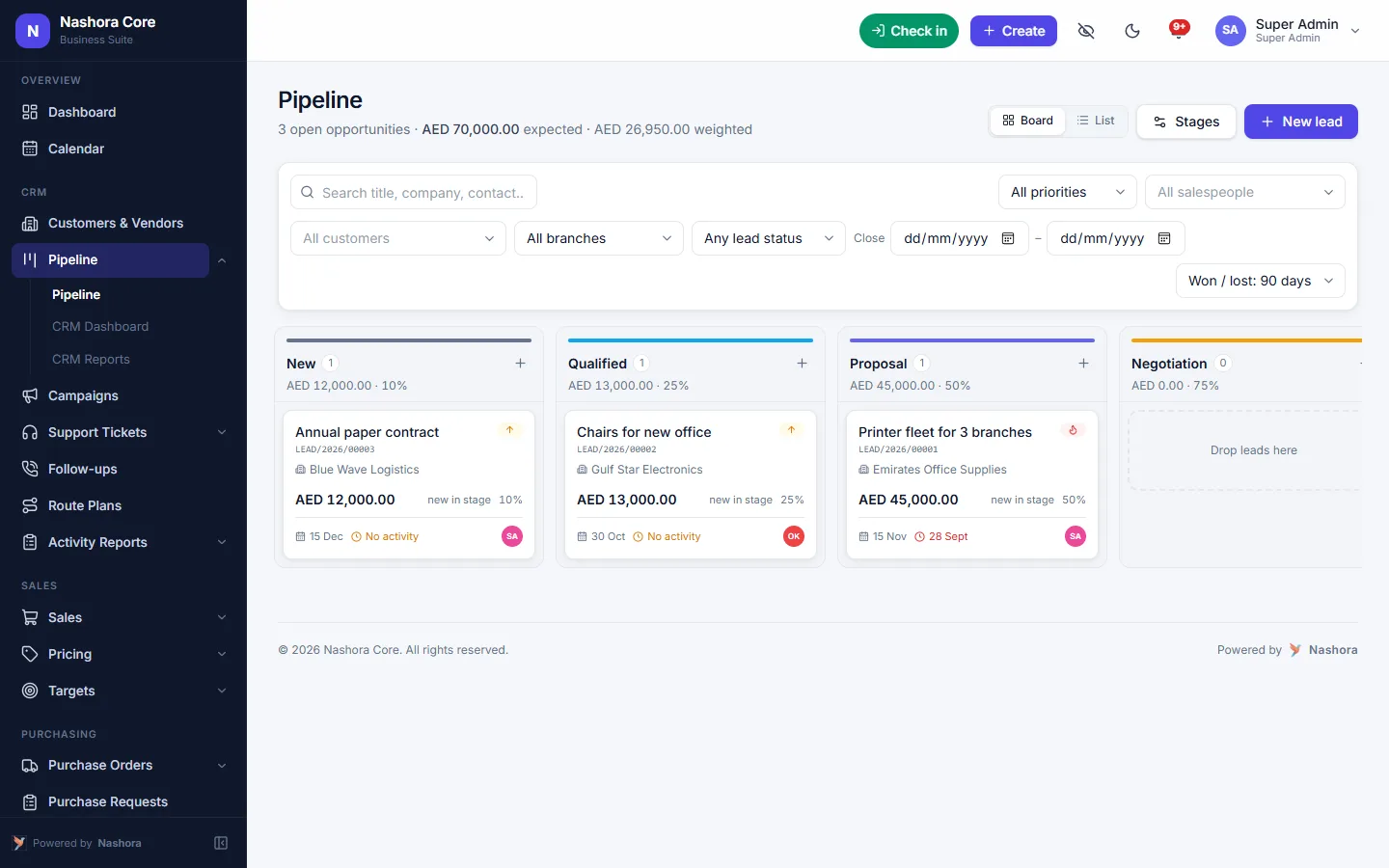
See Nashora in 45 seconds
From the dashboard to the VAT return, here is the whole system in one short film. It plays by itself, quietly. Tap the speaker if you would like the voice-over.
Jump to
Nashora ERP for India, with GST built in
The system UAE businesses run their accounting, sales, stock and HR on is coming to India. Same easy screens, with what Indian law asks for, priced in rupees.
- GST invoices: CGST + SGST or IGST, HSN / SAC
- GSTR-1 and GSTR-3B from your books
- E-invoice (IRN + QR) and e-way bills
- TDS on bills and payments
- Payroll with PF, ESI and Professional Tax
- Lakh / crore amounts, April–March year
Your UAE company
- Tax
- VAT 5%, VAT 201, FTA audit file
- Currency
- AED
- Payroll
- WPS, gratuity
Your Indian company Early access
- Tax
- GST, GSTR-1, GSTR-3B, e-invoice
- Currency
- ₹ with lakh / crore
- Payroll
- PF, ESI, PT, TDS
from ₹14,999 / year + GST
What is ERP software?
ERP (enterprise resource planning) software is one system that runs a company's core work — accounting, VAT, sales, purchasing, inventory, CRM, HR and payroll — on a single shared database. Each transaction is entered once and updates every report, instead of being copied between spreadsheets and separate apps. Nashora is cloud ERP built for UAE businesses.
All the modules you need, in one ERP system
A sale updates stock, receivables and VAT. A payroll run posts its own journal. Every module shares the same customers, employees and accounts.
Accounting & VAT
Invoices, bills, payments, bank reconciliation, cheques, petty cash, multi-currency, VAT returns and FTA audit file.
HR & Payroll
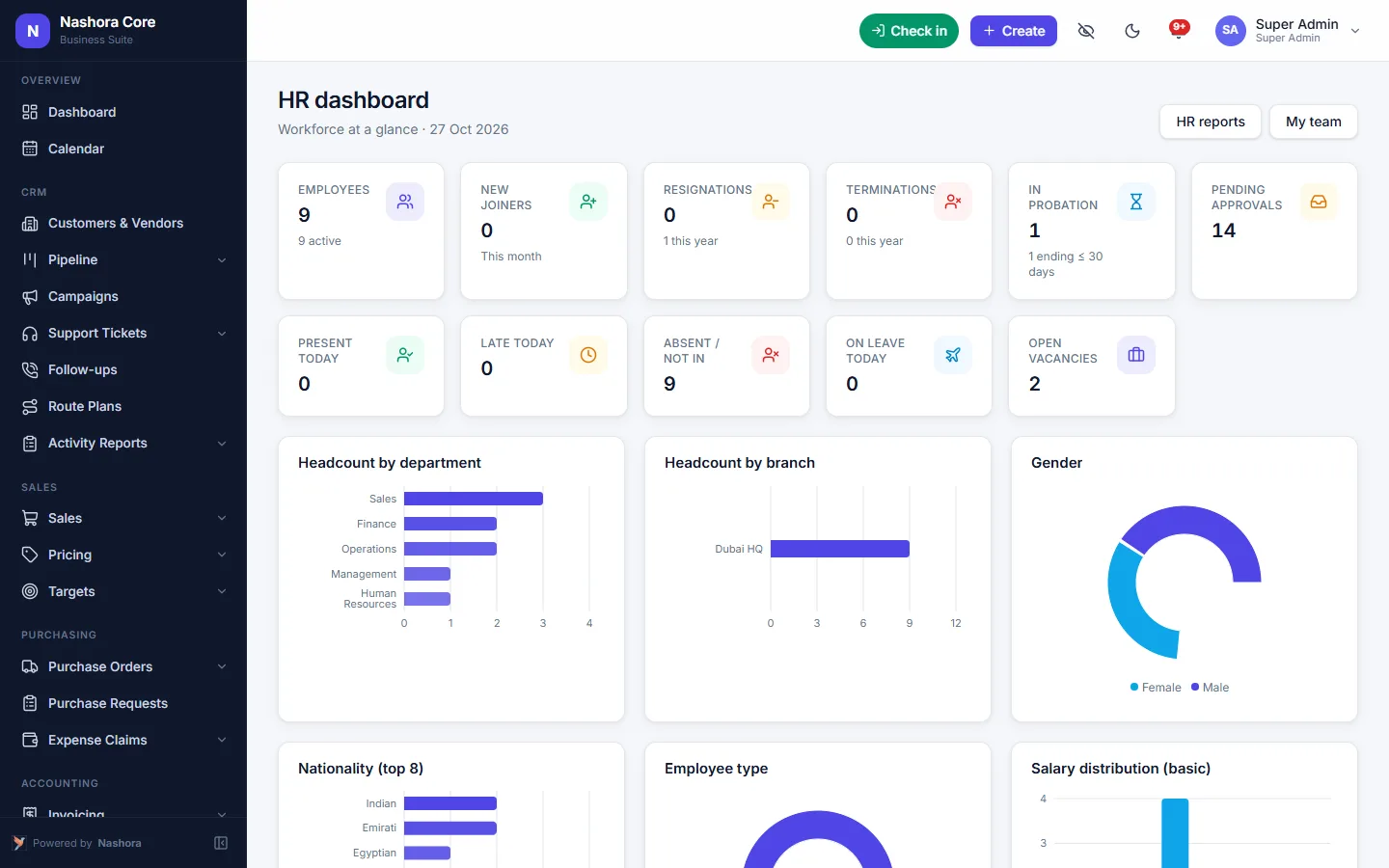
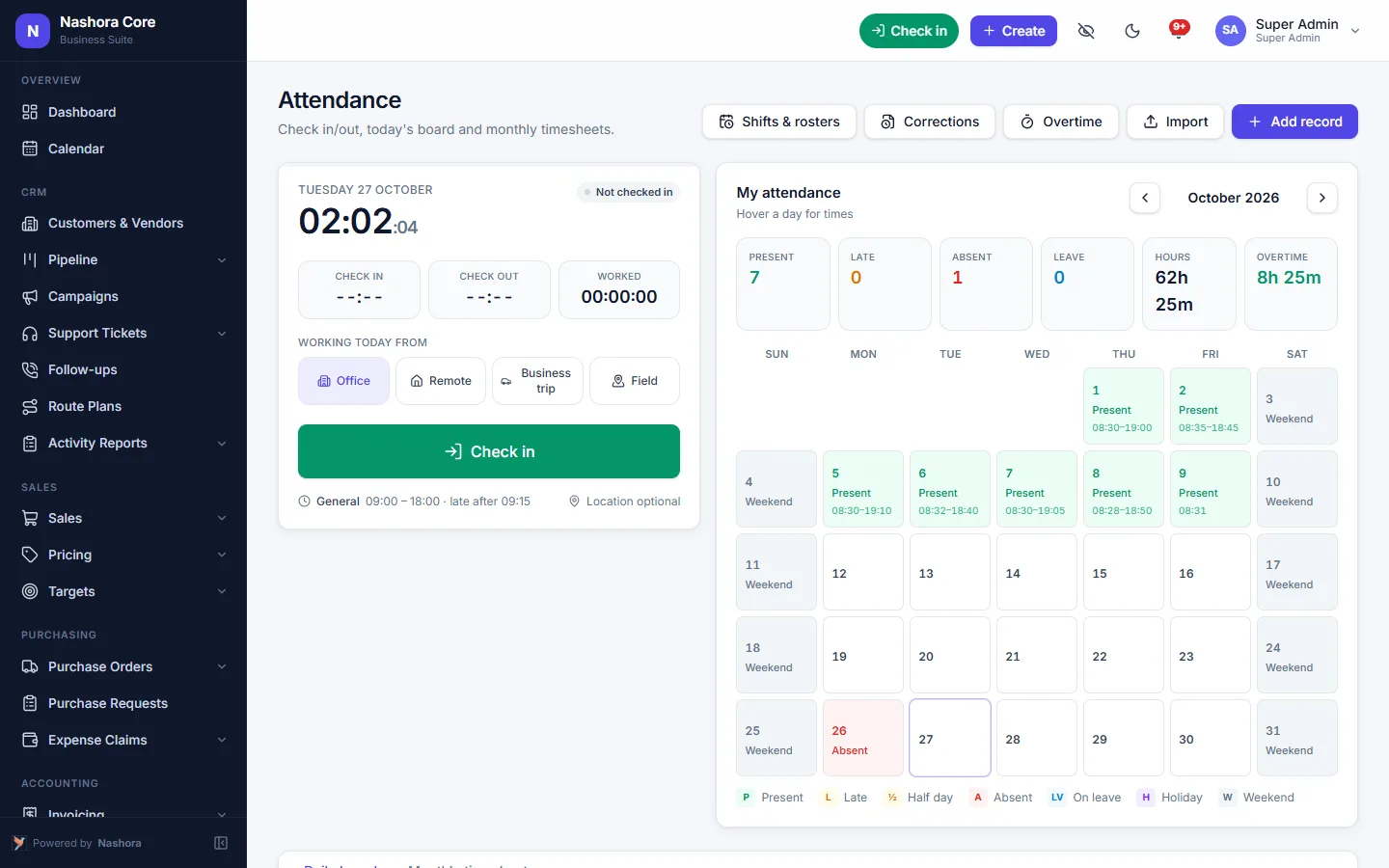
Employees, attendance, shifts, leave, payroll with WPS SIF, gratuity, loans, recruitment, performance and training.
CRM & Sales
Leads pipeline, follow-ups, route plans, campaigns, support tickets, quotations, orders, deliveries, pricing and targets.
Purchasing
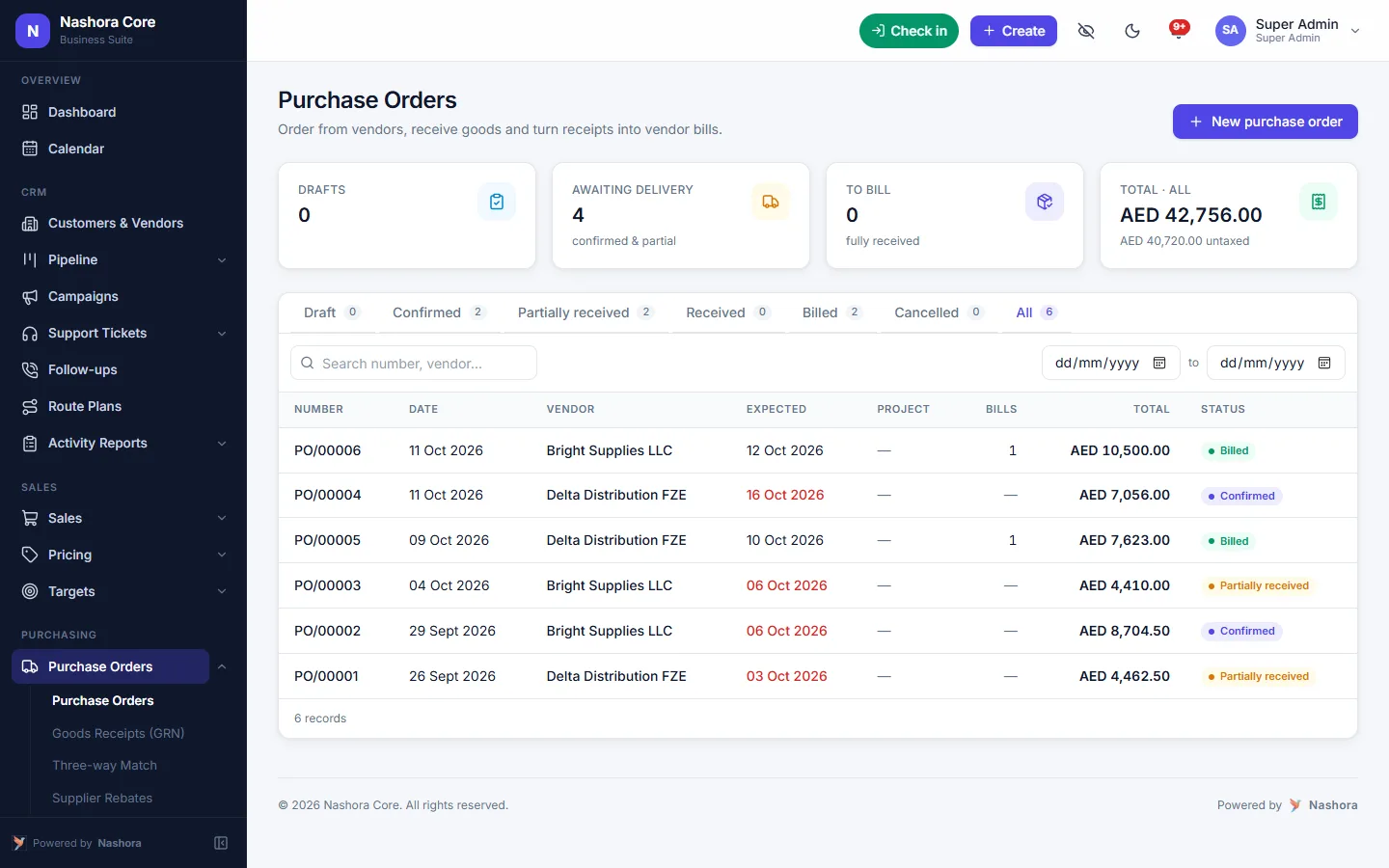
Purchase requests and orders, goods received notes, vendor bills, approvals, rebates and expense claims in any currency.
Inventory
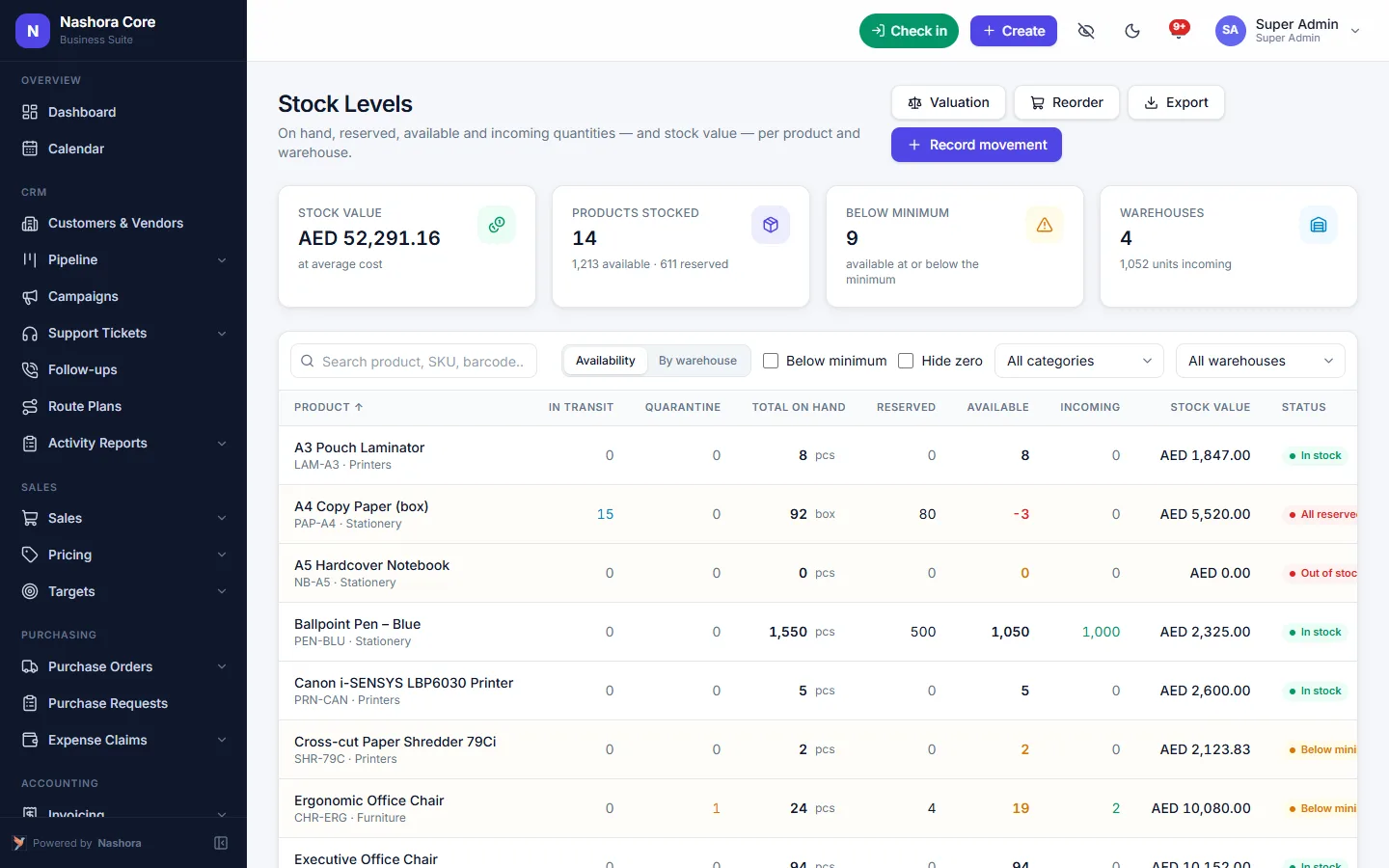
Warehouses and bins, lots with expiry, serial numbers, landed costs, reorder planning and valuation — updated by every delivery and receipt.
Reports & dashboards
Live dashboards, profitability by product and customer, P&L, balance sheet, aging, cash flow, HR and payroll reports — export to Excel.
Books that are always up to date
Every invoice, bill, payment and payroll run creates its accounting entry automatically. Close the month with confidence and file your VAT return from the system.
- Draft → post workflow with a full audit trail
- VAT returns, FTA Audit File and PINT-AE e-invoice files
- Bank reconciliation, cheques (PDC) and petty cash
- Cost centres, projects, branches and budgets
From hiring to final settlement
Keep every employee record, document and visa expiry in one place. Run payroll in minutes and download the WPS SIF file for your bank.
- Check-in button, QR code or ZKTeco / Hikvision machines
- Leave balances, approvals and holidays
- Payroll, WPS SIF, loans and UAE gratuity
- Employee self-service portal and manager approvals
Never lose track of a deal
Follow every lead from first call to paid invoice. Your sales team sees their pipeline, follow-ups and targets; managers see the whole picture.
- Pipeline board with stages and probabilities
- Quotation → order → delivery → invoice
- Route plans and activity reports for field teams
- Monthly targets per salesperson
Built to be simple for your team
Made for the UAE
VAT, FTA audit file, WPS payroll, UAE gratuity, Emirates ID and visa tracking — built in, not bolted on.
Secure by design
Roles and permissions per module, two-factor sign-in, password policies, sign-in history and a full audit log.
Cloud, any device
Works in the browser on desktop, tablet and phone. Nothing to install; your data is backed up.
Help built in
Switch on help mode for explanations on every screen, plus a step-by-step tutorial with examples.
Fits your process
Approval rules, automation, custom fields and custom modules, numbering formats, branding and Excel import.
Real support
We help you set up, import your data and train your team — and stay with you after go-live.

Keep every PostgreSQL database fast, clean and backed up
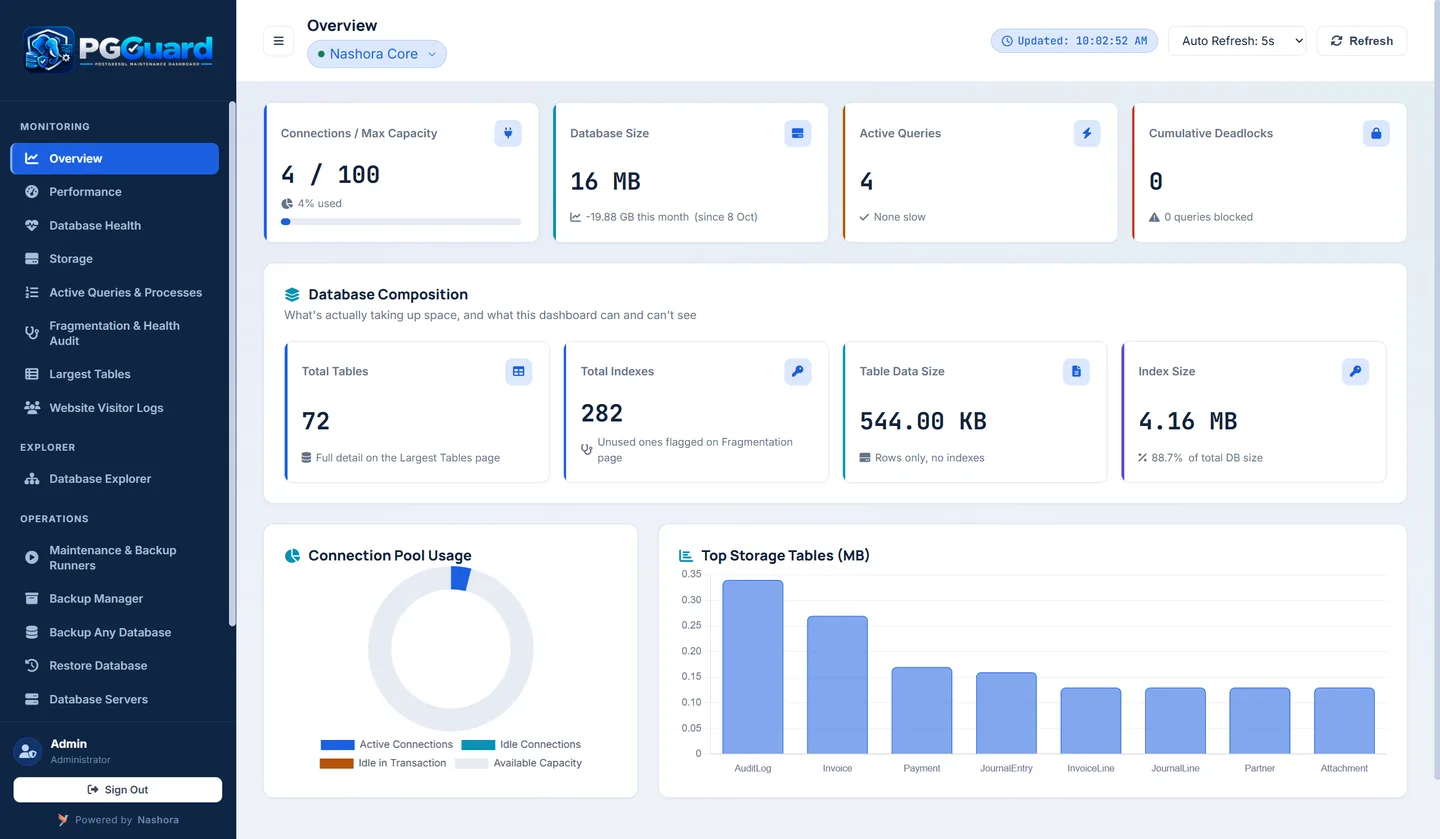
PGGuard is our Windows app for database administrators. Watch health and performance live, fix bloat in one click, run ready-made maintenance plans, and back up or restore any database — with automatic copies to Google Drive.
- Live health, performance and active queries
- Fragmentation audit with one-click fixes
- Immediate, Weekly and Monthly maintenance plans
- Backups, safe restore and Google Drive sync
Live in days, not months
Free demo
A 30-minute online walk-through of the modules you need.
Setup
We configure your company, VAT, chart of accounts, users and roles.
Data import
Customers, vendors, products, opening balances and employees from Excel.
Training & go-live
Short training for each team, then ongoing support.
What is Nashora?
Nashora is cloud ERP software for UAE businesses, based in Al Nahda, Sharjah. You will see the name written three ways: Nashora, Nashora ERP and Nashora Core. They all mean the same product. Nashora is the company, Nashora ERP is how we describe what it does, and Nashora Core is the name of the application your team signs in to.
The idea is simple. A growing company usually ends up with an accounting package, a stock sheet, a CRM or a WhatsApp group for sales, and a payroll spreadsheet. Nashora puts all of that on one database, built around the paperwork a business in the Emirates actually handles: UAE VAT at 5%, the VAT 201 return, the FTA Audit File, WPS salary files, gratuity, cheques and post-dated cheques.
What the product covers
- Accounting and VAT. Invoices, bills, payments, bank reconciliation, cheques, petty cash, multi-currency, the VAT 201 return and the FTA Audit File. Details are on the accounting and VAT software page.
- Sales and CRM. A leads pipeline, follow-ups, route plans, campaigns, support tickets, quotations, sales orders, delivery notes, price lists and monthly targets.
- Purchasing and inventory. Purchase requests and orders with approvals, goods received notes, three-way match, warehouses and bins, lots with expiry, serial numbers, landed costs and reorder planning.
- HR, attendance and payroll. Employee records, visa and document reminders, leave, attendance machines, payroll with the WPS SIF file, loans and UAE gratuity.
- Control and reporting. Dashboards, P&L, balance sheet, aging, roles per module, two-factor sign-in, an audit log and Excel import and export.
How we work with a new customer
There is no long consulting project. You book a free 30-minute online demo and we walk through the modules you care about. If it fits, we set up your company, VAT, chart of accounts, users and roles, then import your customers, vendors, products, opening balances and employees from Excel. Each team gets short training on its own screens.
After go-live we stay reachable by phone, WhatsApp and e-mail from our office in Sharjah. Pricing is published, so you can see the annual licence and the one-time installation fee on the Nashora pricing page before you speak to anyone.
Nashora and PGGuard
We also make PGGuard, a separate Windows app for PostgreSQL maintenance and backups. It is aimed at database administrators rather than office teams. If you are here for business software, everything else on this page is about Nashora ERP. You can read more about the company on the About Nashora page.
Choosing ERP software in the UAE: what actually matters
Most UAE businesses don't start with ERP software. They start with an accounting package, a payroll spreadsheet, a stock sheet only one person understands, and sales updates arriving on WhatsApp. That works until the month the VAT return doesn't match the sales report, or a salesperson promises stock that left the warehouse last Tuesday.
An ERP system fixes this by putting every department on one database. Nashora is cloud ERP built for that job in the UAE: accounting and VAT, sales and CRM, purchasing, inventory, HR, attendance and payroll, all sharing the same customers, products, employees and accounts. When you compare business management software, the useful question isn't how many modules it lists. It's whether a sale, a delivery and a payroll run each reach the books without someone typing them twice.
ERP vs spreadsheets: where the time goes
Spreadsheets are flexible, and that is the problem. Every team keeps its own version. Finance re-keys invoices into the ledger, HR rebuilds the salary sheet each month, and the owner waits for someone to combine it all into a report that is already a week old.
Separate single-purpose apps help each team on its own, but the numbers still have to be exported, matched and imported again. One app for accounting, another for payroll and a third for CRM means three customer lists, three sets of user accounts and three places to look when something doesn't add up.
How Nashora works, step by step
Here is what a normal month looks like when everything runs through one system:
- Set up once. Your chart of accounts, VAT settings, branches, users and roles are configured, and customers, vendors, products and employees are imported from Excel.
- Sell. A quotation becomes a sales order, then a delivery note that reduces stock, then an invoice that posts the receivable and the output VAT.
- Buy. A purchase request is approved into a purchase order. The goods received note updates stock, and the vendor bill is matched to what was ordered and received.
- Collect and pay. Receipts and payments are recorded against invoices and bills, and the bank statement is imported and reconciled, post-dated cheques included.
- Run payroll. Attendance comes in from the check-in button, a QR code or your ZKTeco, eSSL, BioTime or Hikvision machine. Payroll works out overtime, loans and gratuity, produces the WPS SIF file and posts its own journal.
- Close the month. Profit and loss, balance sheet, aging and stock valuation are already up to date. The VAT 201 return is prepared by period, and the FTA Audit File can be exported and validated when it is requested.
Benefits of all-in-one business software
One set of numbers
Sales, stock, receivables and VAT all come from the same transactions, so the sales report and the VAT return agree. Nobody has to ask which file is the latest.
VAT-ready from the first invoice
Every line carries its VAT treatment: standard-rated at 5%, zero-rated, exempt or reverse charge. The return is built from those lines, not from a summary sheet someone keeps by hand.
Fewer handoffs between teams
A delivery updates stock, a payroll run posts its journal, and an approved expense claim is reimbursed through the books. Each step happens once, done by the person who owns it.
Control over who sees what
Roles decide what each user can view, create, edit, delete, approve and export, module by module. Approval limits by amount, two-factor sign-in and an audit log with IP address keep the trail clean.
Live reports instead of month-end packs
Dashboards for the business, accounting, CRM, inventory and HR show today's position. Profitability by product, customer and branch is a click away, and every report exports to Excel or PDF.
Who Nashora is for
Nashora suits small and medium businesses across the UAE that have outgrown spreadsheets but don't want a long, expensive ERP project.
By business type
- Trading and distribution. Price lists per customer, lots with expiry dates, serial numbers, landed costs for freight and customs, and route plans for the field sales team. See sales, CRM and inventory software.
- Retail and showrooms. Stock across warehouses and bins, transfers, reorder planning and low-stock alerts, with pricing rules that check margins before a new price goes live. Read about stock tracking with lots and serials.
- Services and project businesses. Quotations with versions and approvals, costs tracked by project and cost centre, employee expense claims, and support tickets with SLA timers.
- Multi-branch companies. Branches in Dubai, Sharjah and Abu Dhabi work in one system. The VAT 201 return follows the selling branch's emirate, users can be limited to their own branch, and profit is reported per branch. Running more than one company? They run inside one Nashora with one login, each with its own books and TRN.
By role
- Owners and managers see the main dashboard, P&L, receivables, stock and the sales pipeline without waiting for anyone's spreadsheet. Browse all Nashora ERP features.
- Finance teams post, reconcile and close in one ledger, with period lock, fixed assets, multi-currency and the FTA Audit File. See the accounting and VAT return software.
- Sales teams work their pipeline, follow-ups and monthly targets, and can check stock before they promise a delivery date. See CRM and sales features.
- HR and payroll teams keep employee records, visa and document expiry reminders, leave balances and payroll in one place, then download the SIF file for the bank. See HR and WPS payroll in Nashora.
Why Nashora is easier to adopt than you expect
ERP has a reputation for long projects and consultants who never leave. It doesn't have to be like that. Nashora runs in the browser on desktop, tablet and phone, so there is nothing to install on staff machines and nothing to update.
We configure your company, VAT, chart of accounts, users and roles, then import customers, vendors, products, opening balances and employees from Excel. Each team gets short training on the screens it actually uses. Most companies go live within days to a few weeks, depending on the modules and how much data comes across.
After go-live, help mode explains every screen and a step-by-step tutorial walks through worked examples. If something still isn't clear, our team in Sharjah is a phone call or WhatsApp message away. You can read common questions on the Nashora FAQ page, or book a free ERP demo and see your own process running in the system.
Nashora vs spreadsheets vs separate apps
The same everyday jobs, done three ways. Separate apps means one tool for accounting, another for payroll, another for CRM.
| Task | Nashora | Spreadsheets | Separate apps |
|---|---|---|---|
| Sales invoice with VAT | VAT on every line, posted to the books automatically | Typed into a template, then into the ledger | Invoiced in one app, exported to accounting |
| VAT 201 return | Prepared from posted transactions by period | Totals added up by hand | Only as complete as the last import |
| FTA Audit File | Exported and validated from the system | Built manually when the FTA asks | Depends on the accounting app |
| Stock after a delivery | Reduced by the delivery note | Updated when someone remembers | Separate stock app, synced by export |
| Quotation to invoice | Quotation → order → delivery → invoice in one flow | Copied between files | Re-keyed from CRM into accounting |
| Purchase approvals | Approval rules by amount, three-way match | E-mail approvals, checked by eye | Often a separate tool, or missing |
| Bank reconciliation | Statement import and matching, PDC tracked | Ticked off line by line | In the accounting app only |
| Attendance | Check-in button, QR code or attendance machines | Copied from machine reports | Separate attendance app |
| Payroll and WPS SIF file | Generated from the payroll run | Built by hand | Payroll app; journal re-entered in accounts |
| Gratuity and final settlement | Calculated in payroll | A formula per employee | Depends on the payroll app |
| Owner's view of the business | Live dashboards, P&L and aging | Combined by hand each month | One report per app |
| Access control and audit trail | Roles per module and a full audit log | Anyone with the file can change it | Separate users and logs in each app |
Simple yearly pricing, in dirhams
One annual licence per company, plus a one-time installation fee in the first year that covers installation and training. Pick the plan that matches your team and modules.
Starter
AED 2,508 / year
3 users. Books, invoices and UAE VAT.
Business
AED 6,468 / year
10 users. Adds CRM, sales, purchasing and full inventory.
Complete
AED 10,788 / year
15 users. Adds HR, attendance and WPS payroll.
Enterprise
from AED 21,588 / year
30 users. 3 companies, group reports, custom work.
Starter
₹14,999 / year
3 users. Books, GST invoices and GST returns.
Business
₹39,999 / year
10 users. Adds CRM, sales, e-invoice, TDS and full inventory.
Complete
₹64,999 / year
15 users. Adds HR, attendance and payroll with PF and ESI.
Enterprise
from ₹1,29,999 / year
30 users. 3 companies, group reports, custom work.
Introductory prices for the India edition (early access), excluding 18% GST.
See full pricing and what each plan includesSee full India pricing and what each plan includes
Accounting CRM: a sales pipeline that talks to your books
Picture a sales manager who closes a deal on a Thursday afternoon. The finance team hears about it on Sunday, when a PDF quotation is forwarded with the question "did this one go through?" Nobody did anything wrong. The CRM and the accounts simply live in different places, so every handover is a message someone has to write.
That is the gap an accounting CRM closes. In Nashora, the customer you chase in the pipeline is the same customer record the invoice posts against. A lead becomes a quotation, the quotation becomes a sales order, and the invoice lands in receivables with the VAT already worked out. Finance doesn't re-key anything, and sales can see which customers are still waiting to be invoiced or collected.
If you are weighing CRM with invoicing against a stand-alone CRM plus a stand-alone accounting package, our guide on accounting and CRM software in the UAE goes through the trade-offs in more detail.
Stock-aware CRM, inventory and sales in one system
Every trading company has heard some version of "we promised it, but it isn't in the warehouse." A stock-aware CRM is meant to stop exactly that. The salesperson writing a quotation can look at stock levels first, because the CRM and the inventory are the same system, not two files that were last matched on Tuesday.
On the inventory side, Nashora tracks multiple warehouses and bins, lots with expiry dates, serial numbers and landed costs for freight and customs. A delivery note reduces stock, a goods received note increases it, and reorder planning, backorders and low-stock alerts tell the buyer what to order next. Because the same documents feed the accounts, stock valuation and the ledger don't drift apart.
Honestly, if you only sell services, you may never need most of this. If you sell products, it is the difference between guessing and knowing. We explain the idea in what a stock-aware CRM is, and the day-to-day mechanics in our post on an inventory and sales system for the UAE. The module detail is on the CRM, sales and inventory software page.
A sales system that follows the deal all the way to the invoice
A good sales system is boring in the right places. The pipeline board shows leads by stage with probabilities. Follow-ups are dated, so a call that was promised for Monday shows up on Monday. Quotations can carry versions and approvals, which matters the first time a discount needs a manager's sign-off.
Price lists and pricing rules sit behind the quotation, and margin checks flag a price that would sell below your floor. Field teams get route plans and activity reports, and each salesperson has a monthly target that managers can compare with actual sales. Nothing here is exotic. The point is that every step lives next to stock and accounts. Read more in sales systems for UAE businesses, or book a CRM and sales demo.
ERP vs separate apps: where the integration cost hides
Separate apps are not a mistake. For a company with one pressing problem, say invoicing and nothing else, a single-purpose tool can be the right call. The trouble starts when the second and third apps arrive, because the cost moves out of the subscription and into the gaps between them.
What separate apps cost you
- Three customer lists that drift apart, each one slightly out of date.
- Exports and imports at month-end, and the arguments about which file was the latest.
- Separate users, passwords and permissions to manage and to switch off when someone leaves.
- A VAT return and a sales report that disagree, with nobody sure which is right.
What an ERP costs you instead
One system means one way of working. You adopt its approval flow, its screens and its numbering, and you give up the freedom to pick a different favourite tool for each department. For most small and medium companies we think that trade is worth it, but we'd rather you decide with the facts. The comparison table above sets the everyday jobs side by side, and the full Nashora feature list shows what sits in the ERP.
ERP for SMEs in the UAE: how to decide
Choosing an ERP for a small business is mostly about what to leave out. You don't need every module on day one. A sensible way to approach it:
- Start with the job that hurts most. For many companies it is VAT and invoicing. For others it is stock, or payroll and the WPS file.
- Check the UAE basics. Ask to see the VAT 201 return, the FTA Audit File export and a WPS SIF file, using your own sample data if possible.
- Ask how your data gets in. Customers, vendors, products, opening balances and employees should come across from Excel, with someone helping.
- Look at pricing by users and modules. Starter covers accounting, VAT, invoices and basic stock. Business adds CRM, quotations, purchasing, full inventory, expenses and projects. Complete adds HR, attendance and WPS payroll.
- Pick a go-live date and a first team. One team live and happy beats five teams half-trained.
The pricing page shows what each plan includes, and the Nashora FAQ answers the questions we hear most often.
Applications: three ordinary days in Nashora
These are illustrative scenarios, not customer stories. They show how the pieces fit on a normal working day.
A Monday in sales
A sales rep opens the pipeline, works through today's follow-ups and turns an accepted quotation into a sales order. Before confirming the delivery date, she checks stock. The order goes to the warehouse without a single message being typed.
A Wednesday in the warehouse
The storekeeper issues a delivery note against that order, picking from the right bin and, where it applies, the right lot or serial number. Stock falls on the spot. When a purchase order arrives, the goods received note adds it back, and the vendor bill is matched to what was ordered and received.
Month-end in finance
Sales, purchases, payroll and bank lines have already posted. The accountant reconciles the bank statement, reviews the P&L and balance sheet, checks the VAT 201 return and locks the period. It is a review, not a rebuild.
Serving businesses across the UAE
Nashora is a cloud ERP, so it works the same for a company in Dubai, Sharjah, Abu Dhabi, Ajman, Ras Al Khaimah, Fujairah, Umm Al Quwain or Al Ain. Our own office is in Al Nahda, Sharjah. We run demos online, and support comes by phone, WhatsApp and e-mail, so you don't need us in the room.
The UAE context is built into the product rather than added afterwards. VAT at 5% sits on every document line, and each company keeps its own TRN. The VAT 201 return follows the selling branch's emirate, which helps if you invoice from branches in more than one emirate. Payroll produces the WPS SIF file and calculates gratuity under UAE labour law, and the system exports the FTA Audit File and PINT-AE e-invoice files as e-invoicing is phased in.
Free zone and mainland companies both need proper books, and corporate tax at 9% means your accountant needs a clean P&L and balance sheet at year-end. Nashora keeps those reports ready, with AED as the base and any other currency supported for invoices and payments. If you run a group, each company runs inside the same Nashora with its own ledger, TRN and VAT return, and one login for your team. Contact the Nashora team to talk through your setup.
Nashora ERP specification at a glance
The main areas of the system and what each one does.
| Area | What it does | Details |
|---|---|---|
| Accounting | Invoices, bills, payments, journals, recurring entries | Draft to post workflow, period lock, audit trail |
| Bank and cash | Bank reconciliation, cheques (PDC), petty cash | Statement import and matching |
| Currency | Multi-currency with exchange gains and FX revaluation | AED base, other currencies on documents |
| UAE VAT | VAT on every line, VAT 201 return by emirate | Standard, zero-rated, exempt and reverse charge |
| FTA and e-invoicing | FTA Audit File export with validation, PINT-AE XML | E-invoice XML is passed to your accredited provider |
| CRM | Leads pipeline, follow-ups, route plans, campaigns, tickets | Stages with probabilities, support SLA timers |
| Sales | Quotations, sales orders, delivery notes, targets | Price lists, pricing rules and margin checks |
| Purchasing | Purchase requests and orders, GRN, vendor bills | Approvals by amount, three-way match |
| Inventory | Warehouses, bins, lots, serials, landed costs | Expiry dates, stocktakes, reorder planning |
| HR and attendance | Employee records, documents, leave, attendance | Check-in button, QR code, ZKTeco, eSSL, BioTime, Hikvision |
| Payroll | Payroll run, WPS SIF file, loans, gratuity | Posts its own journal; payslips by e-mail |
| Security | Roles per module, two-factor sign-in, audit log | Audit log records IP address |
| Reports | Dashboards, P&L, balance sheet, aging, profitability | Export to Excel and PDF |
| Delivery | Cloud, in the browser on desktop, tablet and phone | Managed cloud database with backups |
Business type to what you get
| Business type | Modules they lean on | What it gives them |
|---|---|---|
| Trading and wholesale | Sales, purchasing, inventory, accounting | Price lists, landed costs and stock that follows every delivery |
| Distribution | CRM, route plans, lots and serials | Field teams with route plans and traceable batches |
| Retail and showrooms | Inventory, pricing rules, accounting | Stock across warehouses, reorder planning, margin checks |
| Services and contracting | Quotations, projects, expenses, HR | Costs by project and cost centre, quotation versions, tickets with SLA timers |
| Food and consumer goods | Inventory with lots and expiry | Expiry dates tracked per lot |
| Multi-branch companies | Branches, accounting, VAT | VAT 201 by selling emirate, profit per branch, branch-limited users |
Frequently asked questions about ERP software in the UAE
What is ERP software and why would a UAE business need it?
ERP software combines accounting, sales, purchasing, inventory, CRM, HR and payroll in one system with one database. For a UAE business that means VAT is calculated on every invoice, stock moves with every delivery, and payroll posts its own journal. You stop re-keying the same numbers into spreadsheets and separate apps, and month-end reports come from data that is already there.
Is Nashora suitable for small and medium businesses in the UAE?
Yes. Nashora is priced by the number of users and the modules you need, so a small company can start with the modules it uses today and add more as it grows. It runs in the browser on your own server (a rented cloud server is enough), and we install it and help with setup, data import and training.
Does Nashora handle UAE VAT and the VAT 201 return?
Yes. Every document line carries its VAT treatment: standard-rated, zero-rated, exempt or reverse charge. The VAT 201 return is prepared by period and by the selling branch's emirate, with the goods-import and reverse-charge boxes filled from your transactions. You can also export and validate the FTA Audit File (FAF) from the system.
Can Nashora produce the WPS SIF file for salary payments?
Yes. The monthly payroll run produces the WPS SIF file for your bank or exchange house, plus a bank transfer file and payslips by e-mail. Overtime, proration, loans, salary advances, UAE gratuity and final settlements are handled in payroll, and each payroll run posts its own journal to the books.
Is Nashora a cloud ERP, or do I need to install it?
Nashora is cloud ERP. It runs in the web browser on desktop, tablet and phone, so there is nothing to install for your users. Data is stored in a managed cloud database with backups, and your team can work from the office, the warehouse or out on the road.
How do I move from Excel spreadsheets to Nashora?
Customers, vendors, products, opening balances, employees, attendance, leave balances and salaries can all be imported from Excel. Our team helps with the import during setup, so you start with your real data rather than a blank system. Reports can still be exported to Excel and PDF whenever you need them.
Can one ERP system cover branches in Dubai, Sharjah and Abu Dhabi?
Yes. Branches are set up inside one Nashora, and the VAT 201 return is reported by the selling branch's emirate. Users can be limited to their own branch's records, and profitability reports show results per branch. If your businesses are separate companies, they run as separate companies inside one Nashora, each with its own books, TRN and VAT return, with one login and a group view.
Does Nashora include CRM and inventory, or only accounting?
It includes both. The CRM covers leads, pipeline stages, follow-ups, route plans, campaigns and support tickets with SLA timers. Inventory covers multiple warehouses and bins, lots with expiry dates, serial numbers, landed costs, stocktakes and reorder planning. Both feed the same accounts, so a delivery updates stock and an invoice updates receivables and VAT.
How much does ERP software cost for a UAE business?
Nashora is sold as an annual licence. Plans start at AED 2,508 a year for 3 users (Starter), with Business at AED 10,788, Complete at AED 10,788 and Enterprise from AED 21,588. Each plan has a one-time installation fee in the first year, renewals cost the licence only, and extra users, payroll employees and companies are priced per year. See the pricing page for the full comparison.
How long does it take to implement Nashora ERP?
Most companies go live within days to a few weeks, depending on the modules and the amount of data to import. The usual steps are a free online demo, setup of your company, VAT, chart of accounts and users, data import from Excel, and then short training for each team.
Is Nashora ready for e-invoicing in the UAE?
Nashora produces PINT-AE e-invoice XML files that you pass to your accredited e-invoicing service provider. As e-invoicing is phased in across the UAE, the invoice data comes from the same documents you already issue in Nashora. Talk to us about how it fits with your provider.
Is my business data safe in a cloud ERP?
Data is stored in a managed cloud database with backups. Every change is recorded in the audit log with the IP address, posted accounting documents are locked, and roles control what each person can see and do. Sign-ins can be protected with two-factor authentication and password policies.
What is Nashora, and what is Nashora Core?
Nashora is a company based in Al Nahda, Sharjah that builds cloud ERP software for UAE businesses. Nashora ERP is how we describe the product, and Nashora Core is the name of the application your team signs in to. It covers accounting, VAT, sales, CRM, purchasing, inventory, HR, attendance and WPS payroll on one database.
Is Nashora an accounting CRM with stock levels?
Yes. The CRM, accounting and inventory share one database, so a lead becomes a quotation, an order, a delivery and an invoice without re-keying. Salespeople can check stock before they promise a delivery date, and each delivery reduces stock while the invoice posts receivables and VAT. It is a stock-aware CRM that talks to your books.
Can Nashora work as a sales and inventory system for my company?
Yes. Nashora covers the pipeline, quotations, sales orders, delivery notes, price lists, pricing rules and monthly targets, alongside warehouses, bins, lots with expiry, serial numbers, landed costs and reorder planning. Sales and stock sit in the same system as accounting. The CRM and inventory modules come with the Business plan and above.
See Nashora with your own workflow
Book a free 30-minute online demo. We'll walk through the modules you need and answer your questions — no obligation.