
It is a Thursday afternoon. The disk in the office server makes a noise it should not, then stops. You open the backup folder, relieved, and find the newest file is dated fourteen months ago. The one before it is zero kilobytes.
That story is not rare, and it is almost never about bad luck. It is about a backup that was set up once, never watched and never restored. This guide is a plain, Windows-focused walk through PostgreSQL backup: what a logical backup is, which format to choose, how to run pg_dump and pg_restore step by step, how to schedule it, how long to keep copies, where to send them offsite and how to prove they work. If you also look after the database itself, the companion piece on PostgreSQL maintenance covers VACUUM, bloat and monitoring.
We write for software houses and small IT teams in the UAE who look after PostgreSQL on Windows servers, but nothing here is specific to one application.
What a logical backup is, and what it is not
pg_dump produces a logical backup. It connects to one database, takes a consistent snapshot of it and writes out what is needed to rebuild it: table definitions, data, indexes, constraints and functions. Users can keep working while it runs. It does not block normal reads and writes, although it adds load and can delay schema changes, so run it when the system is quiet if you can.
Three things people often miss:
- It covers one database at a time. If your server holds several, each needs its own dump.
- It does not include roles. Users and their passwords live at cluster level. Save them separately with pg_dumpall --globals-only, otherwise a restore on a fresh server may fail on missing owners.
- It is not a copy of the data folder. Copying the files of a running PostgreSQL server gives you something that usually will not start. A file copy is only valid if the server is stopped, or if it is made with PostgreSQL's proper base-backup tools.
The big advantage of a logical dump is portability. You can restore it on another machine, another operating system or a newer PostgreSQL version. The disadvantage is that it captures one moment only. Restore it and you are back at the time the dump started, with everything since then gone.
Choosing a PostgreSQL backup format: custom, plain, directory or tar
pg_dump can write four formats, selected with -F. Pick on purpose, because the choice decides how you can restore.
| Format | Flag | Restore with | Parallel | Selective restore | Best for |
|---|---|---|---|---|---|
| Custom | -Fc | pg_restore | Restore only (-j) | Yes, pick tables or sections | The sensible default for most business databases; compressed by default |
| Directory | -Fd | pg_restore | Dump and restore (-j) | Yes | Large databases, where parallel dumps save real time |
| Plain SQL | -Fp (the default) | psql | No | Only by editing the text | Small databases, readable scripts, moving between versions, schema-only files |
| Tar | -Ft | pg_restore | No | Yes | Rarely needed; no compression, so custom is usually better |
If you do not want to think about it, use custom format. It is compressed, pg_restore can restore a single table from it and it can restore in parallel. Choose directory format when the database is big enough that a single-threaded dump is the bottleneck. Choose plain SQL when you want a file a human can open in a text editor, for example to review a schema, or when you are migrating between versions. Plain files restore through psql, one statement at a time, so they are the slowest to bring back.
How to back up and restore PostgreSQL on Windows, step by step
The commands below use PowerShell. Change the version number in the path to match your installation, and change database names to yours.
- Find the right PostgreSQL tools. Open the bin folder of your PostgreSQL install (for example C:\Program Files\PostgreSQL\16\bin) and check pg_dump.exe is there. Use a pg_dump that is the same version as the server or newer, never older.
- Store the password safely. Create a pgpass.conf file in %APPDATA%\postgresql with one line per connection, so scripts never carry the password in plain sight.
- Pick a backup folder on another drive. Create a folder such as D:\Backups on a different physical disk from the PostgreSQL data folder. A backup on the same disk dies with the same disk.
- Run pg_dump in custom format. Run pg_dump with -Fc and -f to write a compressed, date-stamped .dump file for the database. Use -f rather than shell redirection.
- Check that the file is real. Look at the file size, then run pg_restore -l on it. If it prints a list of tables and objects, the archive is readable.
- Create an empty scratch database. Use createdb to make a new, empty database such as erp_restore_test. Never practise on the live one.
- Restore with pg_restore. Run pg_restore with -d for the scratch database and -j 4 for four parallel jobs. Watch for errors.
- Check the data, then clean up. Count rows in a few key tables, open the application against the scratch database if you can, then drop the scratch database and note the date of the test.
Here is what that looks like in practice. First, the setup and the backup:
cd "C:\Program Files\PostgreSQL\16\bin"

# %APPDATA%\postgresql\pgpass.conf, one line per connection:
# localhost:5432:erp_db:postgres:YourPasswordHere

.\pg_dump.exe -h localhost -p 5432 -U postgres -Fc -f "D:\Backups\erp_db_2026-11-13.dump" erp_db
Then the check and the practice restore:
.\pg_restore.exe -l "D:\Backups\erp_db_2026-11-13.dump" | Select-Object -First 20

.\createdb.exe -h localhost -U postgres erp_restore_test

.\pg_restore.exe -h localhost -U postgres -d erp_restore_test -j 4 --verbose "D:\Backups\erp_db_2026-11-13.dump"
A few notes on those lines. Use -f to name the output file instead of redirecting with the greater-than sign. In Windows PowerShell 5.1, redirection can write the file in UTF-16, which breaks a plain SQL restore in ways that are miserable to diagnose. The -j option on pg_restore sets the number of parallel jobs; four is a sensible start on a modest server. And pg_restore --verbose is noisy, which is the point on a first run.
Other variants you will want
# Directory format, dumped in parallel (the target folder must not already exist)
.\pg_dump.exe -h localhost -U postgres -Fd -j 4 -f "D:\Backups\erp_db_dir" erp_db

# Plain SQL, restored with psql; stop at the first error
.\pg_dump.exe -h localhost -U postgres -Fp -f "D:\Backups\erp_db.sql" erp_db
.\psql.exe -h localhost -U postgres -d erp_restore_test -v ON_ERROR_STOP=1 -f "D:\Backups\erp_db.sql"

# Schema only: table definitions without any data
.\pg_dump.exe -h localhost -U postgres --schema-only -f "D:\Backups\erp_db_schema.sql" erp_db

# Roles and other cluster-wide objects
.\pg_dumpall.exe -h localhost -U postgres --globals-only -f "D:\Backups\globals.sql"
Schema-only dumps are small and quick, and worth keeping alongside full ones. They are what you want when a developer asks "what did the tables look like before last month's update?".
Restoring over an existing database
Normally you restore into a fresh, empty database. If you must restore into one that already has objects, add --clean --if-exists, which drops each object before recreating it and does not complain about ones that are missing. That is destructive by design: anything not in the backup is gone, so double-check the database name before you press Enter. If the roles that owned the objects do not exist on the target server, --no-owner restores the objects owned by the user you connect as instead. It is a convenience for a test restore, not something to use blindly on production.
Scheduling PostgreSQL backups with Windows Task Scheduler
A backup you have to remember is a backup that will be forgotten around the second week of Ramadan, or the week of the VAT return. Put it on a schedule. Here is a small PowerShell script that dumps, checks the exit code and only then removes old files:
$bin   = "C:\Program Files\PostgreSQL\16\bin"
$dir   = "D:\Backups"
$stamp = Get-Date -Format "yyyy-MM-dd_HHmm"
$file  = Join-Path $dir "erp_db_$stamp.dump"

& "$bin\pg_dump.exe" -h localhost -U postgres -Fc -f $file erp_db
if ($LASTEXITCODE -ne 0) {
    Remove-Item $file -ErrorAction SilentlyContinue
    exit 1
}

# Keep 14 days of files; this line is only reached if today's dump worked
Get-ChildItem $dir -Filter "erp_db_*.dump" |
    Where-Object { $_.LastWriteTime -lt (Get-Date).AddDays(-14) } |
    Remove-Item
The order matters. If the dump fails and the clean-up still runs, a few bad nights in a row can delete every good backup you have. Then register it, running as a dedicated account whose profile holds the pgpass.conf file:
schtasks /Create /TN "PostgreSQL nightly backup" /SC DAILY /ST 23:30 /RU "YOURPC\svc-backup" /RP * /TR "powershell.exe -NoProfile -ExecutionPolicy Bypass -File C:\Scripts\pg_backup.ps1"You can do the same through the Task Scheduler window if you prefer clicking. Either way, a scheduled task that silently fails is no better than no task, so look at the "Last Run Result" column, and add an e-mail or a log line when the exit code is not zero.
Backup retention: how long to keep what
Retention is the policy for when old backups get deleted. Without one, the backup drive fills up and the job starts failing, usually on the one night you need it. With a careless one, you keep nothing long enough to help when a problem is discovered late, such as a bad import noticed three weeks later.
A common pattern, which you should adjust, is to keep the last 14 daily backups, a weekly copy for around two months and a monthly copy for a year. Daily files protect you from yesterday's mistake, and monthly ones from the slow ones. Ask your accountant how long financial records must be kept for your company. That is a record-keeping question rather than a backup one, but it should inform how long your month-end copies stick around.
Offsite copies and the 3-2-1 rule
The 3-2-1 rule is easy to remember: keep three copies of your data (the live database plus two backups), on two different kinds of storage, with one copy offsite. A backup folder on the same server only covers deleted rows and bad updates. Fire, theft, flooding, ransomware or a failed controller take the database and the backup together.
Practical offsite options for a small business are a cloud drive, a second office or branch, or a rotated external disk that leaves the building. Whatever you choose:
- copy the finished file, not the one being written;
- restrict who can open it, since a backup contains everything the database does;
- consider encrypting it before it leaves the server;
- check each month that the offsite copy actually arrived.
A note on data residency
Some UAE customers, contracts or industry rules have expectations about where business data may be stored. We cannot give legal advice, and requirements differ by sector, so check the region and terms of whichever cloud service you use, and keep the decision on record. Customers are increasingly asking where backups live, and "on a Drive in a known location, with access limited to two people" is an answer you can give calmly.
Test your restores, because a backup you have never restored is a hope
Everything above is wasted if the file does not restore. Files get truncated, scripts point at the wrong database, an old pg_dump quietly fails, a disk fills halfway through. The only way to know is to restore.
Once a month, take the latest backup, restore it into a scratch database (steps six and seven above), and check three things: the restore finishes without errors, row counts in a few key tables look right, and the application opens against it. Write down the date, how long the restore took and who did it. That last number matters: when someone asks "how long would we be down?", you will have a real answer instead of a guess.
Logical dumps versus point-in-time recovery
There is another way to protect a PostgreSQL server, called point-in-time recovery (PITR). You take a physical base backup of the whole cluster and keep archiving the write-ahead log (WAL) files continuously. If something goes wrong at 14:32, you can restore the base backup and replay the log up to 14:31. It is the right tool when losing a day of postings is unacceptable.
| Aspect | Logical dump (pg_dump) | Point-in-time recovery |
|---|---|---|
| What you get back | The database as it was when the dump started | Any chosen moment between the base backup and the last archived WAL |
| Scope | One database, or a single table from a custom archive | The whole cluster |
| Portable across versions and systems | Yes | No; same major version and platform |
| Setup effort | Low: one command | Higher: archiving, storage and a tested recovery procedure |
| Restore speed on a large database | Slower, because it replays all data and rebuilds indexes | Usually faster, since files are copied back |
| Typical data-loss window | Since the last dump | Seconds to minutes |
Honestly, a nightly logical dump with offsite copies and a monthly restore test is a perfectly respectable plan for most small and mid-sized ERP databases. If you lose a day at the worst moment, ask yourself whether the business could re-key it. If the answer is a firm no, it is time to look at PITR, ideally with someone who has set it up before. The two approaches also work together: dumps for easy portability, PITR for the small window.
Common PostgreSQL backup mistakes on Windows
- The backup lives on the same disk as the database. One failure, two losses.
- Nobody has restored one. The most common and most expensive mistake.
- Copying the data folder of a running server. It looks like a backup and usually is not one.
- Forgetting the roles. A restore on a new server fails on missing owners because pg_dump does not include them.
- Using an older pg_dump than the server. pg_dump refuses or misbehaves when it is older than the server version.
- Shell redirection in PowerShell. Use -f instead of the greater-than sign.
- Passwords written into scripts. Use pgpass.conf with a dedicated account.
- Retention that deletes before it verifies. Clean up only after a successful run.
- No alert on failure. A silent scheduled task is as good as no task.
A PostgreSQL backup checklist and specification
| Area | What to set up | Why it matters |
|---|---|---|
| Frequency | At least nightly, and before upgrades or big imports | Sets the most data you can lose |
| Format | Custom (-Fc) by default; directory (-Fd) for large databases | Compressed, restorable in parallel and selectively |
| File naming | Database name plus date and time, e.g. erp_db_2026-11-13_2330.dump | You can find the right file at 2 a.m. |
| Location | A different physical disk from the data folder | Survives a disk failure |
| Offsite copy | Cloud drive, second site or rotated disk | Survives fire, theft and ransomware (3-2-1 rule) |
| Retention | For example 14 daily, 8 weekly, 12 monthly | Fills the disk if missing; loses history if too short |
| Roles | pg_dumpall --globals-only after any user change | Restores succeed on a fresh server |
| Schema-only copy | Weekly or before changes | Small, quick reference for structure |
| Verification | Check file size and run pg_restore -l | Catches empty and truncated files |
| Restore test | Monthly, into a scratch database | The only real proof; gives you a recovery time |
| Monitoring | Alert on non-zero exit code or missing file | Silent failures are the usual story |
| Access | Dedicated account; backups readable by few people | A backup holds all of your data |
| Documentation | One page: where files live, who restores, how long it takes | The next person will not have your memory |
How PGGuard handles PostgreSQL backups on Windows
You can do everything above with scripts, and many teams do. If the scripts, the retention clean-up, the offsite sync and the restore procedure feel like a lot of plumbing for something you want to be boring, PGGuard is our Windows app that wraps it in one screen. Here is what is documented, nothing more:
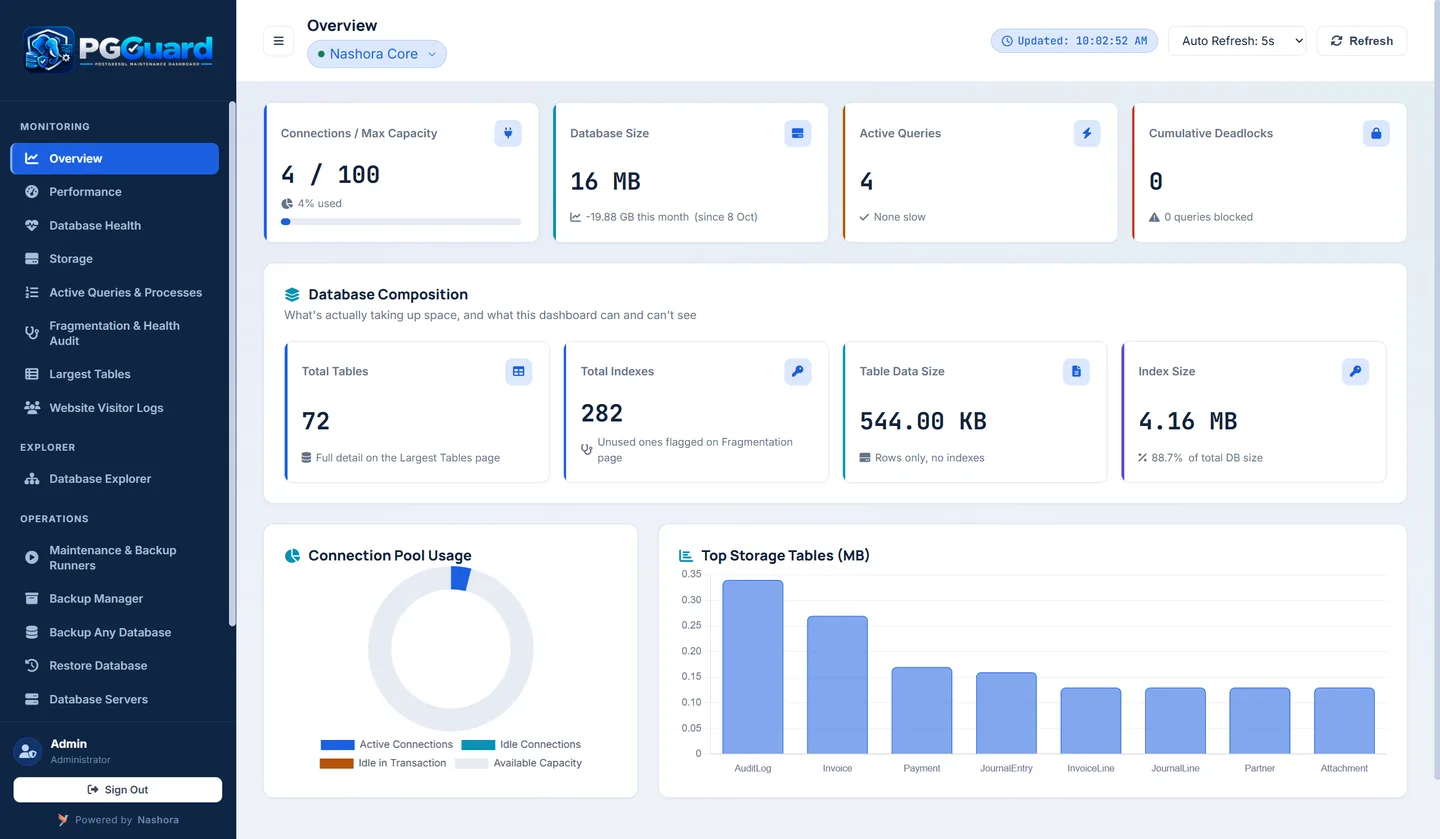
- Backup types: compressed, plain SQL or schema-only, taken with PostgreSQL's own tools. pg_dump, pg_restore and psql are included, so there is nothing else to install.
- Retention: you set a retention period and old backup files are removed for you, so the folder does not quietly fill the disk.
- Google Drive sync: each finished backup can be copied to your Google Drive automatically. PGGuard only sees the files it creates in your Drive, not the rest.
- Safe restore: choose a backup and a target database on any server you have added, and type the database name to confirm before anything is overwritten.
- No half-written files: backups, restores and maintenance run in a separate worker, and a cancelled backup does not leave a partial file behind.
It supports Windows 10 and 11 (64-bit) and PostgreSQL 9.2 and newer, across as many servers as you add. To be straight about the limits: these are logical backups, not PITR, and an offsite copy to one cloud drive is one leg of the 3-2-1 rule rather than the whole rule. Test restores still need to happen, though the restore-to-another-database option makes it easy to try one on a spare database.
Benefits of a boring, tested backup routine
A calm recovery
When the disk dies or someone drops the wrong table, a tested procedure turns a crisis into a task with a checklist and a known duration.
Safer changes
Upgrades, migrations and mass updates are less frightening when you took a backup an hour ago and know how to restore it.
An answer for customers and auditors
If you are a software house, your customers will ask what happens to their data. A dated restore log is a better answer than reassurance.
A smaller, tidier database
Backups are quicker and smaller when the database is not carrying piles of dead rows, which is another reason to keep up with maintenance.
Who needs this: use cases by business type
Software houses and implementers
You ship a Windows application with PostgreSQL underneath and a dozen customers phone you when something breaks. A standard script, a standard retention policy and a monthly restore test, repeated per site, are what stop each customer's server being a one-off.
Trading, wholesale and distribution companies
Your database holds stock, invoices and customer balances, and the day-end close depends on it. Nightly dumps plus a pre-upgrade dump before any ERP update are the minimum.
Services and contracting firms
The server is often an old PC in a cupboard. An external disk or cloud copy is the single biggest improvement you can make.
Multi-branch retail and F&B groups
Several sites, several servers. Keep the same schedule and naming on each so that anyone can restore any of them.
Day-to-day scenarios
- The bad import. Someone loads the wrong price list over the real one. A dump from the previous evening lets you restore one table from a custom-format archive instead of the whole database.
- The upgrade day. Before moving to a newer PostgreSQL or ERP version, take a full dump and a globals file, and test that the dump restores on the new version in a scratch database first.
- The new server. Moving to better hardware is a dump on the old machine and a restore on the new one, with roles included.
- The audit question. A customer asks how long your backups are kept. Your retention table and last restore log answer it in a minute.
PostgreSQL backups for UAE businesses
From small trading companies in Sharjah and Ajman to software houses in Dubai and Abu Dhabi, and branches in Ras Al Khaimah, Fujairah, Umm Al Quwain and Al Ain, the setup is similar: one Windows server, a small IT team and a database that carries VAT invoices, payroll and customer records. Summer power cuts, building maintenance and shared offices in free zones all make an offsite copy more than a nice-to-have. The VAT 201 filing and year-end are bad times to discover a backup problem, so put the monthly restore test in the calendar next to them.
If you would rather not set this up yourself, Nashora ERP comes with its database installed on your server and the backup tools included, and covers accounting and VAT, CRM, sales and inventory and HR and payroll; see the pricing page or request a demo.
What to do next
- Look in your backup folder today. Find the newest file, check its size and date, and note whether a copy exists anywhere else.
- Do one practice restore into a scratch database using the steps above, and time it.
- Schedule the job with Task Scheduler, a dedicated account and an alert on failure, and add a retention rule.
- Set up one offsite copy and put a monthly reminder in the calendar to confirm it arrives.
- Review the rest of the routine in our PostgreSQL maintenance guide, or look at PGGuard if you want backups, maintenance and Google Drive copies in one Windows app. Questions? Get in touch.