
ERP features: every module your business needs
One system, fourteen areas, all sharing the same data. Here is the full list of Nashora ERP features and modules — accounting, VAT, CRM, inventory, HR and payroll — and what each one does today.
What features should an ERP system have?
A good ERP system should cover accounting and tax, sales and CRM, purchasing, inventory, HR and payroll, plus reports, user roles and an audit log — all on one shared database so nothing is entered twice. Nashora ERP includes each of these modules, with UAE VAT and WPS payroll built in.
Accounting
- Chart of accounts, journals and recurring entries
- Customer invoices, credit and debit notes, receipts
- Vendor bills, debit notes and payments
- Attachments on every accounting document
- Bank accounts, statement import and reconciliation
- Cheques and post-dated cheques (PDC)
- Petty cash with top-ups and vouchers
- Multi-currency, exchange gains and FX revaluation
- Fixed assets, depreciation and disposal
- Budgets, cost centres, projects and branches
- Fiscal periods, period lock and approvals
VAT & compliance
- UAE VAT on every line: standard, zero-rated, exempt, reverse charge
- VAT 201 return by the selling branch's emirate
- Goods-import and reverse-charge boxes
- FTA Audit File (FAF) export with validation
- PINT-AE e-invoice XML for your accredited provider
- Tax transaction report
- Full audit log of every change
CRM & sales
- Customers & vendors with branches, contacts and documents
- Customer 360°: sales, orders, pipeline and products bought
- Leads pipeline with stages and probability
- Lead intake from your website form or API, with assignment rules
- Follow-ups, activities and calendar
- Route plans and field activity reports
- Quotations with versions, approvals and e-mail
- Sales orders, proforma invoices, pick lists and packing
- Delivery notes and partial deliveries
- Sales targets per person and team
Pricing
- Price lists per customer, branch and currency
- Pricing rules, discounts and market prices
- Margin targets and below-cost checks
- Price changes with approval
- Price-change impact before you publish
Campaigns & support
- Marketing campaigns with members, costs and results
- Support tickets with SLA timers by priority
- Escalation and assignment
- Customer e-mails become ticket replies
- Ticket and SLA reports
Purchasing & expenses
- Purchase requests that become orders after approval
- Purchase orders with approval rules
- Goods received notes (GRN)
- Three-way match: order → receipt → bill
- Supplier rebates
- Employee expense claims and advances, in any currency
- Manager and finance approval
- Reimbursement posted to the books
Inventory
- Products, variants, categories and units
- Multiple warehouses, bins and transfers
- Lots, expiry dates and serial numbers
- Landed costs and stock revaluations
- Average cost, or FIFO when you choose
- Stocktakes and cycle counts
- Reorder planning, backorders and low-stock alerts
- Stock valuation reconciled to the books
HR
- Employee records, documents and expiry reminders
- Organization: departments, grades, designations, locations
- Contracts, benefits and company assets
- HR actions: promotion, transfer, warnings
- Letters and certificates from editable templates
- Resignations, exits and clearance
Attendance & leave
- Check-in button for every employee, with location
- QR code check-in at the site
- Attendance machines: ZKTeco, eSSL, BioTime and Hikvision face & fingerprint
- Punch-log import from machines without a network
- Geofenced work locations
- Shifts, rosters and rotations
- Late, early leave and overtime
- Leave types, accrual and balances
- Holidays and approvals with delegation
Payroll
- Salary structures and pay components
- Monthly payroll with proration and overtime
- WPS SIF file and bank transfer file
- Loans and salary advances
- UAE gratuity and final settlement
- Payslips by e-mail and self-service
Recruitment & talent
- Manpower requisitions and job openings
- Candidate pipeline and interviews
- Offer letters and hiring
- Onboarding checklists
- Probation, performance reviews and goals
- Training, skills and succession
Reports & dashboards
- Main, accounting, CRM, inventory and HR dashboards
- Profit & loss, balance sheet, trial balance
- Profitability by product, customer and branch
- Receivable and payable aging
- Sales, purchase, stock and expiry reports
- Product cost history
- HR, attendance, leave and payroll reports
- Export to Excel and PDF
Security & administration
- Users, teams and custom roles
- View / create / edit / delete / approve / export per module
- Own, team, branch or all-records access
- Approval limits by amount
- Two-factor sign-in and password policy
- Audit log with IP address
- Optional virus scan of uploaded files
- Backup and restore
Workspace & tools
- Chat with colleagues, live
- Voice and video calls with screen share, whiteboard and recording
- Automation rules with e-mail and push notifications
- Webhooks for your mail and phone systems
- Shared calendar and reminders
- Document library with expiry reminders
- Custom modules and fields
- Excel import and export
- Company branding, full logo and themes
- Built-in help and tutorial
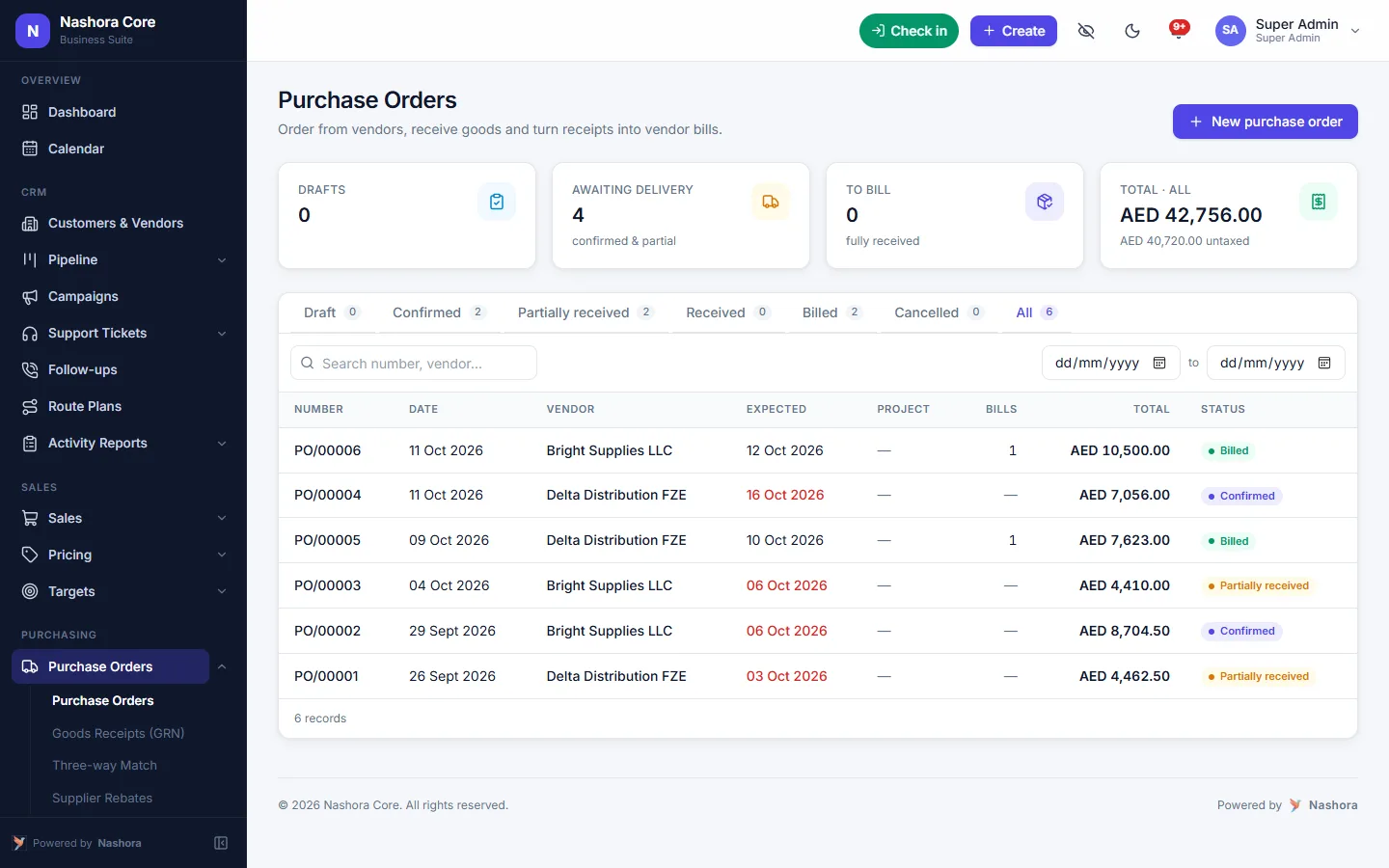
Control spending before it happens
Purchase orders go through approval rules based on amount. Goods received notes update stock, and the vendor bill is matched to what was ordered and received.
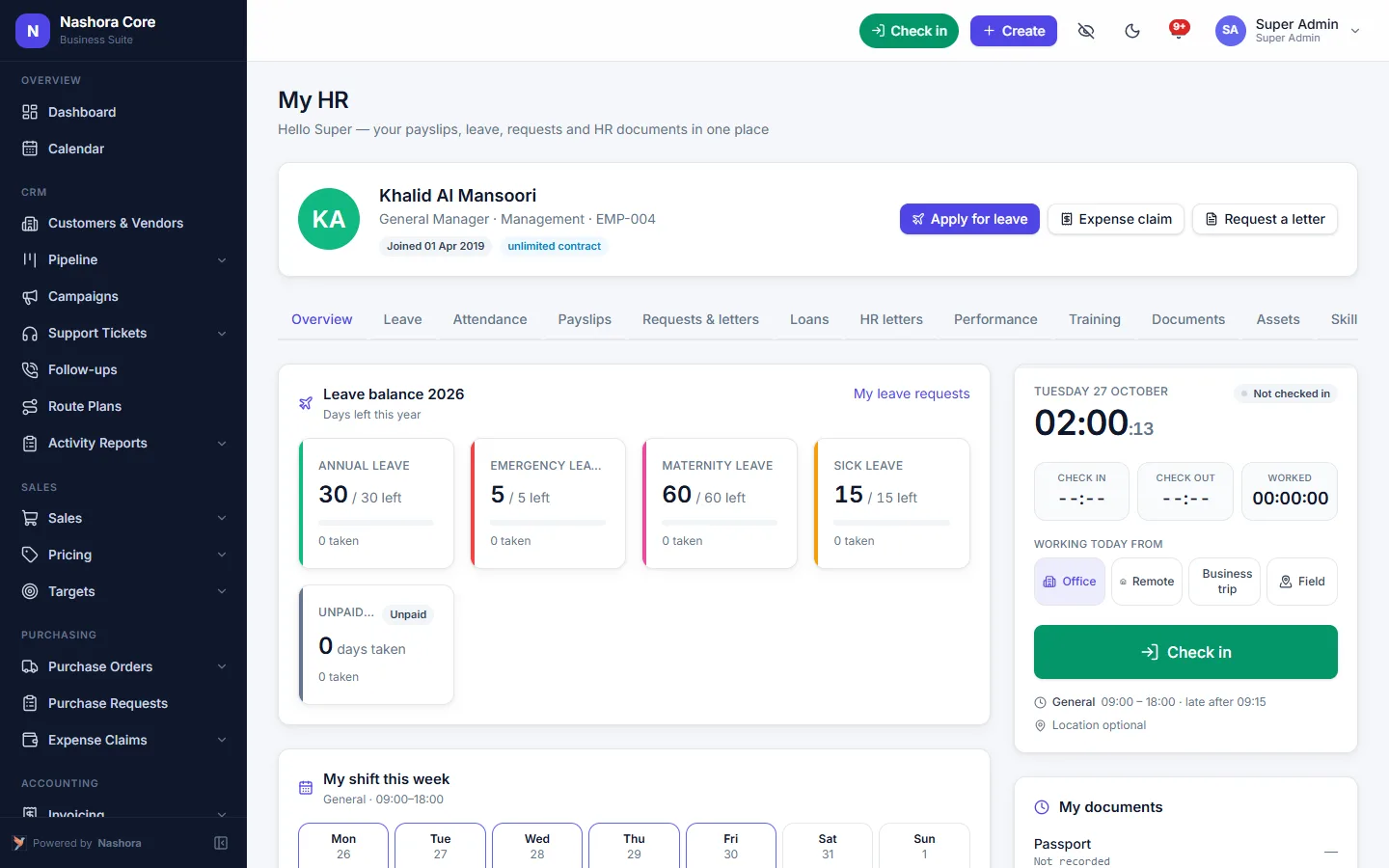
Your team helps itself
Employees see their payslips, leave balance, attendance and documents, request letters, loans and leave, and managers approve everything from one inbox.
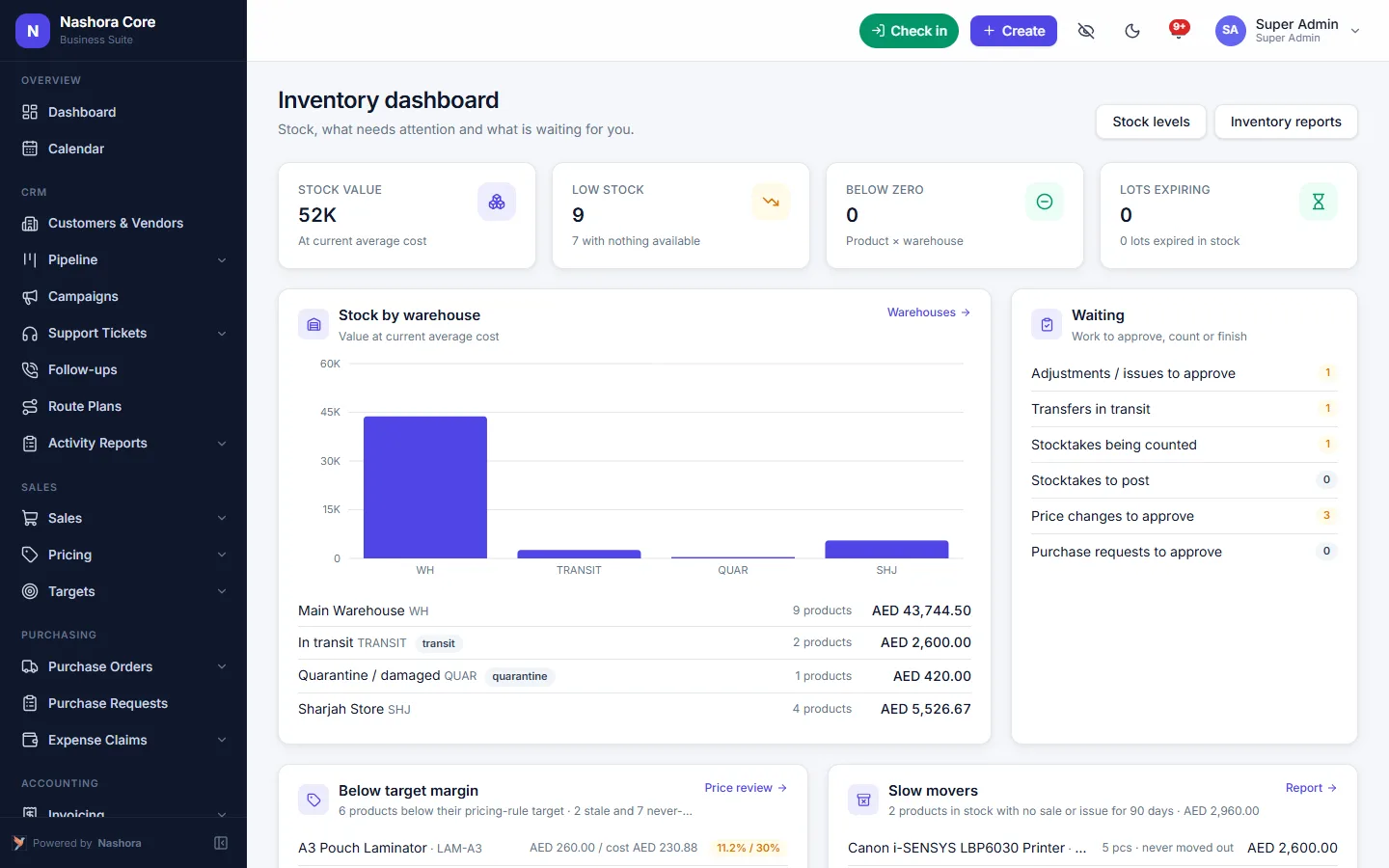
Know what you have and what it really cost
Stock per warehouse and bin, lots with expiry dates and serial numbers. Freight and customs are added as landed costs, so every margin is real — and the dashboard shows what needs attention today.
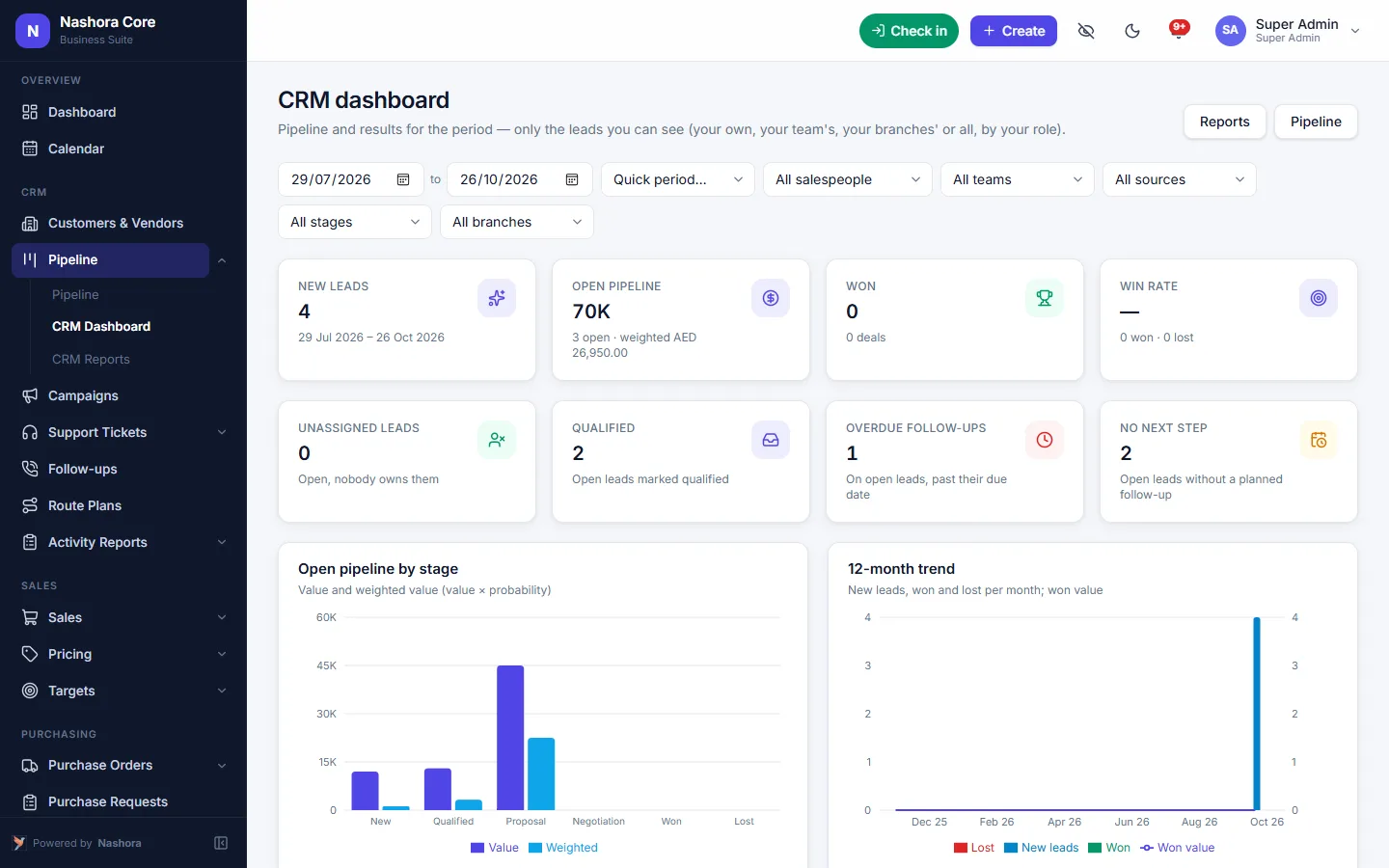
See every deal at a glance
Open pipeline by stage, weighted value, win rate, leads nobody owns and follow-ups that are overdue — by period, salesperson, team, source or branch. Click any number to open the leads behind it.
How the ERP modules work together
A list of ERP features only tells half the story. What matters is what happens between the modules: whether a sale reaches your stock, your receivables and your VAT return without anyone typing it twice. In Nashora every module shares one database, with the same customers, products, employees and accounts.
One sale, from quotation to VAT return
Here is what happens to a single order:
- Quotation. Your salesperson sends a quotation from the CRM module, using the customer's price list. If a discount takes the price below cost, the margin check flags it.
- Sales order. Once the customer accepts, the quotation becomes a sales order and a pick list goes to the warehouse.
- Delivery. The delivery note reduces stock in the right warehouse and bin, by lot or serial number where you track them. Partial deliveries are fine.
- Invoice. The tax invoice carries UAE VAT on every line and posts its own journal entry to sales, receivables and output VAT.
- Payment. The receipt or post-dated cheque clears the receivable and shows up in the month-end bank rec.
- VAT return. At the end of the period the invoice sits in the right VAT 201 box, by the selling branch's emirate, and it is included in the FTA Audit File export.
Nobody re-keyed the order into a stock sheet or a separate accounting package. You can see the sales side of this in detail on the CRM, sales and inventory page, and the finance side on the accounting and VAT software page.
One payroll run, from attendance to the books
Payroll follows the same idea. Check-ins from the button, a QR code at the site or an attendance machine feed the late, early-leave and overtime figures. Approved leave and loan deductions are already in the system.
When you run the month, Nashora prorates salaries, produces payslips and the WPS SIF file for your bank, and posts the payroll journal to your accounts. Gratuity and final settlement use the same employee record when someone leaves. There is more on this in WPS payroll and HR in Nashora.
Purchases and expenses
On the buying side, a purchase request becomes a purchase order after approval, the goods received note adds stock, and the vendor bill is checked against both in a three-way match. Freight and customs go into the product cost as landed costs, so the margin on your next sale is the real one. Employee expense claims are approved by the manager and finance, then the reimbursement is posted to the books.
How to choose the right ERP modules for your business
You don't need every module on day one. Pricing depends on the number of users and the modules you need, so it pays to start with the right set. A simple way to decide:
- Start with the books. Every VAT-registered business in the UAE needs accounting and VAT. This is the core that every other module posts into.
- Add what you sell and stock. If you hold goods, add inventory and purchasing. If you have a sales team, add the CRM module for leads, quotations and targets.
- Count your people. When payroll lives in a spreadsheet and attendance sits on a separate machine, the HR and payroll module saves the most time. Add recruitment and performance reviews when you hire regularly.
- Decide who sees what. List your users and what they do. User roles and permissions limit each person to view, create, edit, approve or export, module by module.
- Check your reports. Write down the three or four reports you look at every month — P&L by branch, receivable aging, stock valuation, payroll cost — and confirm they come out of the modules you picked.
- Plan the import. Customers, vendors, products, opening balances and employees can come in from Excel. Get those lists clean before go-live.
Not sure where to draw the line? Our frequently asked questions cover setup, pricing and security, or you can book a demo of all the modules and decide afterwards.
Benefits of an integrated ERP system
Enter it once
A customer, product or employee is created once and used everywhere. No more copying invoice totals into a VAT sheet at the end of the quarter.
Numbers that agree
Stock valuation is reconciled to the books, and payroll posts its own journal. Your accountant spends month-end checking, not hunting for differences.
Control without chasing
Approval limits by amount, period lock and an audit log with IP address show who changed what and when. Two-factor authentication protects every sign-in.
Reports across departments
Profitability by product, customer and branch draws on sales, purchasing and inventory together. Dashboards for accounting, CRM, inventory and HR show what needs attention today, and every report exports to Excel and PDF.
One place for the team
Chat, voice and video calls, the shared calendar and the document library sit inside the same cloud ERP. Staff aren't switching between five apps to get one quotation approved.
Who Nashora ERP is for
Trading and distribution companies
Multiple warehouses, lots with expiry dates, landed costs, price lists per customer and route plans for field sales. The inventory and sales order software handles the stock side, and accounting picks up every delivery and receipt.
Retail and multi-branch businesses
Branches and cost centres on every document, profitability by branch, and a VAT 201 return that follows the selling branch's emirate.
Services and contracting firms
Projects and cost centres, employee expense claims, purchase approvals, and attendance by geofenced work location or a QR code at the site.
Small companies growing out of spreadsheets
Start with VAT-ready accounting and add modules as the team grows, without moving your data to a new system.
Finance and HR teams
Finance gets bank reconciliation, PDC tracking, fixed assets and the FTA Audit File. HR gets employee documents with expiry reminders, leave accrual and UAE payroll with gratuity and WPS.
Groups with more than one company get a separate Nashora per company, each with its own books, TRN and VAT return.
Why it's easier to get started
Nashora is browser-based, so there is nothing to install on desktop, tablet or phone. We configure your company, VAT, chart of accounts, users and roles, help you import your data from Excel, and give each team short training. Help mode explains every screen, and the built-in tutorial walks through examples. Most companies go live within days to a few weeks.
If your IT team also looks after PostgreSQL servers, have a look at PGGuard, our PostgreSQL maintenance and backup app for Windows.
Nashora vs spreadsheets vs a stack of separate apps
Most businesses we speak to run on Excel, or on a mix of single-purpose apps for invoicing, stock and payroll. Here is how an integrated ERP compares on the jobs that take the most time.
| Task | Nashora | Spreadsheets | Separate apps |
|---|---|---|---|
| Data entry | Entered once, shared by every module | Re-typed into each sheet | Exported and imported between apps |
| Integrations | None needed — one database | Copy and paste | Connectors to set up and maintain |
| User logins | One login, roles per module | Shared files, little access control | A separate login for each app |
| Reporting across departments | Profitability by product, customer and branch from live data | Built by hand each month | Data pulled from each app first |
| VAT 201 return | Filled from posted invoices and bills | Totals added up manually | Only covers what the accounting app sees |
| Stock and the books | Stock valuation reconciled to the books | A separate stock sheet | Often out of step |
| Payroll to accounts | Payroll run posts its own journal | Journal typed by hand | Exported and re-posted |
| Approvals | Approval limits by amount, one inbox | By e-mail or WhatsApp | Different rules in each app |
| Audit trail | Audit log of every change, with IP address | Hard to tell who changed what | A separate log in each app, if any |
| Cost | One licence, priced by users and modules | Cheap to start, costly in staff time | Several subscriptions to pay and renew |
| Setup and support | One team for setup, import and training | You are on your own | A different vendor for each app |
Want the detail for one area? Compare the accounting module, the HR and payroll module or the CRM and inventory module.
Frequently asked questions about ERP features and modules
What are the main modules of an ERP system?
Most ERP systems are built around accounting, sales and CRM, purchasing, inventory, and HR and payroll, with reports and user administration on top. Nashora adds UAE VAT and compliance, pricing, campaigns and support tickets, attendance and leave, recruitment and talent, and a workspace with chat, calls and automation.
Can I buy only the ERP modules I need?
Pricing depends on the number of users and the modules you need, so you don't pay for areas you won't use. Tell us how your business works and which modules matter to you, and we'll send you a quote for that setup.
Does the accounting module handle UAE VAT returns?
Yes. VAT is calculated on every line as standard, zero-rated, exempt or reverse charge. The VAT 201 return is prepared by period and by the selling branch's emirate, and the FTA Audit File can be exported and validated. Nashora also produces PINT-AE e-invoice XML for your accredited provider.
Does the HR and payroll module produce the WPS SIF file?
Yes. The monthly payroll run produces the WPS SIF file for your bank or exchange house, along with a bank transfer file and payslips. Proration, overtime, loans and salary advances are included, and UAE gratuity and final settlement are calculated from the employee record.
How does the inventory module connect to accounting?
Every goods received note and delivery note updates stock, and the matching bill or invoice posts to the books. You choose average cost or FIFO, landed costs such as freight and customs are added to product cost, and stock valuation is reconciled to the accounts.
Can I control what each user can see and do?
Yes. Custom roles set view, create, edit, delete, approve and export rights for every module, and whether a user sees their own records, their team's, their branch's or everyone's. Approval limits can be set by amount, and sign-ins can be protected with two-factor authentication and a password policy.
Is there an audit log in Nashora ERP?
Yes. Every change is recorded in the audit log with the user and IP address. Posted accounting documents are locked, fiscal periods can be closed with a period lock, and attachments can be kept on every accounting document for your auditor.
Is Nashora a cloud ERP, or do I need to install it?
Nashora is a cloud ERP that runs in the web browser on desktop, tablet and phone, so there is nothing to install for your users. Data is stored in a managed cloud database with backups, and the system includes backup and restore.
Can the ERP connect to our attendance machine?
Yes. ZKTeco, eSSL and BioTime machines connect through their cloud-server (ADMS) setting, Hikvision face and fingerprint terminals through HTTP listening, and machines without a network by importing their punch log. Employees can also check in with a button or a QR code at the site.
Can I add custom fields or my own modules?
Yes. You can add custom fields and custom modules, set automation rules with e-mail and push notifications, and use webhooks for your mail and phone systems. Numbering formats, company branding and themes can be set to match your business.
Which reports and dashboards come with the ERP?
There are main, accounting, CRM, inventory and HR dashboards, plus profit and loss, balance sheet, trial balance, receivable and payable aging, profitability by product, customer and branch, stock and expiry reports, and HR, attendance, leave and payroll reports. Everything exports to Excel and PDF.
How long does it take to set up an ERP like Nashora?
Most companies go live within days to a few weeks, depending on the modules and the amount of data to import. We configure your company, VAT, chart of accounts, users and roles, help import your data from Excel, and train each team.
See Nashora with your own workflow
Book a free 30-minute online demo. We'll walk through the modules you need and answer your questions — no obligation.