
Accounting software for UAE businesses, with VAT built in
Nashora is cloud accounting software for the UAE that keeps your books, VAT and cash in one place. Every sale, purchase and payroll run posts automatically — ready for your accountant and the FTA.
What is VAT accounting software in the UAE?
VAT accounting software in the UAE is a bookkeeping system that applies 5% VAT to each invoice and bill line, keeps output and input VAT in the ledger, and builds your VAT 201 return for the FTA from posted documents. Nashora also exports the FTA Audit File (FAF) and produces PINT-AE e-invoice XML.
Accounting that does the posting for you
Create documents the way your team already works — invoices, bills, receipts, payments — and Nashora writes the double-entry journal behind each one.
- Draft → post: drafts change nothing until you post
- Posted documents are locked; corrections use credit notes or reversals
- Approval rules for bills, payments and journals by amount
- Recurring journals and automatic depreciation of fixed assets
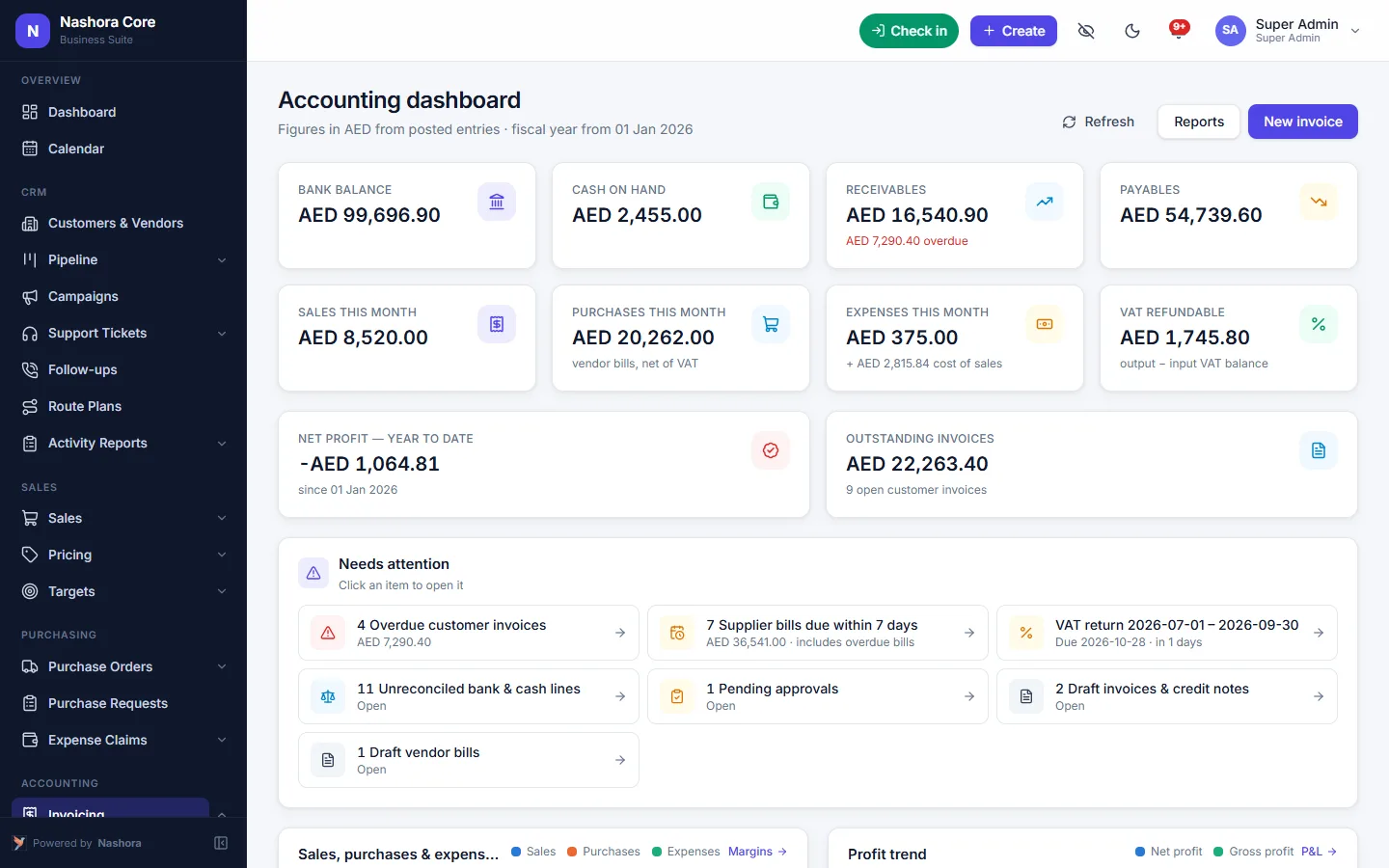
UAE VAT, ready to file
VAT is calculated on every line and collected into returns per period, with the boxes you need for the FTA portal.
- Standard, zero-rated, exempt and reverse-charge VAT
- VAT 201 boxes by the selling branch's emirate
- VAT return by period with drill-down to documents
- FTA Audit File (FAF) export, validated before download
- PINT-AE e-invoice XML with validation and status tracking, for your accredited service provider
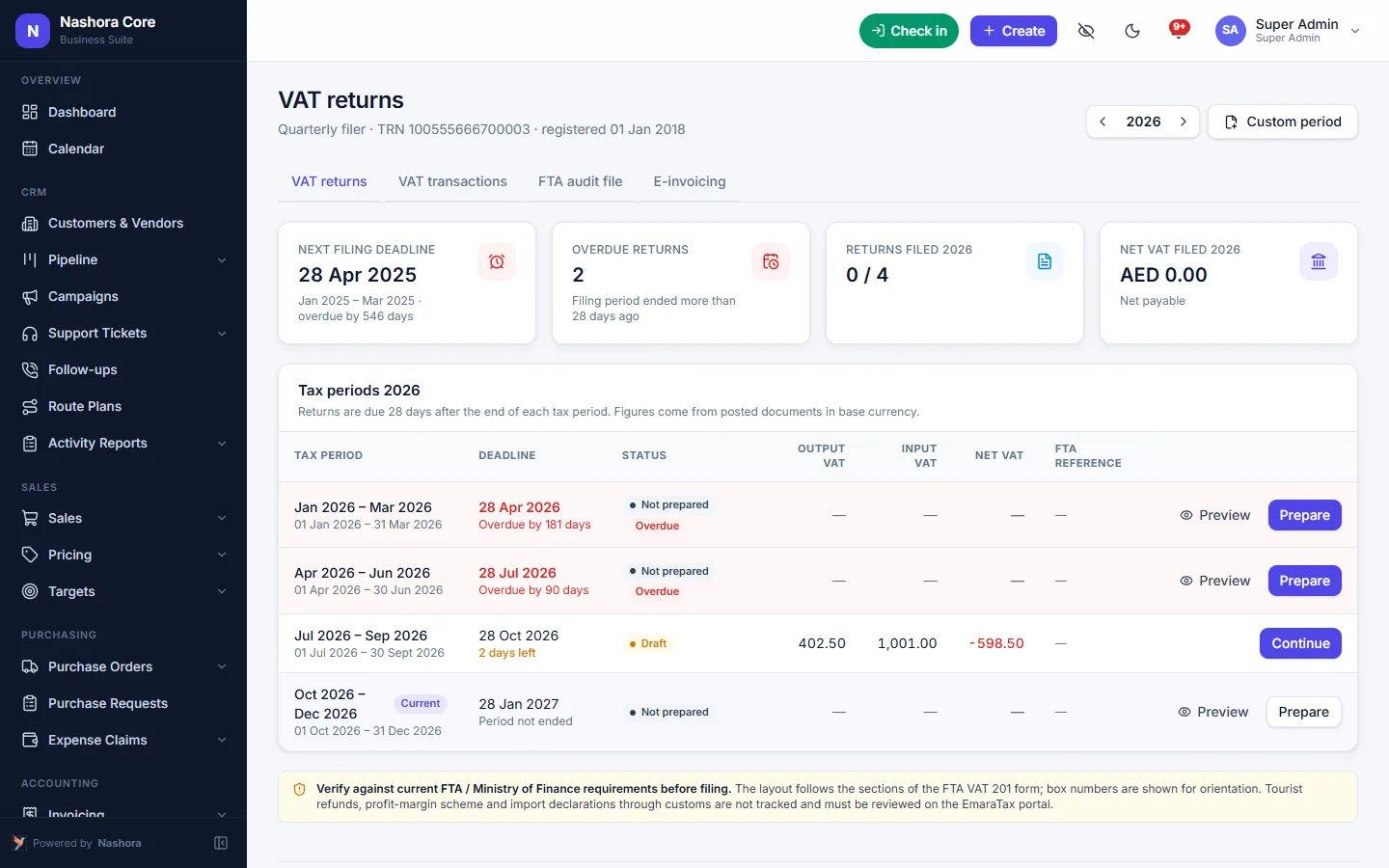
Know where your cash is
Import bank statements and match them in a few clicks. Track cheques — including post-dated cheques — and petty cash per custodian.
- Bank reconciliation with statement import
- Cheque register with due-date reminders
- Petty cash vouchers and top-ups
- Receivable and payable aging, cash-flow view
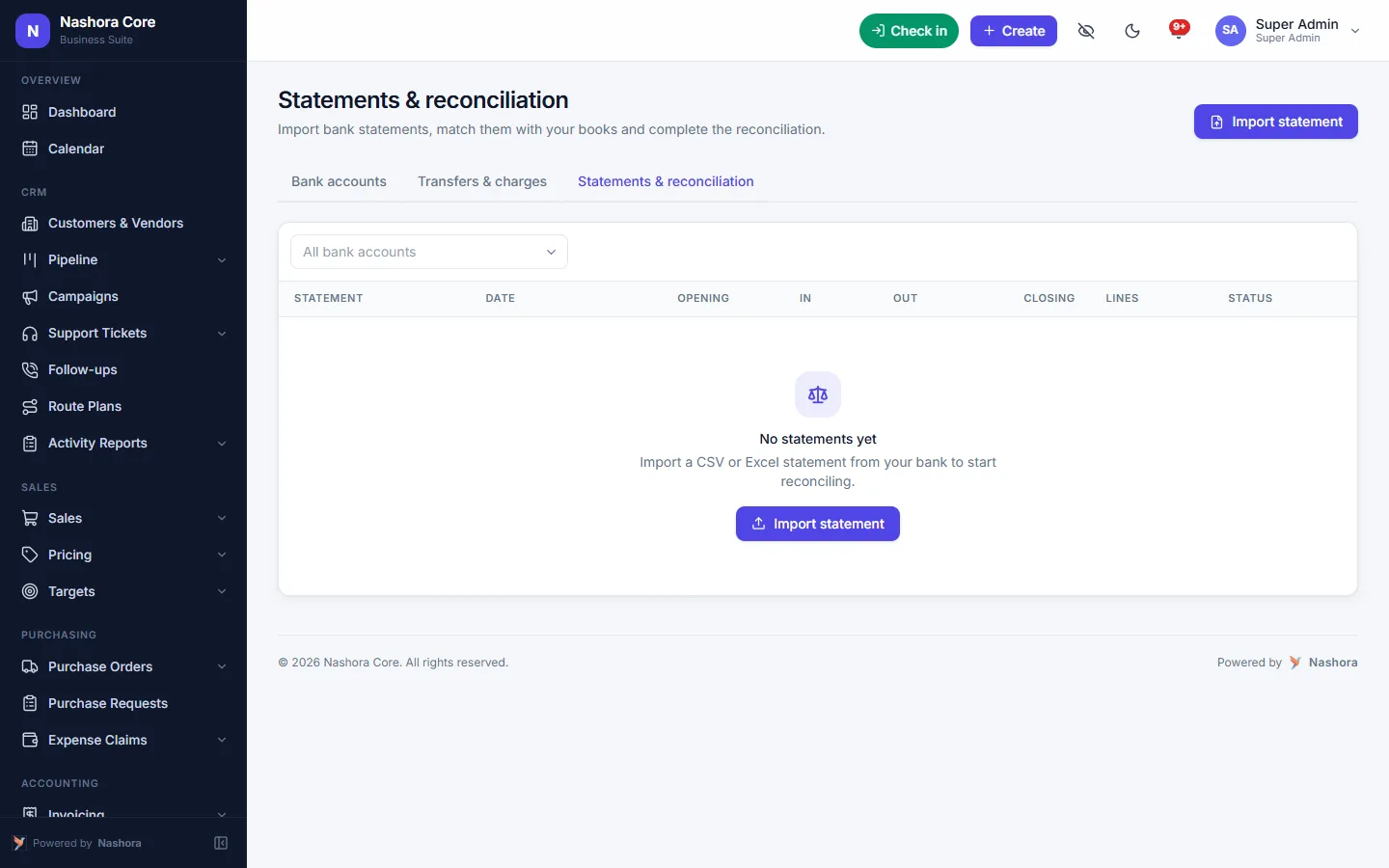
Also included
Any currency
Set your base currency, trade in others, and revalue open foreign balances at month-end.
Cost centres & branches
Analyse profit by branch, project or cost centre, and compare against budgets.
Financial reports
P&L, balance sheet, trial balance, ledgers and VAT reports — export to Excel.
What accounting software in the UAE has to handle
Keeping the books for a UAE company is more than debits and credits. Since VAT arrived in 2018 at 5%, every sales invoice and purchase bill carries a tax decision, and every tax period ends with a VAT 201 return to the Federal Tax Authority (FTA). Add post-dated cheques, a petty cash box in the warehouse, suppliers who bill in USD and branches in more than one emirate, and the spreadsheet starts to crack.
Good bookkeeping software for the UAE takes that load off your desk. In Nashora, the VAT treatment sits on each line of the document, the double-entry journal is written when you post, and the return is collected from posted documents. The figures your accountant files are the same figures in your ledger — no re-typing, no second version of the truth.
How to prepare your UAE VAT return in Nashora
Here is the path from invoice to filing, using only the VAT tools that are already in the system.
- Set the VAT on each line. When you raise a customer invoice or enter a vendor bill, each line is standard-rated, zero-rated, exempt or reverse charge. Nashora works out the 5% and records output or input VAT when the document is posted.
- Open the VAT return for the period. Returns are prepared by period and pick up the posted invoices, bills, credit notes and debit notes that fall inside it. Drafts change nothing until they are posted.
- Check the VAT 201 boxes. Standard-rated sales are split by the emirate of the selling branch, and goods imports and reverse-charge purchases go into their own boxes — the figures you need for the FTA portal.
- Drill down before you file. Click a box to see the documents behind it. If a figure is wrong, correct it with a credit note or a reversal; posted documents stay locked.
- File on the FTA portal. Enter the box values from the return when you submit your VAT 201.
- Export the FTA Audit File when it is requested. Nashora builds the FAF for the period and validates it before download, so format problems show up on your screen rather than after you have sent it.
Because the return is built from the ledger, there is no separate VAT workbook to keep in step with your books. Late bills simply land in the period they are posted to, and the drill-down shows exactly which documents changed a box.
Once the return is filed, lock the fiscal period so nobody can post into a quarter you have already declared.
E-invoicing in the UAE: where Nashora fits
The UAE is moving business invoicing to a structured electronic format, PINT-AE, exchanged through accredited service providers. The rollout is phased, so check the FTA's current guidance for when it applies to your business.
Nashora's job is to get the invoice data right. It produces the PINT-AE e-invoice XML for your invoices, validates it and tracks the status of each one. You then pass that file to your accredited service provider. Nashora is not an accredited service provider itself — it makes sure what you hand over is complete and matches your books, so switching on e-invoicing does not mean re-keying invoices into another system.
Benefits of keeping books and VAT in one system
No double entry between sales and accounts
Invoices and stock movements from Nashora's CRM, sales and inventory module update receivables, stock and VAT automatically. Your finance team stops copying sales out of another app at month-end.
Payroll lands in the right accounts
A payroll run from WPS payroll in Nashora posts its own journal, so salary cost shows in your P&L without a manual entry.
Cash you can actually see
Import bank statements and match them for the month-end bank rec. The cheque register reminds you before post-dated cheques fall due, and petty cash is tracked per custodian with vouchers and top-ups.
Controls your auditor will like
Drafts are separate from posted documents, posted documents are locked, approval rules apply to bills, payments and journals by amount, and the audit log records every change.
Reports without the scramble
Profit & loss, balance sheet, trial balance, ledgers, aging, the tax transaction report and profitability by branch are live, and export to Excel or PDF.
Who Nashora accounting is for
Most UAE businesses that outgrow spreadsheets share the same pain: the VAT return takes days, nobody trusts the receivables list, and the bank balance never quite matches the books. Here is how the accounting module fits different teams.
Trading companies
Buy in one currency, sell in another, and add freight and customs as landed costs so margins are real. Purchase orders, goods received notes and vendor bills go through a three-way match, and stock valuation reconciles to the books.
Multi-branch businesses across emirates
Your Dubai, Sharjah and Abu Dhabi branches each feed the right VAT 201 lines, because boxes follow the selling branch's emirate. Cost centres and branches let you compare profit and budgets location by location.
Service businesses
Track income and cost by project or cost centre, set up recurring journals for rent and retainers, and let staff submit expense claims whose reimbursements post to the books after approval.
Companies dealing in foreign currency
Set your base currency, record invoices and bills in any other currency with exchange rates, and revalue open foreign balances at month-end. Exchange gains and losses are posted for you.
Accountants and finance teams
Roles control who can view, create, approve or export in each module. If you run a group, each company gets its own Nashora with its own books, TRN and VAT return, so nothing mixes.
Why it's easier to switch than you think
Nashora is cloud accounting software that runs in the browser — Dubai office, Sharjah warehouse or a laptop at home — with nothing to install. During setup our team configures your company, VAT, chart of accounts, users and roles, then imports customers, vendors, products and opening balances from Excel.
Help mode explains every screen, and a step-by-step tutorial walks new users through real examples. Most companies go live within days to a few weeks. See the full list of Nashora features, read the general Nashora FAQ, or book an accounting and VAT demo with your own workflow.
Nashora vs spreadsheets vs a standalone accounting app
How the everyday VAT and accounting tasks compare.
| Task | Nashora | Spreadsheets | Standalone accounting app |
|---|---|---|---|
| VAT on each line | Standard, zero-rated, exempt or reverse charge per line | Formulas you maintain | Usually included |
| VAT 201 boxes by emirate | Split by the selling branch's emirate | Summed by hand | Varies by product |
| Drill-down from return to documents | Click a box to see the documents | Search through sheets | Often available |
| FTA Audit File (FAF) | Exported and validated before download | Built manually | Varies by product |
| PINT-AE e-invoice XML | Generated, validated and status tracked | Not possible | Varies by product |
| Sales invoices and stock | Post automatically from sales and inventory | Copied across by hand | Needs a separate sales app and a link |
| Payroll journal | Posted by the payroll run | Typed in each month | Imported from a payroll app |
| Bank reconciliation | Statement import and matching | Ticked off by hand | Usually included |
| Post-dated cheques (PDC) | Cheque register with due-date reminders | A separate list | Sometimes included |
| Petty cash | Vouchers and top-ups per custodian | Another sheet | Sometimes included |
| Foreign currency revaluation | Open balances revalued at month-end | Manual rate formulas | Usually included |
| Audit trail and period lock | Audit log, locked posted documents, period lock | Any cell can be overwritten | Usually included |
Frequently asked questions about accounting and VAT software in the UAE
Can Nashora prepare my UAE VAT 201 return?
Yes. VAT is calculated on every invoice and bill line, and returns are prepared by period from posted documents. Standard-rated sales are split by the selling branch's emirate, and goods imports and reverse-charge purchases have their own boxes. You can drill down from any box to the documents behind it, then enter the figures on the FTA portal.
Does Nashora export the FTA Audit File (FAF)?
Yes. Nashora exports the FTA Audit File for the period you choose and validates it before download. If the FTA asks for your records, you can produce the file from the system instead of assembling ledgers and VAT listings by hand.
Does Nashora send e-invoices to the FTA?
Not directly. Nashora produces PINT-AE e-invoice XML for your invoices, validates it and tracks each invoice's status. You pass the file to your accredited e-invoicing service provider, which handles the exchange. Nashora is not an accredited service provider itself. Check the FTA's current guidance for when e-invoicing applies to your business.
How does Nashora handle reverse charge VAT?
Reverse charge is one of the VAT treatments you can choose on a bill line, alongside standard-rated, zero-rated and exempt. Reverse-charge purchases and goods imports are collected into their own boxes on the VAT return, so you can check them before you file.
Can I run separate VAT returns for more than one company or TRN?
Yes. Each company gets its own Nashora with its own books, TRN, VAT return and staff, so the companies stay fully separate. Within one company, branches in different emirates are handled on the same return, with VAT 201 boxes split by the selling branch's emirate.
How do I reconcile my bank account in Nashora?
Import your bank statement into the bank account in Nashora, then match statement lines to receipts, payments and other entries in a few clicks. That keeps the month-end bank rec short and easy to review.
Can I track post-dated cheques (PDC) and petty cash?
Yes. The cheque register tracks your cheques, including post-dated cheques, with reminders before they fall due. Petty cash is kept per custodian, with vouchers for each expense and top-ups when the float runs low.
Does Nashora support multi-currency accounting?
Yes. You set your base currency and record invoices, bills and payments in other currencies with exchange rates. Open foreign balances can be revalued at month-end, and exchange gains and losses are posted to the books. Employee expense claims can be entered in any currency too.
What financial reports can I get?
Profit & loss, balance sheet, trial balance, ledgers, receivable and payable aging, a cash-flow view, VAT reports and the tax transaction report. You can also see profitability by product, customer and branch. Reports can be exported to Excel and PDF.
Can I correct an invoice after it has been posted?
Posted documents are locked so your books and VAT returns stay reliable. To correct one, issue a credit note or debit note, or post a reversal. Every change is recorded in the audit log, and you can lock a fiscal period once its VAT return has been filed.
Can I import my opening balances and data from Excel?
Yes. Customers, vendors, products and opening balances can be imported from Excel. Our team helps with the import during setup, along with configuring your company, VAT, chart of accounts, users and roles, so you can start with clean balances.
Is Nashora cloud accounting software, or do I need to install it?
Nashora runs in the web browser on desktop, tablet and phone, so there is nothing to install for your users. Data is stored in a managed cloud database with backups, and sign-ins can be protected with two-factor authentication.
See Nashora with your own workflow
Book a free 30-minute online demo. We'll walk through the modules you need and answer your questions — no obligation.